<?xml version="1.0" encoding="utf-8"?><feed xmlns="http://www.w3.org/2005/Atom" ><generator uri="https://jekyllrb.com/" version="4.4.1">Jekyll</generator><link href="https://duckdb.org/feed.xml" rel="self" type="application/atom+xml" /><link href="https://duckdb.org/" rel="alternate" type="text/html" /><updated>2026-09-10T00:37:00+00:00</updated><id>https://duckdb.org/feed.xml</id><title type="html">DuckDB</title><subtitle>DuckDB is an in-process SQL database management system focused on analytical query processing. It is designed to be easy to install and easy to use. DuckDB has no external dependencies. DuckDB has bindings for C/C++, Python, R, Java, Node.js, Go and other languages.</subtitle><author><name>GitHub User</name><email>your-email@domain.com</email></author><entry><title type="html">Try DuckDB v2.0-alpha</title><link href="https://duckdb.org/2026/09/02/try-duckdb-20-alpha.html" rel="alternate" type="text/html" title="Try DuckDB v2.0-alpha" /><published>2026-09-02T00:00:00+00:00</published><updated>2026-09-02T00:00:00+00:00</updated><id>https://duckdb.org/2026/09/02/try-duckdb-20-alpha</id><content type="html" xml:base="https://duckdb.org/2026/09/02/try-duckdb-20-alpha.html"><![CDATA[<h2 id="the-state-of-duckdb-v20">The State of DuckDB v2.0</h2>

<p>A few weeks ago, we published a <a href="/2026/08/17/duckdb-20-highlights.html">preview of DuckDB v2.0</a>.</p>

<p>Today, we branched off <code class="language-plaintext highlighter-rouge">v2.0-cyanoptera</code> from the <code class="language-plaintext highlighter-rouge">main</code> development branch in the <code class="language-plaintext highlighter-rouge">duckdb/duckdb</code> repository. This marks a feature freeze – in the coming weeks, development work will focus on testing, bugfixing and iterating toward the best DuckDB release to date: v2.0 Cyanoptera, <a href="/release_calendar.html">projected for the second half of October</a>.</p>

<p>The DuckDB ecosystem has <code class="language-plaintext highlighter-rouge">duckdb/duckdb</code> at its center: it's a dependency for most other work, so stabilizing it unlocks work across the other repositories. There are two main directions: clients and extensions.</p>

<h2 id="clients">Clients</h2>

<p>Several DuckDB clients are already available as <a href="/install/preview.html">alpha versions</a>.</p>

<h3 id="cli">CLI</h3>

<p>To install the command-line client on Linux or macOS, run:</p>

<div class="language-batch highlighter-rouge"><div class="highlight"><pre class="highlight"><code><span class="nb">curl </span>https://install.duckdb.org | <span class="nv">DUCKDB_VERSION</span><span class="o">=</span>alpha <span class="nb">bash</span>
</code></pre></div></div>

<div class="language-batch highlighter-rouge"><div class="highlight"><pre class="highlight"><code>~/.duckdb/cli/latest/duckdb <span class="nt">-c</span> <span class="s2">"SELECT version() AS version;"</span>
</code></pre></div></div>

<div class="language-text highlighter-rouge"><div class="highlight"><pre class="highlight"><code>┌───────────────────┐
│      version      │
│      varchar      │
├───────────────────┤
│ v2.0.0-alpha39998 │
└───────────────────┘
</code></pre></div></div>

<p>On Windows, download the tarball, extract it and run <code class="language-plaintext highlighter-rouge">duckdb.exe</code>:</p>

<ul>
  <li><a href="https://artifacts.duckdb.org/v2.0-cyanoptera/duckdb-cli-windows-amd64.tar.gz">DuckDB v2.0-alpha for Windows AMD64 (x86_64)</a></li>
  <li><a href="https://artifacts.duckdb.org/v2.0-cyanoptera/duckdb-cli-windows-arm64.tar.gz">DuckDB v2.0-alpha for Windows AArch64 (arm64)</a></li>
</ul>

<blockquote>
  <p>Warning Extensions are not yet available for the Windows client. Stay tuned!</p>
</blockquote>

<h3 id="python">Python</h3>

<p>To install the Python client, run:</p>

<div class="language-batch highlighter-rouge"><div class="highlight"><pre class="highlight"><code><span class="nb">pip </span>install <span class="nb">duckdb</span> <span class="nt">--pre</span> <span class="nt">--upgrade</span>
</code></pre></div></div>

<div class="language-batch highlighter-rouge"><div class="highlight"><pre class="highlight"><code><span class="nb">python3</span> <span class="nt">-c</span> <span class="s2">"import duckdb; print(duckdb.version())"</span>
</code></pre></div></div>

<p>This prints the versions of both the Python client (currently 1.6-dev) and the underlying DuckDB library (2.0.0-alpha):</p>

<div class="language-text highlighter-rouge"><div class="highlight"><pre class="highlight"><code>1.6.0.dev379 (with duckdb 2.0.0-alpha39998)
</code></pre></div></div>

<h3 id="more-clients">More Clients</h3>

<p>We'll gradually add other clients to this list. Each new client that moves to 2.0 improves coverage for the DuckDB project, given that different clients will often have very different test environments and setups.</p>

<h2 id="extensions">Extensions</h2>

<p>In DuckDB v2.0, the <a href="/quack/"><code class="language-plaintext highlighter-rouge">quack</code> extension</a> will move from version 0.x to 1.0. The new version will unlock higher throughput for queries (both server to client <em>and</em> client to server) and better compatibility.</p>

<p>Other core extensions, such as <code class="language-plaintext highlighter-rouge">httpfs</code>, <code class="language-plaintext highlighter-rouge">ducklake</code>, <code class="language-plaintext highlighter-rouge">iceberg</code> or <code class="language-plaintext highlighter-rouge">spatial</code>, are also available in the alpha stage – please report any issues that you might encounter.</p>

<p>Community extensions can already be tested by providing a <code class="language-plaintext highlighter-rouge">ref_next</code> SHA, which builds them against the <code class="language-plaintext highlighter-rouge">v2.0-cyanoptera</code> branch before the release date. If no <code class="language-plaintext highlighter-rouge">ref_next</code> is provided, the <code class="language-plaintext highlighter-rouge">ref</code> SHA will be used once v2.0.0 is finalized.</p>

<h2 id="can-i-help">Can I Help?</h2>

<p>Yes, you can! DuckDB alpha clients are explicitly <strong>not</strong> production-ready, but you can already install them and throw some SQL queries at them to see whether your existing workloads work. Most are expected to be fine, some are expected to complete visibly faster, and some might result in an error. For the next few weeks, we are particularly interested in the latter group: are there environments, situations or queries where the DuckDB v2.0 alpha releases fall short?</p>

<p>If you find an issue, please open a bug report with a reproducible example, either in <code class="language-plaintext highlighter-rouge">duckdb/duckdb</code> or in the repository of the relevant client or extension.</p>

<p>DuckDB's main strength is its community: <a href="https://en.wikipedia.org/wiki/Linus%27s_law">given enough eyeballs, all bugs are shallow</a>, and your bug reports translate to stability gains for every user.</p>]]></content><author><name>The DuckDB team</name></author><category term="release" /><summary type="html"><![CDATA[DuckDB's development team in Amsterdam has started getting DuckDB v2.0 ready for release in October. If you like shiny new things, try out the alpha releases now and report anything that might not be working as expected!]]></summary><media:thumbnail xmlns:media="http://search.yahoo.com/mrss/" url="https://duckdb.org/images/blog/thumbs/duckdb-preview-2-0.png" /><media:content medium="image" url="https://duckdb.org/images/blog/thumbs/duckdb-preview-2-0.png" xmlns:media="http://search.yahoo.com/mrss/" /></entry><entry><title type="html">DuckLabs to Join AWS, Projects to Remain Open Source</title><link href="https://duckdb.org/2026/08/26/ducklabs-to-join-aws.html" rel="alternate" type="text/html" title="DuckLabs to Join AWS, Projects to Remain Open Source" /><published>2026-08-26T00:00:00+00:00</published><updated>2026-08-26T00:00:00+00:00</updated><id>https://duckdb.org/2026/08/26/ducklabs-to-join-aws</id><content type="html" xml:base="https://duckdb.org/2026/08/26/ducklabs-to-join-aws.html"><![CDATA[<p>DuckLabs today has announced that they will be joining Amazon Web Services as a new subsidiary. The big news for DuckDB and related projects like DuckLake is that there are no changes for our projects’ roadmap, licensing, and governance model!</p>

<p>DuckDB, DuckLake, Quack, and all the other extensions will remain free and open source software under the MIT license under the stewardship of the non-profit <a href="https://duckdb.foundation">DuckDB Foundation</a>. DuckDB and related projects will continue to be developed at a very high pace. The Foundation will set up a stakeholder advisory board which can influence the direction of the projects. We are lifting the limitations of <a href="/community_support.html">community support</a>. Please consult the <a href="https://ducklabs.com/news/2026/08/26/ducklabs-to-join-aws">blog post on ducklabs.com</a> and download the <a href="https://ducklabs.com/media/DuckLabs-Media-Kit.zip">media kit</a> for more information.</p>

<p>PS: Next week, we’ll host the <a href="/events/2026/09/03/duckdb-boston-meetup/">DuckDB meetup</a> in Boston. If you’re nearby, consider dropping by!</p>]]></content><author><name>Mark Raasveldt and Hannes Mühleisen</name></author><category term="deep dive" /><summary type="html"><![CDATA[DuckLabs will join Amazon Web Services (AWS), which is expected to be effective in early September. The projects will remain open-source under the MIT license.]]></summary><media:thumbnail xmlns:media="http://search.yahoo.com/mrss/" url="https://duckdb.org/images/blog/thumbs/ducklabs-aws.jpg" /><media:content medium="image" url="https://duckdb.org/images/blog/thumbs/ducklabs-aws.jpg" xmlns:media="http://search.yahoo.com/mrss/" /></entry><entry><title type="html">How DuckDB Runs Recursive CTEs Faster</title><link href="https://duckdb.org/2026/08/25/how-duckdb-runs-recursive-ctes-faster.html" rel="alternate" type="text/html" title="How DuckDB Runs Recursive CTEs Faster" /><published>2026-08-25T00:00:00+00:00</published><updated>2026-08-25T00:00:00+00:00</updated><id>https://duckdb.org/2026/08/25/how-duckdb-runs-recursive-ctes-faster</id><content type="html" xml:base="https://duckdb.org/2026/08/25/how-duckdb-runs-recursive-ctes-faster.html"><![CDATA[<p>When I implemented <a href="https://github.com/duckdb/duckdb/pull/404">DuckDB's first recursive CTE operator</a> in 2020, correctness determined the design: evaluate the non-recursive term once, then evaluate the recursive term until the next working table is empty. That established the right semantic contract, but reusable runtime state was scoped too narrowly. Across iterations, the recursive input changes while most of the machinery that evaluates it remains reusable. The implementation nevertheless treated every iteration almost like a new query and repeatedly paid for pipeline scheduling, operator setup, execution and teardown. I have wanted to remove that mismatch ever since.</p>

<p>In the upcoming DuckDB v2.0, we assign those scopes explicitly. The query plan owns the physical operator tree, precomputed pipeline schedules and a pool of reusable pipeline executors. Each recursive invocation borrows executors from that pool and owns the accumulated recursive state and retained materializations whose lifetime spans the complete fixed-point computation, while each iteration owns only frontier-dependent state. This separation enables retained hash builds, per-iteration selection between inline and scheduled execution and direct probes into keyed state. The physical execution changes are accompanied by one semantic change: for <code class="language-plaintext highlighter-rouge">USING KEY</code>, <code class="language-plaintext highlighter-rouge">UNION</code> now makes new keys and keys whose finalized payload changed visible to the next iteration.</p>

<p>To illustrate the performance impact, we compare the original and new engines on a small reachability query. The table contains one million edges over 100,000 nodes. Ten identical edges leave each source node, and following them from node 0 visits 20,000 nodes:</p>

<div class="language-sql highlighter-rouge"><div class="highlight"><pre class="highlight"><code><span class="k">CREATE</span> <span class="k">TABLE</span> <span class="n">edges</span> <span class="k">AS</span>
    <span class="k">SELECT</span> <span class="p">(</span><span class="py">range</span> <span class="o">%</span> <span class="mi">100_000</span><span class="p">)::</span><span class="nb">INTEGER</span> <span class="k">AS</span> <span class="n">src</span><span class="p">,</span>
           <span class="p">((</span><span class="py">range</span> <span class="o">*</span> <span class="mi">13</span> <span class="o">+</span> <span class="mi">7</span><span class="p">)</span> <span class="o">%</span> <span class="mi">100_000</span><span class="p">)::</span><span class="nb">INTEGER</span> <span class="k">AS</span> <span class="n">dst</span>
    <span class="k">FROM</span> <span class="nf">range</span><span class="p">(</span><span class="mi">1_000_000</span><span class="p">);</span>

<span class="k">WITH</span> <span class="k">RECURSIVE</span> <span class="n">reachable</span><span class="p">(</span><span class="n">node</span><span class="p">)</span> <span class="k">AS</span> <span class="p">(</span>
    <span class="k">SELECT</span> <span class="mi">0</span>
    <span class="nb">UNION</span>
    <span class="k">SELECT</span> <span class="n">dst</span>
    <span class="k">FROM</span> <span class="n">edges</span><span class="p">,</span> <span class="n">reachable</span>
    <span class="k">WHERE</span> <span class="n">src</span> <span class="o">=</span> <span class="n">node</span>
<span class="p">)</span>
<span class="k">SELECT</span> <span class="nf">count</span><span class="p">(</span><span class="o">*</span><span class="p">)</span>
<span class="k">FROM</span> <span class="n">reachable</span><span class="p">;</span>
</code></pre></div></div>

<p>With the optimizations described below, median runtime falls from 4.051 seconds with DuckDB v1.5.5 to 0.095 seconds with the DuckDB v2.0 preview, a 42.6× speedup without changing the SQL.</p>

<h2 id="reusable-execution-state-outlives-the-frontier">Reusable Execution State Outlives the Frontier</h2>

<p>Recursive CTE execution sits inside the query-plan lifetime. The physical operator tree belongs to that plan, and immutable schedule projections are built during physical pipeline construction. Within the plan, an invocation spans one complete fixed-point computation, while an epoch spans one evaluation of the recursive term. The original query plan already retained the recursive physical operator, but its runtime treated each epoch as a fresh execution: it recreated events and executors, reconstructed operator state and repeated scheduling work.</p>

<p>During pipeline construction, DuckDB derives immutable views of the pipeline dependency schedule, including the form that omits invocation-retained build pipelines after their first execution. We refer to these views as <strong>schedule projections</strong>. The runtime can therefore select the required dependency schedule without deriving it again for every epoch.</p>

<h3 id="the-frontier-bounds-recursive-input">The Frontier Bounds Recursive Input</h3>

<p>Every recursive <strong>epoch</strong> replaces the working table, often called the <strong>frontier</strong>, while the query remains fixed. The anchor term produces the first frontier. The recursive term reads it and produces candidates for the next one. With regular <code class="language-plaintext highlighter-rouge">UNION</code>, DuckDB rejects rows already seen; the survivors form the next frontier and also contribute to the logical <strong>union table</strong>. Evaluation stops when no rows survive.</p>

<p>The union table belongs to the semantics. DuckDB need not materialize it: result chunks can stream downstream while the engine retains the current frontier and, for regular <code class="language-plaintext highlighter-rouge">UNION</code>, the hash state required for duplicate elimination. It accumulates a complete copy only when the recursive term accesses <code class="language-sql highlight highlighter-rouge"><span class="k">recurring</span><span class="p">.</span><span class="ge">cte_name</span></code>.</p>

<p>For a monotone, linear recursive term, this frontier discipline is the operational core of <strong>semi-naive evaluation</strong>: an epoch reads only the preceding delta instead of reevaluating the recursive term from every row seen so far. The original operator already preserved this semantic invariant; the remaining mismatch concerned the lifetime of the physical machinery evaluating that frontier.</p>

<h3 id="epoch-invariant-state-belongs-to-the-invocation">Epoch-Invariant State Belongs to the Invocation</h3>

<p>The frontier scan, shown as <code class="language-plaintext highlighter-rouge">REC_CTE_SCAN</code> in an <code class="language-plaintext highlighter-rouge">EXPLAIN</code> plan, must read new input after an epoch boundary, and the runtime state of every operator that depends on that input must be reset. The query-plan-owned schedule projections remain valid. Executors checked out for the invocation and invocation-owned buffers can be reset for reuse, while a build exclusively over recursion-independent base tables can retain its materialized state if repeating the build would produce the same observable result. The old runtime failed to distinguish invocation-scoped materialized state from frontier-dependent state: materialized state whose validity spans the recursive invocation cannot be owned by one epoch.</p>

<p>An operation is <strong>epoch-invariant</strong> when its inputs do not depend on the current frontier and reevaluating it would reproduce the same observable result. Scanning a stable base table and building a hash table from it is the canonical example. The recursive runtime follows the same ownership distinction as <strong>loop-invariant code motion</strong>: the invariant build belongs outside the epoch loop, while probing it with the changing frontier remains inside.</p>

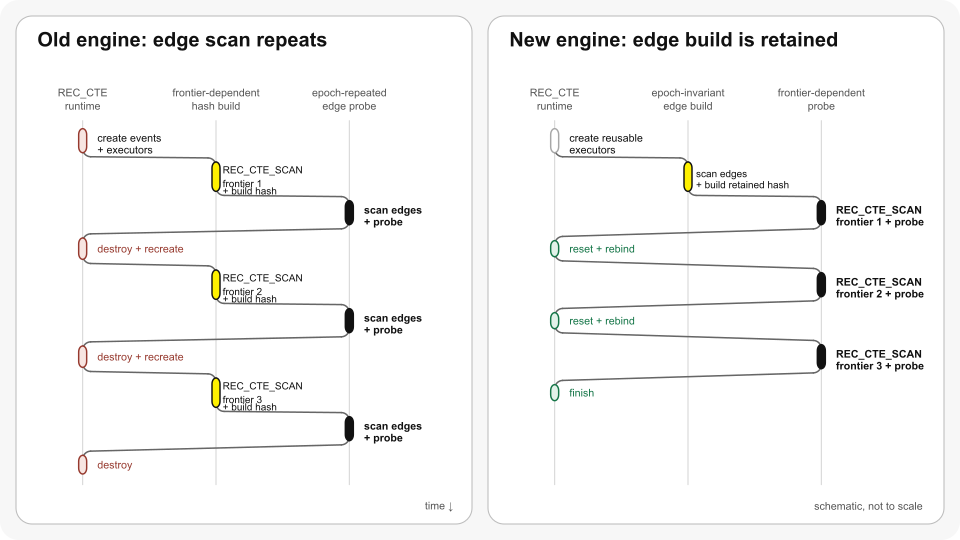
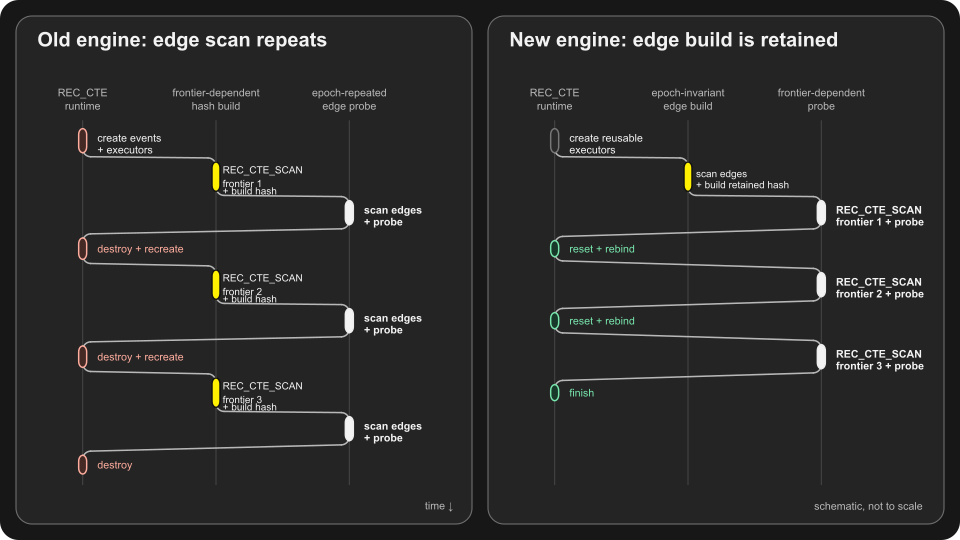
<p>The ownership invariant first failed in the recursive runtime. DuckDB executes a query as a graph of pipelines. Although the old physical operator retained its recursive meta-pipeline, every epoch recreated events and executors, scheduled the pipelines and reconstructed their state. Epoch-invariant pipelines consequently reread the same static input and rebuilt the same state.</p>

<p>A large epoch can amortize fixed scheduling and setup costs across many frontier rows. Rebuilding invariant state remains proportional to the static input size and can cost far more than probing it with the changing frontier.</p>

<p><img src="/images/blog/recursive-cte-engine/execution-reuse-light.svg" alt="The old engine builds a hash table from each REC_CTE_SCAN frontier and probes it by scanning edges; the new engine scans edges and builds a retained hash table once, then probes it with each frontier." class="lightmode-img" />
<img src="/images/blog/recursive-cte-engine/execution-reuse-dark.svg" alt="The old engine builds a hash table from each REC_CTE_SCAN frontier and probes it by scanning edges; the new engine scans edges and builds a retained hash table once, then probes it with each frontier." class="darkmode-img" /></p>

<p><em class="caption">DuckDB v1.5.5 rebuilds a hash table from each frontier and revisits <code class="language-plaintext highlighter-rouge">edges</code> as the probe input. The new engine reverses the join, builds the edge hash table once and probes it with each frontier.</em></p>

<p>The resulting ownership boundary is:</p>

<table>
  <thead>
    <tr>
      <th>State</th>
      <th>Owning scope</th>
      <th>Epoch-boundary action</th>
    </tr>
  </thead>
  <tbody>
    <tr>
      <td>Physical operator tree and immutable schedule projections</td>
      <td>Query plan</td>
      <td>Retain</td>
    </tr>
    <tr>
      <td>Reusable pipeline-executor pool</td>
      <td>Query plan</td>
      <td>Retain</td>
    </tr>
    <tr>
      <td>Executor checkout, chunks and collection capacity</td>
      <td>Recursive invocation</td>
      <td>Reset contents for reuse</td>
    </tr>
    <tr>
      <td>Accumulated duplicate-elimination or keyed state</td>
      <td>Recursive invocation</td>
      <td>Retain</td>
    </tr>
    <tr>
      <td>Repeatable, recursion-independent builds</td>
      <td>Recursive invocation</td>
      <td>Retain materialized state</td>
    </tr>
    <tr>
      <td>Volatile, side-effecting or unknown builds</td>
      <td>Epoch</td>
      <td>Rebuild</td>
    </tr>
    <tr>
      <td>Recursive scans</td>
      <td>Epoch</td>
      <td>Rebind to current recursive state</td>
    </tr>
    <tr>
      <td>Candidate output</td>
      <td>Epoch</td>
      <td>Clear or combine</td>
    </tr>
  </tbody>
</table>

<p>The hash join in the opening query requires both a join reorientation and retained state. DuckDB v1.5.5 builds a hash table from the current <code class="language-plaintext highlighter-rouge">reachable</code> frontier and scans <code class="language-plaintext highlighter-rouge">edges</code> as the probe input in every epoch. The new planner places the recursion-independent <code class="language-plaintext highlighter-rouge">edges</code> relation on the build side where valid. The first epoch scans <code class="language-plaintext highlighter-rouge">edges</code> and builds the hash table; later epochs rebind <code class="language-plaintext highlighter-rouge">reachable</code> as the probe and reuse that table.</p>

<p><code class="language-plaintext highlighter-rouge">EXPLAIN (ANALYZE, FORMAT JSON)</code> makes the avoided input work concrete. Both versions return the expected 20,000 nodes. DuckDB v1.5.5 reports <code class="language-plaintext highlighter-rouge">operator_rows_scanned: 19,718,328,320</code> on the <code class="language-plaintext highlighter-rouge">edges</code> scan, equivalent in row volume to about 19,718 complete scans, while the DuckDB v2.0 preview reports the table's one million rows once. Dynamic filtering skips parts of some v1.5.5 edge scans, but it cannot prevent the base relation from being revisited in every epoch.</p>

<h3 id="retention-requires-a-repeatability-proof">Retention Requires a Repeatability Proof</h3>

<p>We retain a build only when its observable result is repeatable. Recursion independence establishes one requirement. Repeatability adds another: a seeded sample may be retained; an unseeded sample, a volatile expression such as <code class="language-plaintext highlighter-rouge">nextval()</code>, DML, a side-effecting operator or an unknown extension operator must be rebuilt. The repeatability classifier owns that decision and rejects retention when it cannot prove safety. This conservative choice may forgo reuse while preserving query semantics.</p>

<p>Fully materialized CTE producers follow the same ownership rule: a recursion-independent result may survive while each consumer scan is reset. We do not retain streaming or hybrid producers because their consumption state does not have the same lifetime. Early source termination is another boundary case. A retained pipeline must not withhold partial output merely to fill a vector, because doing so could prevent a downstream <code class="language-plaintext highlighter-rouge">LIMIT</code> from stopping recursive execution early. Reuse therefore preserves that termination contract.</p>

<h2 id="exact-cardinalities-make-execution-adaptive">Exact Cardinalities Make Execution Adaptive</h2>

<p>The epoch boundary provides information unavailable during ordinary query planning. By the time an epoch ends, DuckDB has produced the next frontier in full and therefore knows its row and chunk counts exactly. These observed cardinalities govern how the recursive runtime executes the next epoch; optimizer estimates no longer have to stand in for them.</p>

<h3 id="each-epoch-chooses-its-own-mode">Each Epoch Chooses Its Own Mode</h3>

<p>Once the opening query has built and retained its edge hash table, an epoch carries one reachable node into one probe. Sending that work through a parallel scheduler would create more coordination than useful work. A traversal whose frontier expands to many chunks has the opposite shape: executing it on one thread would leave independent pipeline work idle. A static mode chosen for the complete query cannot serve both cases, and a single query may move between them as its frontier grows and contracts.</p>

<p>When the exact frontier and physical work shape do not justify task scheduling, an epoch runs <strong>inline</strong>. One thread walks the selected immutable schedule projection and drives its operators directly, without creating tasks or entering the general scheduler. When the work classifier finds enough independent work, <strong>scheduled execution</strong> instantiates the corresponding recursive event graph and distributes work across a bounded number of workers. Both modes use the same query-plan-owned schedule projections. Executors checked out for the invocation and invocation-owned buffers are reset for reuse; only the epoch-level execution policy changes.</p>

<p>Rows alone do not determine useful parallelism. The policy also considers frontier chunks, the number of recursive references, independent source tasks, configured threads and the pipelines that would actually execute. The same frontier can feed several pipelines, while an independent source can expose work not represented by frontier rows. Conversely, worker-local output and boundary combination introduce costs of their own. We therefore bound workers by both recursive input and physical work units, using private output only for broad regular <code class="language-plaintext highlighter-rouge">UNION ALL</code> and duplicate-eliminating <code class="language-plaintext highlighter-rouge">UNION</code> epochs where its combine cost can amortize.</p>

<h2 id="frozen-keyed-state-enables-direct-probes">Frozen Keyed State Enables Direct Probes</h2>

<p>Torsten Grust and Björn Bamberg explain the original <code class="language-plaintext highlighter-rouge">USING KEY</code> feature and its applications in their <a href="/2025/05/23/using-key.html">“<code class="language-plaintext highlighter-rouge">USING KEY</code> in Recursive CTEs” blog post</a>. Semantically, <code class="language-plaintext highlighter-rouge">USING KEY</code> operates the union table as keyed state: the declared key columns identify a row, while the remaining payload columns are maintained by declared aggregates or the default <code class="language-plaintext highlighter-rouge">last</code> aggregate. DuckDB physically represents this state in an aggregate hash table. The recursive term can therefore probe selected keys directly instead of scanning the complete recurring state.</p>

<h3 id="each-epoch-reads-a-frozen-keyed-state">Each Epoch Reads a Frozen Keyed State</h3>

<p>Direct access must preserve one semantic invariant: every access through <code class="language-sql highlight highlighter-rouge"><span class="k">recurring</span><span class="p">.</span><span class="ge">cte_name</span></code> during epoch <code class="language-plaintext highlighter-rouge">i</code> observes the same keyed state <code class="language-plaintext highlighter-rouge">Sᵢ</code>. The epoch has three ordered phases: read <code class="language-plaintext highlighter-rouge">Sᵢ</code>, buffer its candidate bag and commit those candidates to obtain <code class="language-plaintext highlighter-rouge">Sᵢ₊₁</code>. Making a candidate visible during the read phase would let another candidate from the same epoch observe it and make the result depend on worker arrival order. The three phases preserve an epoch-at-a-time state transition while probes execute concurrently.</p>

<p>The original implementation preserved the invariant by materializing keyed state into a collection for recurring-state reads. That representation gave every access a broad physical path: an epoch touching a few keys could still copy or scan a state containing millions of keys.</p>

<p>The keyed-state owner now enforces those phases. While recursive pipelines execute, <code class="language-sql highlight highlighter-rouge"><span class="k">recurring</span><span class="p">.</span><span class="ge">cte_name</span></code> reads the frozen aggregate hash table and candidates accumulate separately. The owner commits them only at the epoch boundary. A probe cannot observe a half-applied update, and hash-table growth cannot invalidate an address held by a concurrent reader. After recursion ends, the source drains the final keyed state once.</p>

<h3 id="probe-eligibility-follows-join-shape">Probe Eligibility Follows Join Shape</h3>

<p>The frozen representation supports specialized physical lookups while preserving the semantic view. An inner join that compares every declared key with <code class="language-plaintext highlighter-rouge">=</code> or <code class="language-plaintext highlighter-rouge">IS NOT DISTINCT FROM</code> can use a <strong>recursive key join</strong>, shown as <code class="language-plaintext highlighter-rouge">RECURSIVE_KEY_JOIN</code> in <code class="language-plaintext highlighter-rouge">EXPLAIN</code>, and probe the aggregate hash table directly. Such comparisons on a proper subset of a composite key can use an epoch-stable secondary hash index through <code class="language-plaintext highlighter-rouge">RECURSIVE_PARTIAL_KEY_JOIN</code>. New complete keys extend an index only after their addresses are stable; payload-only updates do not require index maintenance.</p>

<p>We select the complete-key specialization only for an inner join against a direct recurring-state scan (<code class="language-plaintext highlighter-rouge">REC_REC_CTE_SCAN</code>) with a direct, exactly typed scalar <code class="language-plaintext highlighter-rouge">=</code> or <code class="language-plaintext highlighter-rouge">IS NOT DISTINCT FROM</code> comparison for every declared key. Residual predicates, wrapped scans, mismatched types, nested keys and other join types use the general path. An ordinary recursive reference is also ineligible because it denotes the frontier; the accumulated keyed state is available through the recurring reference. Treating those two identities as interchangeable would change the query.</p>

<h3 id="sparse-work-should-avoid-full-state-scans">Sparse Work Should Avoid Full-State Scans</h3>

<p>The workload below retains one million keys and advances 1,000 of them through 20 epochs:</p>

<div class="language-sql highlighter-rouge"><div class="highlight"><pre class="highlight"><code><span class="k">WITH</span> <span class="k">RECURSIVE</span> <span class="n">state</span><span class="p">(</span><span class="n">key</span><span class="p">,</span> <span class="n">value</span><span class="p">)</span> <span class="k">USING</span> <span class="k">KEY</span> <span class="p">(</span><span class="n">key</span><span class="p">)</span> <span class="k">AS</span> <span class="p">(</span>
    <span class="k">SELECT</span> <span class="n">key</span><span class="p">,</span> <span class="k">CASE</span> <span class="k">WHEN</span> <span class="n">key</span> <span class="o">&lt;</span> <span class="mi">1_000</span> <span class="k">THEN</span> <span class="mi">0</span> <span class="k">ELSE</span> <span class="mi">100</span> <span class="k">END</span>
    <span class="k">FROM</span> <span class="nf">range</span><span class="p">(</span><span class="mi">1_000_000</span><span class="p">)</span> <span class="n">keys</span><span class="p">(</span><span class="n">key</span><span class="p">)</span>
    <span class="nb">UNION</span> <span class="k">ALL</span>
    <span class="k">SELECT</span> <span class="n">frontier.key</span><span class="p">,</span> <span class="n">recurring_state.value</span> <span class="o">+</span> <span class="mi">1</span>
    <span class="k">FROM</span> <span class="n">state</span> <span class="k">AS</span> <span class="n">frontier</span>
    <span class="k">JOIN</span> <span class="k">recurring</span><span class="n">.state</span> <span class="k">AS</span> <span class="n">recurring_state</span> <span class="k">USING</span> <span class="p">(</span><span class="n">key</span><span class="p">)</span>
    <span class="k">WHERE</span> <span class="n">frontier.value</span> <span class="o">&lt;</span> <span class="mi">20</span>
<span class="p">)</span>
<span class="k">SELECT</span> <span class="nf">count</span><span class="p">(</span><span class="o">*</span><span class="p">)</span> <span class="k">AS</span> <span class="n">keys</span><span class="p">,</span> <span class="nf">sum</span><span class="p">(</span><span class="n">value</span><span class="p">)::</span><span class="nb">BIGINT</span> <span class="k">AS</span> <span class="n">value_sum</span>
<span class="k">FROM</span> <span class="n">state</span><span class="p">;</span>
</code></pre></div></div>

<p>Before direct probes, the join repeatedly scanned <code class="language-plaintext highlighter-rouge">recurring.state</code>. The runtime metrics counted roughly 20 million full-state scan rows for 20,000 useful matches. The specialized plan replaces them with 20,000 direct probes, a 1,000× reduction in recurring-state rows examined. In a comparison of builds immediately before and after the direct-probe work, median runtime fell from 0.401 to 0.040 seconds. The new path also removes the per-epoch collection previously used to materialize the complete keyed state.</p>

<h2 id="candidates-can-leave-keyed-state-unchanged">Candidates Can Leave Keyed State Unchanged</h2>

<p>The candidate bag can be nonempty even when keyed state does not change. If candidates automatically become the next frontier, recursion may continue after the state visible to the query has converged. Retaining execution state and probing it efficiently cannot repair that semantic mismatch.</p>

<p><code class="language-plaintext highlighter-rouge">USING KEY ... UNION</code> now gives this distinction SQL-level semantics. Both our <a href="https://db.cs.uni-tuebingen.de/publications/2023/a-fix-for-the-fixation-on-fixpoints/a-fix-for-the-fixation-on-fixpoints.pdf">“A Fix for the Fixation on Fixpoints” CIDR paper</a> and <a href="/library/bamberg-using-key-sigmod/">“How DuckDB is <code class="language-plaintext highlighter-rouge">USING KEY</code> to Unlock Recursive Query Performance” SIGMOD paper</a> describe the original candidate-frontier design, in which the candidate bag becomes the next working table regardless of whether keyed state changes. Neither defines a changed-key delta. To our knowledge, DuckDB is the first and currently the only database system to distinguish changed-key recursion under <code class="language-plaintext highlighter-rouge">UNION</code> from candidate-frontier recursion under <code class="language-plaintext highlighter-rouge">UNION ALL</code>.</p>

<h3 id="finalized-state-belongs-to-the-commit-layer">Finalized State Belongs to the Commit Layer</h3>

<p>Before this change, DuckDB followed the original design and treated <code class="language-plaintext highlighter-rouge">USING KEY ... UNION</code> and <code class="language-plaintext highlighter-rouge">USING KEY ... UNION ALL</code> alike. Every candidate produced by the recursive term became input to the next epoch, even if applying it left the recurring table unchanged. Because plain <code class="language-plaintext highlighter-rouge">UNION</code> had the same candidate-frontier behavior as <code class="language-plaintext highlighter-rouge">UNION ALL</code>, DuckDB v1.5 deprecated it for <code class="language-plaintext highlighter-rouge">USING KEY</code>. The changed-key semantics introduced here give the two keywords distinct meanings, so the upcoming v2.0 retains both. The observable aggregate result for a key is determined only after every candidate for the epoch has been applied. Consequently, the epoch-commit layer owns the decision whether a key changed.</p>

<p>A shortest-path epoch demonstrates why candidates cannot decide this themselves. Several routes may reach the same node, and every route must participate in <code class="language-plaintext highlighter-rouge">min(distance)</code>. Only the finalized minimum is observable in keyed state. Forwarding every inferior route multiplies the work of the next epoch; forwarding an unchanged minimum can keep candidate production alive after state convergence.</p>

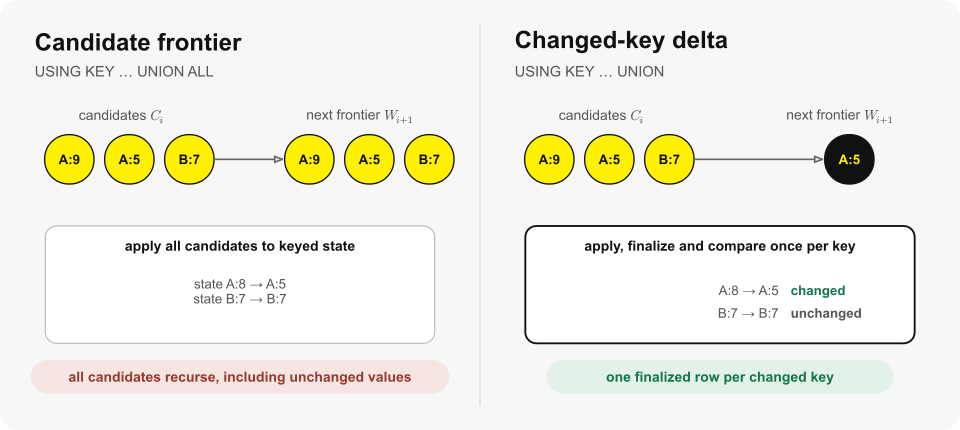
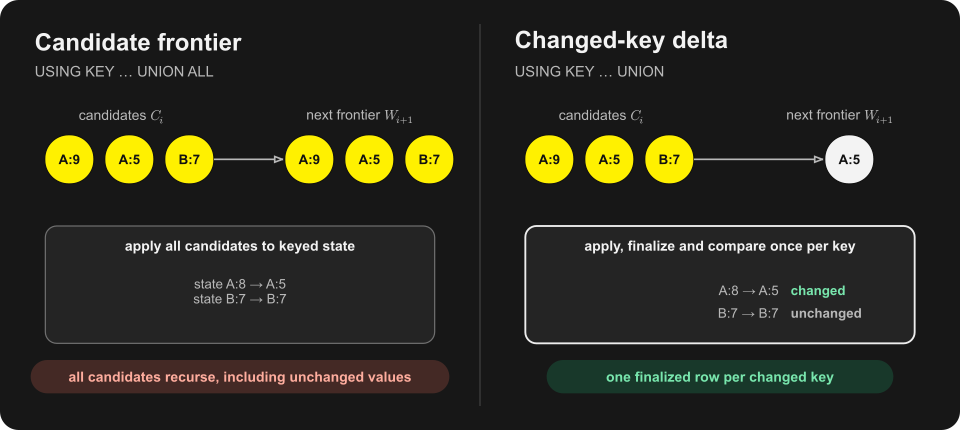
<p>Consider keyed state <code class="language-plaintext highlighter-rouge">{A:8, B:7}</code> with a <code class="language-plaintext highlighter-rouge">min</code> payload and candidates <code class="language-plaintext highlighter-rouge">[A:9, A:5, B:7]</code>. Applying the complete candidate bag produces <code class="language-plaintext highlighter-rouge">{A:5, B:7}</code>. The <code class="language-plaintext highlighter-rouge">A:9</code> candidate does not affect the finalized minimum, and <code class="language-plaintext highlighter-rouge">B:7</code> reproduces an existing value. <code class="language-plaintext highlighter-rouge">UNION ALL</code> nevertheless forwards all three candidates. <code class="language-plaintext highlighter-rouge">UNION</code> forwards only the finalized row <code class="language-plaintext highlighter-rouge">A:5</code> because it is the only observable state change.</p>

<h3 id="union-and-union-all-expose-different-frontiers"><code class="language-plaintext highlighter-rouge">UNION</code> and <code class="language-plaintext highlighter-rouge">UNION ALL</code> Expose Different Frontiers</h3>

<p>Let <code class="language-plaintext highlighter-rouge">Cᵢ</code> be the candidate bag produced in epoch <code class="language-plaintext highlighter-rouge">i</code>, <code class="language-plaintext highlighter-rouge">Sᵢ</code> the keyed state visible during that epoch and <code class="language-plaintext highlighter-rouge">Wᵢ₊₁</code> the next working table. Let <code class="language-plaintext highlighter-rouge">update(Sᵢ, Cᵢ)</code> apply all candidates in the bag and finalize every affected payload aggregate, and let <code class="language-plaintext highlighter-rouge">keys(Sᵢ)</code> denote the keys present before the update. We define the two forms as follows:</p>

<div class="language-text highlighter-rouge"><div class="highlight"><pre class="highlight"><code>USING KEY ... UNION ALL
Sᵢ₊₁ = update(Sᵢ, Cᵢ)
Wᵢ₊₁ = Cᵢ

USING KEY ... UNION
Sᵢ₊₁ = update(Sᵢ, Cᵢ)
Wᵢ₊₁ = { Sᵢ₊₁[k] | k ∉ keys(Sᵢ) OR Sᵢ₊₁[k] IS DISTINCT FROM Sᵢ[k] }
</code></pre></div></div>

<p>For the same input state and candidate bag, both forms compute the same next keyed state. They differ in what becomes recursively visible: <code class="language-plaintext highlighter-rouge">UNION ALL</code> forwards the bag unchanged, while <code class="language-plaintext highlighter-rouge">UNION</code> forwards one finalized row for each new or observably changed key. Recursion under <code class="language-plaintext highlighter-rouge">USING KEY ... UNION</code> therefore stops when keyed state stops changing.</p>

<p>The epoch-commit layer implements the rule by recording prior key existence and snapshotting the pre-epoch finalized payload of an existing key when that key is first touched. It then applies every candidate before finalizing and comparing each touched key once. Duplicate candidates and losing <code class="language-plaintext highlighter-rouge">min</code> or <code class="language-plaintext highlighter-rouge">max</code> inputs still participate in aggregate evaluation, but they do not become recursive work on their own.</p>

<p><img src="/images/blog/recursive-cte-engine/keyed-delta-light.svg" alt="USING KEY UNION ALL forwards every candidate, while UNION applies all candidates and forwards only finalized keys whose values changed." class="lightmode-img" />
<img src="/images/blog/recursive-cte-engine/keyed-delta-dark.svg" alt="USING KEY UNION ALL forwards every candidate, while UNION applies all candidates and forwards only finalized keys whose values changed." class="darkmode-img" /></p>

<p><em class="caption">For the same keyed state and candidate bag, both forms compute the same state update; the next frontier is either that bag or the changed-key delta.</em></p>

<p>We compare finalized values with SQL semantics, including <code class="language-plaintext highlighter-rouge">NULL</code> and collations. Key identity uses the same normalization as <code class="language-plaintext highlighter-rouge">GROUP BY</code>, and collated scalar keys remain eligible for direct and partial-key probes. The implementation also covers multi-column and nested payloads, <code class="language-plaintext highlighter-rouge">NaN</code> and signed zero.</p>

<p>The two frontiers also have different types. A <code class="language-plaintext highlighter-rouge">UNION ALL</code> frontier contains raw candidate rows, so its payload columns use aggregate input types. A <code class="language-plaintext highlighter-rouge">UNION</code> frontier contains finalized keyed rows, so its payload columns use aggregate result types. This distinction is visible through the SQL contract and constrains the internal representation. Because the keyword selects the frontier's contents, types and termination condition, we never infer one form from the other as an optimization.</p>

<h2 id="changed-key-deltas-still-pay-for-candidate-work">Changed-Key Deltas Still Pay for Candidate Work</h2>

<p>A changed-key delta reduces the next frontier only after all candidates have been applied. Millions of duplicate candidates can therefore still make the recurring hash-table update expensive even when few keys ultimately change. For eligible duplicate-heavy epochs, we first combine candidates in a temporary keyed hash table, then combine those aggregate states into recurring state.</p>

<h3 id="preaggregation-requires-combinable-aggregate-state">Preaggregation Requires Combinable Aggregate State</h3>

<p>Early combination must be observationally equivalent to applying candidates directly. We enable preaggregation only when every payload aggregate provides a state-combine operation and none is order-dependent. The default <code class="language-plaintext highlighter-rouge">last</code> aggregate and extension aggregates without a combine callback therefore remain on the direct update path. Without a combine operation, preaggregation lacks a valid state transition. For an order-dependent aggregate, it could change the observed input order and therefore change the result.</p>

<h3 id="cardinality-evidence-governs-preaggregation">Cardinality Evidence Governs Preaggregation</h3>

<p>Eligibility establishes correctness; observed cardinality determines whether the valid transformation is worthwhile. Epochs smaller than one standard vector bypass classification, as do non-expanding epochs whose candidate count does not exceed the preceding frontier. Larger eligible epochs build a HyperLogLog sketch over candidate keys. We preaggregate only when the sketch's error-inflated cardinality estimate is below one quarter of the candidate count, and stop sketching early once distinct-key evidence is sufficient to reject the additional hash table. The decision therefore adapts to the duplication observed in each epoch.</p>

<p>The cost of proving an unchanged value constrains this policy. For a wide workload with 102,400 unique existing-key updates, median runtime increases by 0.913 milliseconds, or 6%, under the new <code class="language-plaintext highlighter-rouge">UNION</code> semantics. The executor must compare finalized values where the previous implementation forwarded candidates without proving a change. Aggregate-specific shortcuts for <code class="language-plaintext highlighter-rouge">min</code> and <code class="language-plaintext highlighter-rouge">max</code> would place aggregate semantics in the recursive executor, so we do not use them. An aggregate-level change-reporting contract could put that responsibility in the aggregate interface. The current interface provides no such contract.</p>

<p>The large motivating workload was an <a href="https://ldbcouncil.org">LDBC</a> SF100 pathfinding query. It generated about 21 million aggregate candidates, but epoch-level aggregation produced only 3.7 million observable keyed results. The adaptive path preaggregated 17 million candidates. On matched Release builds immediately before and after the changed-key work, query time fell from a median of 19.319 to 2.948 seconds, a 6.55× speedup, while peak resident memory fell from 3.918 to 2.663 GB.</p>

<p>The wider regression suite bounds that result. In the same build comparison, the geometric mean across 63 recursive benchmarks improved by 5.5%, and 60 were within ±2%. Duplicate fan-in and duplicate-heavy preaggregation improved substantially; the wide unique-key case above is the one stable loss. For this reason, we classify work per epoch instead of applying the strategy that wins the motivating query to every workload.</p>

<h2 id="recursive-ctes-now-execute-as-one-adaptive-computation">Recursive CTEs Now Execute as One Adaptive Computation</h2>

<p>The new engine resolves the lifetime mismatch I wanted to remove after implementing DuckDB's original recursive operator. The query plan owns the physical operator tree, schedule projections and reusable executor pool. Within each invocation, the runtime checks out executors and retains proven repeatable, recursion-independent state across epochs, while each epoch rebinds and resets frontier-dependent state. This separation makes retained invariant work and per-epoch execution policy compatible. Keyed recursion uses the epoch boundary to freeze recurring state for direct probes, then commits the candidates and exposes only observable changes as the next frontier under <code class="language-plaintext highlighter-rouge">UNION</code>. The implementation landed across <a href="https://github.com/duckdb/duckdb/pull/22211">#22211</a>, <a href="https://github.com/duckdb/duckdb/pull/24031">#24031</a>, <a href="https://github.com/duckdb/duckdb/pull/24565">#24565</a> and <a href="https://github.com/duckdb/duckdb/pull/24647">#24647</a>.</p>

<p>That matters because recursion multiplies every physical cost placed inside the epoch loop. A scan, hash build or trip through the general scheduler that seems modest in isolation may run tens of thousands of times. The new engine pays eligible invariant costs once per invocation, avoids scheduler overhead when the observed work cannot amortize it and distributes epochs that expose sufficient independent work. Eligible keyed joins can access the required state directly, while <code class="language-plaintext highlighter-rouge">USING KEY ... UNION</code> recursion terminates when that state converges. This makes recursive SQL a more practical execution model for graph traversals, pathfinding and state machines, especially when the frontier remains small while the static input is large or when many candidates update the same keys.</p>

<p>The next step is to extend this foundation to more recursive plans. Future work can extend invocation-scoped reuse to more eligible operator states and use cardinalities observed at epoch boundaries for further execution decisions. Each extension must retain the same frontier and state-transition semantics. I intend to keep working along that boundary: reduce the physical cost of iteration while keeping recursive SQL predictable.</p>]]></content><author><name>Denis Hirn</name></author><category term="deep dive" /><summary type="html"><![CDATA[DuckDB's recursive CTE engine now treats recursion as one long-lived computation: it retains eligible epoch-invariant state, chooses execution modes from exact frontier cardinalities and physical work, probes keyed state directly and gives `USING KEY ... UNION` changed-key semantics.]]></summary><media:thumbnail xmlns:media="http://search.yahoo.com/mrss/" url="https://duckdb.org/images/blog/thumbs/recursive-queries.jpg" /><media:content medium="image" url="https://duckdb.org/images/blog/thumbs/recursive-queries.jpg" xmlns:media="http://search.yahoo.com/mrss/" /></entry><entry><title type="html">DuckDB Table Functions in Java</title><link href="https://duckdb.org/2026/08/25/table-functions-in-java.html" rel="alternate" type="text/html" title="DuckDB Table Functions in Java" /><published>2026-08-25T00:00:00+00:00</published><updated>2026-08-25T00:00:00+00:00</updated><id>https://duckdb.org/2026/08/25/table-functions-in-java</id><content type="html" xml:base="https://duckdb.org/2026/08/25/table-functions-in-java.html"><![CDATA[<p>In a large organization, data is spread across many systems, including relational databases, document stores, message queues, data lakes, and cloud data warehouses. Some of these systems can be reached only through a vendor SDK, usually provided in Java, or a <a href="https://en.wikipedia.org/wiki/Service-oriented_architecture">SOAP</a> endpoint, and many sit behind custom authentication or single sign-on that is awkward to satisfy from anything but a JVM client. The layer that ties these together is often a JVM-based distributed query engine, such as <a href="https://trino.io/">Trino</a>, that can run a single query joining across multiple data sources. The Java clients for those systems are mature and fast, with streaming APIs and, increasingly, virtual threads for asynchronous work. They are also already in production and cleared by corporate security.</p>

<p>Teams increasingly add DuckDB to these environments for fast single-node analytics. Because the surrounding infrastructure is Java, they use the <a href="/docs/current/clients/java/overview.html">DuckDB Java client</a> (the JDBC driver). But a query engine is only as useful as the data it can reach, and in these environments much of that data is accessible only through Java client libraries.</p>

<h2 id="bringing-external-data-into-duckdb">Bringing External Data into DuckDB</h2>

<p>Before writing a table function to reach a new source, it is worth asking what DuckDB can already read on its own, and the answer is almost everything. It reads Parquet and other files directly from data lakes. It connects to relational databases such as PostgreSQL, MySQL, and SQLite directly. The ODBC extension reaches proprietary databases such as Oracle, SQL Server, and DB2. JSON functions can query REST-like services by treating them as remote JSON files, and community extensions cover many more systems.</p>

<p>For a source that none of those cover, the data typically ends up in application code, processed by hand on top of a DuckDB result set. It is often more convenient, and frequently more performant, to bring that data into DuckDB's SQL directly, where it can be filtered and joined like any other table. <a href="/docs/current/clients/c/table_functions.html"><em>Table functions</em></a> are meant for exactly that. DuckDB has always let you plug in a custom source this way, but until now that meant writing the function in C++, which in practice was the only realistic choice.</p>

<h2 id="extending-duckdb-in-pure-java">Extending DuckDB in Pure Java</h2>

<p>The DuckDB Java client can now register table functions written in <a href="/docs/current/clients/java/functions.html#table-functions">pure Java</a>. Any data source you can reach from Java can be exposed as a SQL table function, reusing the same streaming, asynchronous client libraries your infrastructure already runs and trusts. You can then query it alongside local Parquet and CSV files, wildcard globs included, joining and filtering across all of them in a single SQL statement.</p>

<p>Until now, adding a custom source in native code meant building and shipping a DuckDB extension. That involved a C++ toolchain, notoriously complex build systems, and the operational risk that a crash in native code is a segfault that takes down the whole JVM. A pure-Java table function is an ordinary Maven dependency that runs on the JVM alongside the rest of the application, with far less risk. And because it is just a Java API, any JVM language works, so the same function could be written in Kotlin, Scala, or Clojure.</p>

<p>This post walks through an <a href="https://github.com/staticlibs/duckdb_mongo_example/blob/master/README.md">example project</a> that adds a <code class="language-plaintext highlighter-rouge">mongo_query()</code> function to DuckDB, and uses it to explain the mechanism.</p>

<blockquote>
  <p>MongoDB is a document store with a robust Java API. The <code class="language-plaintext highlighter-rouge">mongo_query()</code> function below is a deliberately minimal, illustrative example, not a production connector. There are better ways to reach MongoDB in particular, including the <a href="/docs/current/core_extensions/odbc/overview.html">ODBC extension</a> and the <a href="/community_extensions/extensions/mongo.html">MongoDB community extension</a>. We use MongoDB as an example because it is a popular system with a good Java client. The same pattern applies to any source reachable from the JVM, whether through a JDBC driver, one of the most common Java clients, a SOAP service, or a proprietary vendor SDK.</p>
</blockquote>

<h2 id="the-goal">The Goal</h2>

<p>The function should be callable from ordinary SQL:</p>

<div class="language-sql highlighter-rouge"><div class="highlight"><pre class="highlight"><code><span class="k">FROM</span> <span class="n">mongo_query</span><span class="p">(</span>
    <span class="s1">'tab1'</span><span class="p">,</span>
    <span class="s1">'{ "col1": "foo", "col2": { "$lt": 42 } }'</span><span class="p">,</span>
    <span class="k">columns</span> <span class="o">=</span> <span class="s1">'["col1", "col2", "col3"]'</span><span class="p">,</span>
    <span class="k">hostname</span> <span class="o">=</span> <span class="s1">'localhost'</span><span class="p">,</span>
    <span class="k">port</span> <span class="o">=</span> <span class="mi">27017</span><span class="p">,</span>
    <span class="k">database</span> <span class="o">=</span> <span class="s1">'db1'</span>
<span class="p">);</span>
</code></pre></div></div>

<p>The first argument is a MongoDB collection name. The second is a MongoDB filter document, in native MongoDB query syntax, passed through unchanged. The named <code class="language-plaintext highlighter-rouge">columns</code> parameter specifies which fields to project and the shape of the result. Because the filter is a MongoDB BSON document rather than a full SQL query, the collection name and the desired result columns cannot be read out of the query itself and are passed as separate parameters instead. Run against a seeded collection, the function returns the documents that match the filter:</p>

<div class="language-text highlighter-rouge"><div class="highlight"><pre class="highlight"><code>┌─────────┬───────┬─────────┐
│  col1   │ col2  │  col3   │
│ varchar │ int32 │ varchar │
├─────────┼───────┼─────────┤
│ foo     │    10 │ match-a │
│ foo     │    41 │ match-b │
└─────────┴───────┴─────────┘
</code></pre></div></div>

<p>There is no export to Parquet step and no intermediate table. The rows are read from a MongoDB cursor during query execution. And because the result is an ordinary relation, it can be joined with anything else DuckDB can read. Here it joins a remote collection against a directory of local CSV files in one statement:</p>

<div class="language-sql highlighter-rouge"><div class="highlight"><pre class="highlight"><code><span class="k">SELECT</span>
    <span class="n">c.region</span><span class="p">,</span>
    <span class="nf">count</span><span class="p">(</span><span class="o">*</span><span class="p">)</span>                     <span class="k">AS</span> <span class="n">orders</span><span class="p">,</span>
    <span class="nf">sum</span><span class="p">(</span><span class="n">o.amount</span><span class="p">::</span><span class="nb">DECIMAL</span><span class="p">(</span><span class="mi">10</span><span class="p">,</span><span class="mi">2</span><span class="p">))</span> <span class="k">AS</span> <span class="n">revenue</span>
<span class="k">FROM</span> <span class="n">mongo_query</span><span class="p">(</span>
         <span class="s1">'orders'</span><span class="p">,</span>
         <span class="s1">'{ "status": "shipped" }'</span><span class="p">,</span>
         <span class="k">columns</span> <span class="o">=</span> <span class="s1">'["customer_id", "amount"]'</span><span class="p">,</span>
         <span class="k">database</span> <span class="o">=</span> <span class="s1">'app'</span>
     <span class="p">)</span> <span class="k">AS</span> <span class="n">o</span>
<span class="k">JOIN</span> <span class="s1">'customers/*.csv'</span> <span class="k">AS</span> <span class="n">c</span>
  <span class="k">ON</span> <span class="n">c.customer_id</span> <span class="o">=</span> <span class="n">o.customer_id</span>
<span class="k">GROUP</span> <span class="k">BY</span> <span class="n">c.region</span><span class="p">;</span>
</code></pre></div></div>

<p>That is the heterogeneous join. A remote system reached through its Java driver is queried together with a glob of local files in one SQL statement on a single node.</p>

<h2 id="table-functions-in-java">Table Functions in Java</h2>

<p>Adding a new data source no longer requires a native extension. Through the DuckDB Java client, a table function is registered entirely in Java using the <code class="language-plaintext highlighter-rouge">DuckDBFunctions.tableFunction()</code> builder. The builder declares the function name, its positional and named parameters and their types, and the implementation class. Registration in the example is done in <a href="https://github.com/staticlibs/duckdb_mongo_example/blob/master/src/main/java/org/duckdb/example/MongoExample.java"><code class="language-plaintext highlighter-rouge">MongoExample.java</code></a>:</p>

<div class="language-java highlighter-rouge"><div class="highlight"><pre class="highlight"><code><span class="nc">DuckDBFunctions</span><span class="o">.</span><span class="na">tableFunction</span><span class="o">()</span>
    <span class="o">.</span><span class="na">withName</span><span class="o">(</span><span class="s">"mongo_query"</span><span class="o">)</span>
    <span class="o">.</span><span class="na">withParameter</span><span class="o">(</span><span class="nc">String</span><span class="o">.</span><span class="na">class</span><span class="o">)</span>   <span class="c1">// collection name</span>
    <span class="o">.</span><span class="na">withParameter</span><span class="o">(</span><span class="nc">String</span><span class="o">.</span><span class="na">class</span><span class="o">)</span>   <span class="c1">// Mongo filter (JSON)</span>
    <span class="o">.</span><span class="na">withNamedParameter</span><span class="o">(</span><span class="s">"columns"</span><span class="o">,</span> <span class="nc">String</span><span class="o">.</span><span class="na">class</span><span class="o">)</span>
    <span class="o">.</span><span class="na">withNamedParameter</span><span class="o">(</span><span class="s">"hostname"</span><span class="o">,</span> <span class="nc">String</span><span class="o">.</span><span class="na">class</span><span class="o">)</span>
    <span class="o">.</span><span class="na">withNamedParameter</span><span class="o">(</span><span class="s">"port"</span><span class="o">,</span> <span class="nc">Integer</span><span class="o">.</span><span class="na">class</span><span class="o">)</span>
    <span class="o">.</span><span class="na">withNamedParameter</span><span class="o">(</span><span class="s">"database"</span><span class="o">,</span> <span class="nc">String</span><span class="o">.</span><span class="na">class</span><span class="o">)</span>
    <span class="o">.</span><span class="na">withNamedParameter</span><span class="o">(</span><span class="s">"username"</span><span class="o">,</span> <span class="nc">String</span><span class="o">.</span><span class="na">class</span><span class="o">)</span>
    <span class="o">.</span><span class="na">withNamedParameter</span><span class="o">(</span><span class="s">"password"</span><span class="o">,</span> <span class="nc">String</span><span class="o">.</span><span class="na">class</span><span class="o">)</span>
    <span class="o">.</span><span class="na">withFunction</span><span class="o">(</span><span class="k">new</span> <span class="nc">MongoQueryFunction</span><span class="o">())</span>
    <span class="o">.</span><span class="na">register</span><span class="o">(</span><span class="n">connection</span><span class="o">);</span>
</code></pre></div></div>

<p>This completes registration. <code class="language-plaintext highlighter-rouge">mongo_query(...)</code> is then available as a table function on that DuckDB connection and can be used in <code class="language-plaintext highlighter-rouge">FROM</code> clauses, joins, CTEs, and subqueries like any built-in function.</p>

<blockquote>
  <p>This example takes <code class="language-plaintext highlighter-rouge">username</code> and <code class="language-plaintext highlighter-rouge">password</code> parameters and opens a fresh connection on every call. In a real, non-toy implementation it is often preferable to open a connection to the remote server once and run several queries on it. That can be done with a set of scalar functions. A <code class="language-plaintext highlighter-rouge">mongo_connect()</code> opens a connection and returns its handle as a DuckDB value, a <code class="language-plaintext highlighter-rouge">mongo_query()</code> reads through that handle, and a <code class="language-plaintext highlighter-rouge">mongo_close()</code> closes it. That approach is outside the scope of this post and could be the subject of a follow-up. For a similar example, see <a href="/docs/current/core_extensions/odbc/functions.html#odbc_connect"><code class="language-plaintext highlighter-rouge">odbc_connect</code></a> in the ODBC extension.</p>
</blockquote>

<p>The implementation is a class that implements <code class="language-plaintext highlighter-rouge">DuckDBTableFunction</code>, which follows DuckDB's native table-function lifecycle with three callbacks:</p>

<ul>
  <li><strong><code class="language-plaintext highlighter-rouge">bind</code></strong> runs at prepare time. It reads the parameters, determines the output schema, and declares each result column with <code class="language-plaintext highlighter-rouge">addResultColumn()</code>.</li>
  <li><strong><code class="language-plaintext highlighter-rouge">init</code></strong> runs once before execution and sets up shared state, such as opening a cursor or issuing the remote request.</li>
  <li><strong><code class="language-plaintext highlighter-rouge">apply</code></strong> is called repeatedly, each time filling a chunk of the output, until it returns <code class="language-plaintext highlighter-rouge">0</code>.</li>
</ul>

<blockquote>
  <p>The API also exposes an <code class="language-plaintext highlighter-rouge">initLocal</code> callback for per-thread local state used in multithreaded execution. This post keeps to single-threaded execution and does not use it, though it may be covered in a future post.</p>
</blockquote>

<p>The example implements these in <a href="https://github.com/staticlibs/duckdb_mongo_example/blob/master/src/main/java/org/duckdb/example/MongoQueryFunction.java"><code class="language-plaintext highlighter-rouge">MongoQueryFunction.java</code></a>, with named parameters defined in <a href="https://github.com/staticlibs/duckdb_mongo_example/blob/master/src/main/java/org/duckdb/example/MongoQueryParameters.java"><code class="language-plaintext highlighter-rouge">MongoQueryParameters.java</code></a>.</p>

<h3 id="bind-declare-the-output-schema">Bind: Declare the Output Schema</h3>

<p><code class="language-plaintext highlighter-rouge">bind</code> reads the call parameters and declares the output columns. Because MongoDB documents have no fixed schema, this example asks the caller to list the columns rather than inferring them from a prepared statement, and declares each one to DuckDB:</p>

<div class="language-java highlighter-rouge"><div class="highlight"><pre class="highlight"><code><span class="kd">public</span> <span class="nc">MongoQueryBindData</span> <span class="nf">bind</span><span class="o">(</span><span class="nc">DuckDBTableFunctionBindInfo</span> <span class="n">info</span><span class="o">)</span>
    <span class="kd">throws</span> <span class="nc">Exception</span> <span class="o">{</span>
    <span class="nc">String</span> <span class="n">collectionName</span> <span class="o">=</span> <span class="n">info</span><span class="o">.</span><span class="na">getParameter</span><span class="o">(</span><span class="mi">0</span><span class="o">).</span><span class="na">getString</span><span class="o">();</span>
    <span class="nc">String</span> <span class="n">queryJson</span>      <span class="o">=</span> <span class="n">info</span><span class="o">.</span><span class="na">getParameter</span><span class="o">(</span><span class="mi">1</span><span class="o">).</span><span class="na">getString</span><span class="o">();</span>
    <span class="nc">String</span> <span class="n">columnsJson</span>    <span class="o">=</span> <span class="n">info</span><span class="o">.</span><span class="na">getNamedParameter</span><span class="o">(</span><span class="s">"columns"</span><span class="o">).</span><span class="na">getString</span><span class="o">();</span>
    <span class="c1">// ... read hostname / port / database / credentials ...</span>

    <span class="nc">MongoClient</span> <span class="n">client</span> <span class="o">=</span> <span class="nc">MongoClients</span><span class="o">.</span><span class="na">create</span><span class="o">(</span><span class="n">settings</span><span class="o">.</span><span class="na">build</span><span class="o">());</span>
    <span class="nc">MongoCollection</span><span class="o">&lt;</span><span class="nc">Document</span><span class="o">&gt;</span> <span class="n">collection</span> <span class="o">=</span>
        <span class="n">client</span><span class="o">.</span><span class="na">getDatabase</span><span class="o">(</span><span class="n">database</span><span class="o">).</span><span class="na">getCollection</span><span class="o">(</span><span class="n">collectionName</span><span class="o">);</span>

    <span class="nc">List</span><span class="o">&lt;</span><span class="nc">String</span><span class="o">&gt;</span> <span class="n">columns</span> <span class="o">=</span> <span class="k">new</span> <span class="nc">ArrayList</span><span class="o">&lt;&gt;();</span>
    <span class="k">for</span> <span class="o">(</span><span class="nc">BsonValue</span> <span class="n">bv</span> <span class="o">:</span> <span class="nc">BsonArray</span><span class="o">.</span><span class="na">parse</span><span class="o">(</span><span class="n">columnsJson</span><span class="o">))</span> <span class="o">{</span>
        <span class="nc">String</span> <span class="n">name</span> <span class="o">=</span> <span class="n">bv</span><span class="o">.</span><span class="na">asString</span><span class="o">().</span><span class="na">getValue</span><span class="o">();</span>
        <span class="n">columns</span><span class="o">.</span><span class="na">add</span><span class="o">(</span><span class="n">name</span><span class="o">);</span>
        <span class="n">info</span><span class="o">.</span><span class="na">addResultColumn</span><span class="o">(</span><span class="n">name</span><span class="o">,</span> <span class="nc">String</span><span class="o">.</span><span class="na">class</span><span class="o">);</span> <span class="c1">// declare it to DuckDB</span>
    <span class="o">}</span>

    <span class="nc">Document</span> <span class="n">query</span> <span class="o">=</span> <span class="nc">Document</span><span class="o">.</span><span class="na">parse</span><span class="o">(</span><span class="n">queryJson</span><span class="o">);</span>
    <span class="k">return</span> <span class="k">new</span> <span class="nf">MongoQueryBindData</span><span class="o">(</span><span class="n">client</span><span class="o">,</span> <span class="n">collection</span><span class="o">,</span> <span class="n">columns</span><span class="o">,</span> <span class="n">query</span><span class="o">);</span>
<span class="o">}</span>
</code></pre></div></div>

<p>Two aspects here generalize beyond MongoDB. DuckDB never parses or interprets the source's query language. The filter is handed to the source's own driver essentially unchanged, apart from a JSON-to-BSON conversion, so the full source syntax stays available. The object returned from <code class="language-plaintext highlighter-rouge">bind</code>, here a <a href="https://github.com/staticlibs/duckdb_mongo_example/blob/master/src/main/java/org/duckdb/example/MongoQueryBindData.java"><code class="language-plaintext highlighter-rouge">MongoQueryBindData</code></a>, then carries that state forward to the next callback. Note that <code class="language-plaintext highlighter-rouge">bind</code> also runs when a query is <code class="language-plaintext highlighter-rouge">EXPLAIN</code>ed, since DuckDB needs the output schema to plan the query.</p>

<h3 id="init-open-the-cursor">Init: Open the Cursor</h3>

<p><code class="language-plaintext highlighter-rouge">init</code> runs once and prepares the execution state that <code class="language-plaintext highlighter-rouge">apply</code> will consume. In the example it issues the query and stores the resulting cursor in a <a href="https://github.com/staticlibs/duckdb_mongo_example/blob/master/src/main/java/org/duckdb/example/MongoQueryInitData.java"><code class="language-plaintext highlighter-rouge">MongoQueryInitData</code></a>. It also pins execution to a single thread with <code class="language-plaintext highlighter-rouge">setMaxThreads(1)</code>, because this post does not cover multithreaded execution:</p>

<div class="language-java highlighter-rouge"><div class="highlight"><pre class="highlight"><code><span class="kd">public</span> <span class="nc">MongoQueryInitData</span> <span class="nf">init</span><span class="o">(</span><span class="nc">DuckDBTableFunctionInitInfo</span> <span class="n">info</span><span class="o">)</span>
    <span class="kd">throws</span> <span class="nc">Exception</span> <span class="o">{</span>
    <span class="n">info</span><span class="o">.</span><span class="na">setMaxThreads</span><span class="o">(</span><span class="mi">1</span><span class="o">);</span>
    <span class="nc">MongoQueryBindData</span> <span class="n">bindData</span> <span class="o">=</span> <span class="n">info</span><span class="o">.</span><span class="na">getBindData</span><span class="o">();</span>
    <span class="nc">FindIterable</span><span class="o">&lt;</span><span class="nc">Document</span><span class="o">&gt;</span> <span class="n">iter</span> <span class="o">=</span> <span class="n">bindData</span><span class="o">.</span><span class="na">collection</span><span class="o">.</span><span class="na">find</span><span class="o">(</span><span class="n">bindData</span><span class="o">.</span><span class="na">query</span><span class="o">);</span>
    <span class="k">return</span> <span class="k">new</span> <span class="nf">MongoQueryInitData</span><span class="o">(</span><span class="n">iter</span><span class="o">.</span><span class="na">cursor</span><span class="o">());</span>
<span class="o">}</span>
</code></pre></div></div>

<h3 id="apply-stream-rows-into-vectors">Apply: Stream Rows into Vectors</h3>

<p><code class="language-plaintext highlighter-rouge">apply</code> reflects DuckDB's vectorized execution model. Rather than returning rows, it writes them into the output data chunk column by column, up to the chunk's capacity of 2048 rows, and returns the number of rows produced:</p>

<div class="language-java highlighter-rouge"><div class="highlight"><pre class="highlight"><code><span class="kd">public</span> <span class="kt">long</span> <span class="nf">apply</span><span class="o">(</span><span class="nc">DuckDBTableFunctionCallInfo</span> <span class="n">info</span><span class="o">,</span>
    <span class="nc">DuckDBDataChunkWriter</span> <span class="n">output</span><span class="o">)</span> <span class="kd">throws</span> <span class="nc">Exception</span> <span class="o">{</span>
    <span class="nc">MongoCursor</span><span class="o">&lt;</span><span class="nc">Document</span><span class="o">&gt;</span> <span class="n">cursor</span> <span class="o">=</span> <span class="n">info</span><span class="o">.</span><span class="na">getInitData</span><span class="o">().</span><span class="na">getResultCursor</span><span class="o">();</span>

    <span class="kt">long</span> <span class="n">row</span> <span class="o">=</span> <span class="mi">0</span><span class="o">;</span>
    <span class="k">for</span> <span class="o">(;</span> <span class="n">row</span> <span class="o">&lt;</span> <span class="n">output</span><span class="o">.</span><span class="na">capacity</span><span class="o">()</span> <span class="o">&amp;&amp;</span> <span class="n">cursor</span><span class="o">.</span><span class="na">hasNext</span><span class="o">();</span> <span class="n">row</span><span class="o">++)</span> <span class="o">{</span>
        <span class="nc">Document</span> <span class="n">doc</span> <span class="o">=</span> <span class="n">cursor</span><span class="o">.</span><span class="na">next</span><span class="o">();</span>
        <span class="k">for</span> <span class="o">(</span><span class="kt">long</span> <span class="n">col</span> <span class="o">=</span> <span class="mi">0</span><span class="o">;</span> <span class="n">col</span> <span class="o">&lt;</span> <span class="n">output</span><span class="o">.</span><span class="na">columnCount</span><span class="o">();</span> <span class="n">col</span><span class="o">++)</span> <span class="o">{</span>
            <span class="n">copyValueFromResultSetToVector</span><span class="o">(</span>
                <span class="n">doc</span><span class="o">,</span>
                <span class="n">output</span><span class="o">.</span><span class="na">vector</span><span class="o">(</span><span class="n">col</span><span class="o">),</span>
                <span class="n">row</span><span class="o">,</span>
                <span class="n">columns</span><span class="o">.</span><span class="na">get</span><span class="o">((</span><span class="kt">int</span><span class="o">)</span> <span class="n">col</span><span class="o">)</span>
            <span class="o">);</span>
        <span class="o">}</span>
    <span class="o">}</span>
    <span class="k">return</span> <span class="n">row</span><span class="o">;</span> <span class="c1">// 0 signals "no more data"</span>
<span class="o">}</span>
</code></pre></div></div>

<p>Values are written into typed vectors through the vector API, using <code class="language-plaintext highlighter-rouge">setString</code>, <code class="language-plaintext highlighter-rouge">setInt</code>, <code class="language-plaintext highlighter-rouge">setDouble</code>, <code class="language-plaintext highlighter-rouge">setNull</code>, and related methods. DuckDB calls <code class="language-plaintext highlighter-rouge">apply</code> repeatedly, draining the source one vector-sized batch of 2048 rows at a time, so the full result does not have to be materialized in memory on either side. In the example, the BSON-to-vector conversion lives in <a href="https://github.com/staticlibs/duckdb_mongo_example/blob/master/src/main/java/org/duckdb/example/MongoTypes.java"><code class="language-plaintext highlighter-rouge">MongoTypes.java</code></a>.</p>

<blockquote>
  <p>Writing rows into a <code class="language-plaintext highlighter-rouge">DuckDBDataChunkWriter</code> here is the mirror image of reading them out. The <a href="/2026/08/21/chunked-query-results-java-driver.html">previous post</a> covered consuming query results through the <code class="language-plaintext highlighter-rouge">DuckDBDataChunkReader</code> API, where the driver hands you chunks to read. As shown in the code snippet above, a table function uses the writer side of the same columnar model to produce them.</p>
</blockquote>

<h2 id="implications">Implications</h2>

<p>This example is a MongoDB connector, but the broader point is that DuckDB can now be extended in pure Java, putting the rich ecosystem of Java libraries within reach as a data source:</p>

<ul>
  <li><strong>No native build.</strong> The project contains no C++ code. It is a Maven project with two dependencies, the DuckDB Java client and the MongoDB driver. Adding a new source is ordinary Java work, done with the tools a team already uses and without touching a native toolchain.</li>
  <li><strong>Reuse of the official client.</strong> The example does not reimplement a wire protocol or query language. It uses the vendor's Java driver and passes filters through unchanged. The same applies to any system with a JDBC driver or a Java SDK, such as a REST API, a message queue, or a SOAP service.</li>
  <li><strong>In-process access.</strong> The data is not exported and reloaded. It is read from a cursor during query execution. Because the result is an ordinary table function, it can be joined with Parquet files, CSV globs, or attached databases in a single SQL statement, so DuckDB acts as the query layer over the source rather than a copy of it.</li>
  <li><strong>Predicates run at the source.</strong> The filter is written in the source's own query language and handed to its driver unchanged, so it executes at the source, against its indexes, and only matching rows cross the wire. The selective work happens remotely, and DuckDB streams back only what it needs.</li>
</ul>

<h2 id="current-limitations">Current Limitations</h2>

<p>These are limitations of the current Java table-function API:</p>

<ul>
  <li><strong>A Java table function cannot yet be packaged as a DuckDB extension.</strong> A DuckDB extension is a native shared library loaded into the DuckDB process, whereas a Java table function requires a JVM to run. As a result, the function can only be used from the DuckDB Java client. Packaging JVM code as a loadable extension is technically possible, for example through a JNI or <a href="https://openjdk.org/jeps/454">FFM</a> shim that embeds the JVM, or by compiling to a GraalVM native image, but neither is supported today.</li>
  <li>
    <p><strong>Bind and init objects are not managed automatically.</strong> In the current release, the caller is responsible for the lifecycle of the objects returned from <code class="language-plaintext highlighter-rouge">bind</code> and <code class="language-plaintext highlighter-rouge">init</code>, for example closing the MongoDB client and cursor after the query completes. A <a href="/docs/current/clients/java/functions.html#cleaning-up-resources"><code class="language-plaintext highlighter-rouge">DuckDBTableFunctionState</code></a> mechanism (<a href="https://github.com/duckdb/duckdb-java/pull/803">contributed</a> by a community member) manages that lifecycle for you. The init object then becomes:</p>

    <div class="language-java highlighter-rouge"><div class="highlight"><pre class="highlight"><code><span class="kd">public</span> <span class="kd">class</span> <span class="nc">MongoQueryInitData</span>
    <span class="kd">implements</span> <span class="nc">AutoCloseable</span> <span class="cm">/* DuckDBTableFunctionState */</span> <span class="o">{</span>

    <span class="kd">final</span> <span class="nc">MongoCursor</span><span class="o">&lt;</span><span class="nc">Document</span><span class="o">&gt;</span> <span class="n">cursor</span><span class="o">;</span>

    <span class="c1">// ...</span>
    <span class="nd">@Override</span>
    <span class="kd">public</span> <span class="kt">void</span> <span class="nf">close</span><span class="o">()</span> <span class="o">{</span>
        <span class="n">cursor</span><span class="o">.</span><span class="na">close</span><span class="o">();</span>
    <span class="o">}</span>
<span class="o">}</span>
</code></pre></div>    </div>
  </li>
  <li><strong>Composite DuckDB types are not yet supported.</strong> The vector API currently covers scalar types, but <code class="language-plaintext highlighter-rouge">STRUCT</code>, <code class="language-plaintext highlighter-rouge">LIST</code>, and other nested types are planned for the future. Until then, nested source data has to be flattened or serialized to a scalar column.</li>
</ul>

<h2 id="conclusion">Conclusion</h2>

<p>For many analytical workloads, the data does not have to move to a cluster, and you do not need a distributed query engine to join across systems. With pure-Java table functions, the client libraries already running in your infrastructure expose remote data sources as SQL tables, and DuckDB joins them against each other and against local files in a single query on one node, using the Java client libraries you already have.</p>

<p>The table-function API is documented under <a href="/docs/current/clients/java/functions.html#table-functions">Defining Functions</a>. The complete example is available in the <a href="https://github.com/staticlibs/duckdb_mongo_example"><code class="language-plaintext highlighter-rouge">duckdb_mongo_example</code> repository</a>, and the DuckDB team is always happy to talk Java in the <code class="language-plaintext highlighter-rouge">#java</code> channel on the <a href="https://discord.duckdb.org">DuckDB Discord</a>.</p>]]></content><author><name>Geertjan Wielenga, Alex Kasko</name></author><category term="deep dive" /><summary type="html"><![CDATA[The DuckDB Java client can register table functions written in pure Java, exposing any Java-accessible data source as a SQL table. That turns DuckDB into a single-node query engine for heterogeneous joins across remote systems and local files, with no export step.]]></summary><media:thumbnail xmlns:media="http://search.yahoo.com/mrss/" url="https://duckdb.org/images/blog/thumbs/java.png" /><media:content medium="image" url="https://duckdb.org/images/blog/thumbs/java.png" xmlns:media="http://search.yahoo.com/mrss/" /></entry><entry><title type="html">Chunked Query Results in the DuckDB Java Driver</title><link href="https://duckdb.org/2026/08/21/chunked-query-results-java-driver.html" rel="alternate" type="text/html" title="Chunked Query Results in the DuckDB Java Driver" /><published>2026-08-21T00:00:00+00:00</published><updated>2026-08-21T00:00:00+00:00</updated><id>https://duckdb.org/2026/08/21/chunked-query-results-java-driver</id><content type="html" xml:base="https://duckdb.org/2026/08/21/chunked-query-results-java-driver.html"><![CDATA[<p>DuckDB is a columnar, vectorized database. Every operator inside the engine works on <a href="/docs/current/clients/c/data_chunk.html"><em>data chunks:</em></a> batches of column vectors, 2,048 rows at a time. That is a big part of why DuckDB is fast: the engine amortizes interpretation overhead over thousands of values instead of paying it once per value.</p>

<p>JDBC, on the other hand, was designed in 1997 around a very different idea. The <code class="language-plaintext highlighter-rouge">ResultSet</code> API hands you one row at a time (<code class="language-plaintext highlighter-rouge">next()</code>) and one value at a time (<code class="language-plaintext highlighter-rouge">getInt(1)</code>, <code class="language-plaintext highlighter-rouge">getString(2)</code> and so on). It is a solid, familiar API, supported across the Java ecosystem, but it forces the data into a form that DuckDB never used internally.</p>

<p>The DuckDB Java driver has to bridge the two. It embeds the native DuckDB library and talks to it over JNI. When the engine has already produced a columnar chunk of 2,048 rows, the JDBC specification requires the driver to slice it back into rows and cells before you can read it. If your application is going to put those values right back into columnar form, such as arrays, Arrow buffers or a machine learning feature matrix, the data is split into rows only to be reassembled into columns, wasting work on both sides.</p>

<p>Version 1.5.3.0 of the Java driver adds an alternative.</p>

<blockquote>
  <p>Tip We have thoroughly updated the <a href="/docs/current/clients/java/overview.html">Java client documentation</a>, which now covers the driver's full API surface across dedicated pages: <a href="/docs/current/clients/java/connecting.html">defining connections</a>, <a href="/docs/current/clients/java/querying.html">running queries</a>, <a href="/docs/current/clients/java/result_handling.html">handling results</a> (including <a href="/docs/current/clients/java/result_handling.html#arrow-methods">Arrow methods</a> and <a href="/docs/current/clients/java/result_handling.html#streaming-results">streaming results</a>), <a href="/docs/current/clients/java/data_import.html">importing data</a> with the <a href="/docs/current/clients/java/data_import.html#appender">appender</a> and <a href="/docs/current/clients/java/data_import.html#batch-writer">batch writer</a>, and <a href="/docs/current/clients/java/functions.html">defining functions</a>. The chunked query results discussed in this post are documented under <a href="/docs/current/clients/java/result_handling.html#chunked-results">Chunked Results</a>.</p>
</blockquote>

<h2 id="reading-results-row-by-row">Reading Results Row by Row</h2>

<p>A typical JDBC read loop looks like this:</p>

<div class="language-java highlighter-rouge"><div class="highlight"><pre class="highlight"><code><span class="k">try</span> <span class="o">(</span><span class="nc">ResultSet</span> <span class="n">rs</span> <span class="o">=</span> <span class="n">stmt</span><span class="o">.</span><span class="na">executeQuery</span><span class="o">(</span><span class="s">"SELECT a, b FROM measurements"</span><span class="o">))</span> <span class="o">{</span>
    <span class="k">while</span> <span class="o">(</span><span class="n">rs</span><span class="o">.</span><span class="na">next</span><span class="o">())</span> <span class="o">{</span>
        <span class="kt">long</span> <span class="n">a</span> <span class="o">=</span> <span class="n">rs</span><span class="o">.</span><span class="na">getLong</span><span class="o">(</span><span class="mi">1</span><span class="o">);</span>
        <span class="kt">double</span> <span class="n">b</span> <span class="o">=</span> <span class="n">rs</span><span class="o">.</span><span class="na">getDouble</span><span class="o">(</span><span class="mi">2</span><span class="o">);</span>
        <span class="c1">// ...</span>
    <span class="o">}</span>
<span class="o">}</span>
</code></pre></div></div>

<p>Calling <code class="language-plaintext highlighter-rouge">next()</code> advances the cursor, and a <code class="language-plaintext highlighter-rouge">get*</code> call then locates the value inside the current native chunk and converts it to a Java representation. For some non-primitive types that conversion has to cross the JNI boundary on every value, and a few conversions are more involved, such as fetching a timestamp against a caller-supplied <code class="language-plaintext highlighter-rouge">java.util.Calendar</code> (the pre-<code class="language-plaintext highlighter-rouge">java.time</code> class the JDBC specification still mandates here). None of these steps is expensive on its own, but multiplied by millions of rows times a handful of columns, they add up. This is exactly the per-value interpretation overhead that vectorized execution is designed to avoid.</p>

<p>The loop also carries fixed overhead. So that a single connection can keep several result sets open at once, <a href="/docs/current/clients/java/result_handling.html#streaming-results">result streaming</a> is off by default, which means a query's entire result is read into memory unless you set <code class="language-plaintext highlighter-rouge">jdbc_stream_results</code>, an option most users never set. The driver also assembles a full set of result metadata. That happens once per result rather than once per row, so it is cheap next to the row loop, but it is not free, and most queries never look at it.</p>

<p>The <code class="language-plaintext highlighter-rouge">ResultSet</code> path is the standard your ORM and the rest of the ecosystem already use, and for the vast majority of queries, the ones returning hundreds or thousands of rows, it is the right choice. The chunked API is for the other case: a query returns <em>a lot</em> of data, you control both ends of the pipe, and reading it row by row provides no advantage.</p>

<h2 id="reading-chunks-with-duckdbchunkedresult">Reading Chunks with <code class="language-plaintext highlighter-rouge">DuckDBChunkedResult</code></h2>

<p>The Java driver now exposes the engine's native chunk stream directly, via the same mechanism the <a href="/docs/current/clients/c/overview.html">C API</a> offers as <code class="language-plaintext highlighter-rouge">duckdb_fetch_chunk</code>. A query result becomes a lazily fetched sequence of data chunks, and you read column vectors out of each chunk in batches, the way the engine produced them, avoiding the per-row overhead required by the JDBC specification.</p>

<p>Putting that together:</p>

<div class="language-java highlighter-rouge"><div class="highlight"><pre class="highlight"><code><span class="k">try</span> <span class="o">(</span><span class="nc">DuckDBConnection</span> <span class="n">conn</span> <span class="o">=</span> <span class="nc">DriverManager</span>
        <span class="o">.</span><span class="na">getConnection</span><span class="o">(</span><span class="s">"jdbc:duckdb:"</span><span class="o">)</span>
        <span class="o">.</span><span class="na">unwrap</span><span class="o">(</span><span class="nc">DuckDBConnection</span><span class="o">.</span><span class="na">class</span><span class="o">);</span>
     <span class="nc">DuckDBPreparedStatement</span> <span class="n">ps</span> <span class="o">=</span> <span class="n">conn</span><span class="o">.</span><span class="na">prepare</span><span class="o">(</span>
         <span class="s">"SELECT l_orderkey, l_linenumber, l_shipmode "</span>
             <span class="o">+</span> <span class="s">"FROM 's3://my-bucket-name/lineitems.parquet'"</span><span class="o">))</span> <span class="o">{</span>

    <span class="k">try</span> <span class="o">(</span><span class="nc">DuckDBChunkedResult</span> <span class="n">res</span> <span class="o">=</span> <span class="n">ps</span><span class="o">.</span><span class="na">query</span><span class="o">())</span> <span class="o">{</span>

        <span class="c1">// advance to the next chunk, returns true on success</span>
        <span class="k">while</span> <span class="o">(</span><span class="n">res</span><span class="o">.</span><span class="na">nextChunk</span><span class="o">())</span> <span class="o">{</span>

            <span class="c1">// get the current chunk from the result</span>
            <span class="nc">DuckDBDataChunkReader</span> <span class="n">chunk</span> <span class="o">=</span> <span class="n">res</span><span class="o">.</span><span class="na">chunk</span><span class="o">();</span>

            <span class="c1">// vectors are addressed by 0-based column index</span>
            <span class="nc">DuckDBReadableVector</span> <span class="n">orderKeys</span> <span class="o">=</span> <span class="n">chunk</span><span class="o">.</span><span class="na">vector</span><span class="o">(</span><span class="mi">0</span><span class="o">);</span>
            <span class="nc">DuckDBReadableVector</span> <span class="n">lineNumbers</span> <span class="o">=</span> <span class="n">chunk</span><span class="o">.</span><span class="na">vector</span><span class="o">(</span><span class="mi">1</span><span class="o">);</span>
            <span class="nc">DuckDBReadableVector</span> <span class="n">shipModes</span> <span class="o">=</span> <span class="n">chunk</span><span class="o">.</span><span class="na">vector</span><span class="o">(</span><span class="mi">2</span><span class="o">);</span>

            <span class="c1">// read each column with the getter for its type</span>
            <span class="k">for</span> <span class="o">(</span><span class="kt">long</span> <span class="n">row</span> <span class="o">=</span> <span class="mi">0</span><span class="o">;</span> <span class="n">row</span> <span class="o">&lt;</span> <span class="n">chunk</span><span class="o">.</span><span class="na">rowCount</span><span class="o">();</span> <span class="n">row</span><span class="o">++)</span> <span class="o">{</span>
                <span class="kt">long</span> <span class="n">orderKey</span> <span class="o">=</span> <span class="n">orderKeys</span><span class="o">.</span><span class="na">getLong</span><span class="o">(</span><span class="n">row</span><span class="o">);</span>
                <span class="kt">int</span> <span class="n">lineNumber</span> <span class="o">=</span> <span class="n">lineNumbers</span><span class="o">.</span><span class="na">getInt</span><span class="o">(</span><span class="n">row</span><span class="o">);</span>
                <span class="nc">String</span> <span class="n">shipMode</span> <span class="o">=</span> <span class="n">shipModes</span><span class="o">.</span><span class="na">getString</span><span class="o">(</span><span class="n">row</span><span class="o">);</span>
                <span class="nc">System</span><span class="o">.</span><span class="na">out</span><span class="o">.</span><span class="na">println</span><span class="o">(</span><span class="n">orderKey</span> <span class="o">+</span> <span class="s">" "</span> <span class="o">+</span> <span class="n">lineNumber</span> <span class="o">+</span> <span class="s">" "</span> <span class="o">+</span> <span class="n">shipMode</span><span class="o">);</span>
            <span class="o">}</span>
        <span class="o">}</span>
    <span class="o">}</span>
<span class="o">}</span>
</code></pre></div></div>

<p>This approach has a few notable properties:</p>

<ul>
  <li>
    <p><strong>Laziness.</strong> <code class="language-plaintext highlighter-rouge">nextChunk()</code> pulls one chunk at a time from the engine. The full result is never materialized on the native side or the Java side, so you can stream through results far larger than your heap, the same way the engine itself produces them.</p>
  </li>
  <li>
    <p><strong>Columnar access.</strong> Inside a chunk you work vector by vector. If your destination is columnar too, such as a <code class="language-plaintext highlighter-rouge">long[]</code>, an Arrow <code class="language-plaintext highlighter-rouge">VectorSchemaRoot</code> or a Parquet writer, you copy values in tight, monomorphic loops instead of switching columns on every row.</p>
  </li>
  <li>
    <p><strong>Enough metadata to dispatch.</strong> Each result still reports its column count and column types, so you can pick the right <code class="language-plaintext highlighter-rouge">get*</code> call per vector without carrying a separate schema description alongside the data.</p>
  </li>
  <li>
    <p><strong>A familiar API if you have written a UDF.</strong> Chunk contents are accessed through the same <code class="language-plaintext highlighter-rouge">DuckDBDataChunkReader</code> API that the driver's <a href="/docs/current/clients/java/functions.html">user-defined functions</a> use to read their input vectors. So the same code that reads a function's arguments inside a UDF also reads query results outside one.</p>
  </li>
  <li>
    <p><strong>Zero-based indexing.</strong> Chunk <em>columns and rows</em> are 0-based, matching the C API and the UDF interfaces.</p>
  </li>
</ul>

<p>Inside a vector you are free to iterate however suits your code, a Java <code class="language-plaintext highlighter-rouge">Stream</code> included. A <em>parallel</em> stream over a single chunk rarely helps, though: 2,048 values is small enough that fork/join coordination usually costs more than it saves. If you want parallelism, apply it across chunks rather than within a single one.</p>

<h2 id="current-limitations">Current Limitations</h2>

<p>This is the first iteration of the API, and there are a few limitations you should know about before adopting it:</p>

<ul>
  <li>
    <p><strong>Basic data types only, for now.</strong> The scalar types are supported. Composite types (<code class="language-plaintext highlighter-rouge">LIST</code>, <code class="language-plaintext highlighter-rouge">STRUCT</code>) are not yet readable through the chunked interface. Support for them is planned for a future release.</p>
  </li>
  <li>
    <p><strong>Prepared statements only.</strong> <code class="language-plaintext highlighter-rouge">query()</code> currently exists on <code class="language-plaintext highlighter-rouge">DuckDBPreparedStatement</code>, and there is no <code class="language-plaintext highlighter-rouge">query(String)</code> convenience overload yet. Preparing the statement first adds one line.</p>
  </li>
  <li>
    <p><strong>A small reader surface, for now.</strong> The reader covers the essential types today, with more coverage planned for future releases. One addition already planned is reading <code class="language-plaintext highlighter-rouge">VARCHAR</code> values directly as UTF-8 <code class="language-plaintext highlighter-rouge">byte[]</code>, so text-heavy workloads can skip materializing a Java <code class="language-plaintext highlighter-rouge">String</code> per value.</p>
  </li>
</ul>

<p>If any of these blocks a use case you care about, please <a href="https://github.com/duckdb/duckdb-java/issues">open an issue</a>. Your feedback is what drives the priorities for the next iteration.</p>

<h2 id="conclusion">Conclusion</h2>

<p>The JDBC <code class="language-plaintext highlighter-rouge">ResultSet</code> remains the right default for most applications. But the engine produces its results in columnar chunks, and <code class="language-plaintext highlighter-rouge">DuckDBChunkedResult</code> lets your Java code read them in that same form: directly and lazily, with little overhead at the JNI boundary.</p>

<p>The feature is provided by <a href="https://github.com/duckdb/duckdb-java/pull/682">duckdb-java#682</a> and is available in the current <a href="https://central.sonatype.com/artifact/org.duckdb/duckdb_jdbc"><code class="language-plaintext highlighter-rouge">duckdb_jdbc</code> releases on Maven Central</a>. Try it on your largest result set and let us know how it performs. Issues and <a href="https://github.com/duckdb/duckdb-java/pulls">pull requests</a> are welcome, and the DuckDB team is always happy to talk Java in the <code class="language-plaintext highlighter-rouge">#java</code> channel on the <a href="https://discord.duckdb.org">DuckDB Discord</a>.</p>]]></content><author><name>Geertjan Wielenga, Alex Kasko</name></author><category term="deep dive" /><summary type="html"><![CDATA[The DuckDB Java driver can now return query results as a lazily fetched sequence of columnar data chunks, avoiding JDBC's row-at-a-time ResultSet and its per-value overhead.]]></summary><media:thumbnail xmlns:media="http://search.yahoo.com/mrss/" url="https://duckdb.org/images/blog/thumbs/java.png" /><media:content medium="image" url="https://duckdb.org/images/blog/thumbs/java.png" xmlns:media="http://search.yahoo.com/mrss/" /></entry><entry><title type="html">DuckDB v2.0: Your Database Deserves a Better Parser</title><link href="https://duckdb.org/2026/08/20/duckdb-20-peg-parser.html" rel="alternate" type="text/html" title="DuckDB v2.0: Your Database Deserves a Better Parser" /><published>2026-08-20T00:00:00+00:00</published><updated>2026-08-20T00:00:00+00:00</updated><id>https://duckdb.org/2026/08/20/duckdb-20-peg-parser</id><content type="html" xml:base="https://duckdb.org/2026/08/20/duckdb-20-peg-parser.html"><![CDATA[<p>At DuckDB, one of our goals is to make working with a database system as easy as possible. Users interact with the system through the widely understood Structured Query Language (SQL). Previous blog posts have covered DuckDB’s <a href="https://duckdb.org/2022/05/04/friendlier-sql">friendly</a> <a href="https://duckdb.org/2023/08/23/even-friendlier-sql">SQL</a>, including <code class="language-plaintext highlighter-rouge">GROUP BY ALL</code> and column selection using <code class="language-plaintext highlighter-rouge">SELECT * EXCLUDE (...)</code>. Before DuckDB can execute a query using these features, however, it first has to determine whether its syntax is valid. That is the job of the <em>parser</em>, and in DuckDB v2.0 we are completely replacing it without you noticing.</p>

<h2 id="what-is-the-role-of-a-parser">What is the Role of a Parser?</h2>

<p>At a high level, DuckDB processes a SQL query through the following stages:</p>

<p><img src="/images/blog/parser/parser-workflow-light.svg" alt="Parser workflow" class="lightmode-img" />
<img src="/images/blog/parser/parser-workflow-dark.svg" alt="Parser workflow" class="darkmode-img" /></p>

<p>In this blog, we focus on the tokenizer, parser, and transformer:</p>

<ul>
  <li>Tokenizer: This is the first step and is responsible for splitting up the raw input string into <em>tokens</em>. These can be of various categories, for example: <code class="language-plaintext highlighter-rouge">KEYWORD</code>, <code class="language-plaintext highlighter-rouge">NUMBER</code>, or <code class="language-plaintext highlighter-rouge">IDENTIFIER</code>. It is also where comments, in SQL denoted with either <code class="language-plaintext highlighter-rouge">--</code> or <code class="language-plaintext highlighter-rouge">/* */</code>, are recognized and skipped.</li>
  <li>Parser: The parser determines whether these tokens follow DuckDB's grammar and produces a <code class="language-plaintext highlighter-rouge">ParseResult</code> tree.</li>
  <li>Transformer: Converts the generic parse results into DuckDB’s internal abstract syntax tree (AST), forming structures such as <code class="language-plaintext highlighter-rouge">SQLStatement</code>, <code class="language-plaintext highlighter-rouge">TableRef</code>, and <code class="language-plaintext highlighter-rouge">ParsedExpression</code>. The resulting AST is passed on to the binder.</li>
</ul>

<p>The parser determines whether a query is syntactically valid, while the binder determines whether the tables, columns, and functions it refers to actually exist.</p>

<p>Consider the following query:</p>

<div class="language-sql highlighter-rouge"><div class="highlight"><pre class="highlight"><code><span class="k">SELECT</span> <span class="o">*</span>
<span class="k">WHERE</span> <span class="k">true</span>
<span class="k">FROM</span> <span class="nf">range</span><span class="p">(</span><span class="mi">1</span><span class="p">);</span>
</code></pre></div></div>

<div class="language-console highlighter-rouge"><div class="highlight"><pre class="highlight"><code>Parser Error:
syntax error at or near "FROM"

LINE 3: FROM range(1);
        ^^^^
</code></pre></div></div>

<p>Every individual <em>token</em> in this query is valid, but the clauses occur in an order that DuckDB’s grammar does not accept. Friendly SQL allows both <code class="language-plaintext highlighter-rouge">SELECT</code>-first and <code class="language-plaintext highlighter-rouge">FROM</code>-first syntax, but it does not allow the clauses to appear in an arbitrary order.</p>

<p>By comparison, the following query is syntactically valid, so it passes the parser and transformer. However, it fails later in the binder because the table <code class="language-plaintext highlighter-rouge">missing_table</code> does not exist.</p>

<div class="language-sql highlighter-rouge"><div class="highlight"><pre class="highlight"><code><span class="k">FROM</span> <span class="n">missing_table</span><span class="p">;</span>
</code></pre></div></div>

<div class="language-console highlighter-rouge"><div class="highlight"><pre class="highlight"><code>Catalog Error:
Table with name missing_table does not exist!

LINE 1: FROM missing_table;
             ^^^^^^^^^^^^^
</code></pre></div></div>

<h2 id="the-duckdb-sql-dialect">The DuckDB SQL Dialect</h2>

<p>Although a SQL standard exists, every database system supports different parts of the standard and adds its own syntax and behavior. The resulting variants are commonly referred to as SQL dialects. Examples include the dialects supported by <a href="https://www.postgresql.org/docs/current/sql.html">PostgreSQL</a>, <a href="https://docs.oracle.com/en/database/oracle/oracle-database/26/sqlrf/">Oracle</a>, <a href="https://docs.cloud.google.com/bigquery/docs/introduction-sql">GoogleSQL for BigQuery</a>, <a href="https://dev.mysql.com/doc/refman/8.4/en/sql-statements.html">MySQL</a>, <a href="https://mariadb.com/docs/server/reference/sql-statements">MariaDB</a>, <a href="https://sqlite.org/lang.html">SQLite</a>, <a href="https://spark.apache.org/docs/latest/sql-ref.html">Spark SQL</a>, and, of course, <a href="https://duckdb.org/docs/current/sql/dialect/overview">DuckDB</a>.</p>

<p>DuckDB’s SQL closely follows PostgreSQL conventions, but it has evolved considerably over the years. We have added features of our own, such as <code class="language-plaintext highlighter-rouge">GROUP BY ALL</code>, as well as features inspired by other database systems. At the same time, DuckDB does not implement every aspect of PostgreSQL’s behavior. DuckDB therefore speaks its own SQL dialect, which we will refer to as <strong>DuckSQL</strong> in this post, even though it remains strongly influenced by PostgreSQL.</p>

<p>This distinction is important when talking about the parser. The SQL dialect that DuckDB accepts and the implementation used to parse that SQL are two separate things. For DuckDB v2.0, we are replacing the parser implementation and rewriting its grammar. What we are <strong>not</strong> replacing is DuckSQL itself.</p>

<h2 id="outgrowing-the-postgresql-derived-parser">Outgrowing the PostgreSQL-Derived Parser</h2>

<p>When DuckDB started out, it made a lot of sense to use the PostgreSQL-derived parser and grammar. This parser was already part of the <a href="https://github.com/duckdb/duckdb/commit/ba75d81601913782d28a3878707d135319f38bdd">first commit</a> to DuckDB in 2018. It gave DuckDB a mature, battle-tested SQL grammar based on syntax that many users were already familiar with. We adapted the parser to our needs and added a <code class="language-plaintext highlighter-rouge">Transformer</code> that converted the resulting PostgreSQL-style parse tree into DuckDB’s internal AST.</p>

<p>However, over the years this parser also came with some downsides. Extending DuckSQL meant modifying the underlying YACC/Bison grammar. Because Bison generates an LALR(1) parser, seemingly small additions to the grammar can interact with existing rules and introduce <code class="language-plaintext highlighter-rouge">shift/reduce</code> or <code class="language-plaintext highlighter-rouge">reduce/reduce</code> conflicts. As DuckSQL grew, making changes to the grammar therefore became increasingly difficult.</p>

<p>This was one of the motivations behind our earlier <a href="https://duckdb.org/2024/11/22/runtime-extensible-parsers">blog post</a> on runtime-extensible SQL parsers. In that post and the accompanying <a href="https://vldb.org/cidrdb/papers/2025/p18-muhleisen.pdf">CIDR paper</a>, we explored whether Parsing Expression Grammars (PEGs) could provide a better foundation for an extensible database parser. At the time, the PEG parser was still an experimental prototype capable of parsing only a subset of SQL.</p>

<h2 id="a-primer-on-peg-parsers">A Primer on PEG Parsers</h2>

<p>Before looking at how we turned the prototype into a production parser, let us briefly revisit how a PEG describes a language.</p>

<p>A PEG consists of named rules that describe how an input should be matched. Consider the following rules from DuckDB’s new grammar:</p>

<div class="language-text highlighter-rouge"><div class="highlight"><pre class="highlight"><code>SelectFrom &lt;- SelectFromClause / FromSelectClause
SelectFromClause &lt;- SelectClause FromClause?
FromSelectClause &lt;- FromClause SelectClause?
</code></pre></div></div>

<p>The <code class="language-plaintext highlighter-rouge">&lt;-</code> operator defines a rule, <code class="language-plaintext highlighter-rouge">/</code> specifies a choice between alternatives, and <code class="language-plaintext highlighter-rouge">?</code> makes an element optional. Together, these rules state that DuckSQL accepts both a traditional <code class="language-plaintext highlighter-rouge">SELECT</code>-first query:</p>

<div class="language-sql highlighter-rouge"><div class="highlight"><pre class="highlight"><code><span class="k">SELECT</span> <span class="o">*</span>
<span class="k">FROM</span> <span class="nf">range</span><span class="p">(</span><span class="mi">1</span><span class="p">);</span>
</code></pre></div></div>

<p>And DuckDB’s Friendly SQL <code class="language-plaintext highlighter-rouge">FROM</code>-first equivalent:</p>

<div class="language-sql highlighter-rouge"><div class="highlight"><pre class="highlight"><code><span class="k">FROM</span> <span class="nf">range</span><span class="p">(</span><span class="mi">1</span><span class="p">)</span>
<span class="k">SELECT</span> <span class="o">*</span><span class="p">;</span>
</code></pre></div></div>

<p>A PEG evaluates alternatives in order. When matching <code class="language-plaintext highlighter-rouge">SelectFrom</code>, the parser first attempts <code class="language-plaintext highlighter-rouge">SelectFromClause</code>. If that does not match, it attempts <code class="language-plaintext highlighter-rouge">FromSelectClause</code>. The first successful alternative is selected. As a result, PEG grammars do not have the same <code class="language-plaintext highlighter-rouge">shift/reduce</code> and <code class="language-plaintext highlighter-rouge">reduce/reduce</code> conflicts as LALR grammars. Instead, alternatives are ordered explicitly, and that order forms part of the grammar’s behavior.</p>

<p>We are not the only ones changing to a PEG-based parser. Python <a href="https://peps.python.org/pep-0617/">switched</a> from its LL(1) parser to a PEG-based parser in Python 3.9, also motivated by the additional flexibility PEG provides to evolve the language.</p>

<p>In DuckDB, these rules operate on the tokens produced by the tokenizer. The matcher applies the grammar rules to those tokens and constructs a generic <code class="language-plaintext highlighter-rouge">ParseResult</code> tree, which is subsequently transformed into DuckDB’s internal AST.</p>

<h2 id="going-from-prototype-to-production">Going from Prototype to Production</h2>

<p>The research prototype demonstrated that a PEG-based SQL parser was feasible. Replacing DuckDB’s existing parser, however, required considerably more than parsing a subset of SQL. The new parser had to accept all of DuckSQL and produce the same AST expected by DuckDB’s binder.</p>

<p>The PEG grammar was first introduced in DuckDB <code class="language-plaintext highlighter-rouge">v1.2</code>, where it handled autocomplete in the CLI. Later, in DuckDB <code class="language-plaintext highlighter-rouge">v1.5</code>, we introduced the complete PEG parser as an experimental, opt-in feature. We also used it for an April Fools' joke that made <a href="https://duckdb.org/2026/04/01/duckdb-now-speaks-dutch">DuckDB speak Dutch</a>. Since then, the grammar, matcher, and transformer have been steadily improved to make the PEG parser the default for DuckDB v2.0.</p>

<p>Among other things, the parser had to support:</p>

<ul>
  <li><strong>Every statement and expression type:</strong> Supporting the complete DuckSQL dialect includes both common syntax as well as the less frequently used statements and expressions.</li>
  <li><strong>Operator precedence and associativity:</strong> For example, <code class="language-plaintext highlighter-rouge">SELECT true OR true AND false;</code> must be interpreted as <code class="language-plaintext highlighter-rouge">(true OR (true AND false))</code>, because <code class="language-plaintext highlighter-rouge">AND</code> binds more tightly than <code class="language-plaintext highlighter-rouge">OR</code>.</li>
  <li><strong>Correct keyword classification:</strong> Some keywords, such as <code class="language-plaintext highlighter-rouge">SELECT</code>, are <code class="language-plaintext highlighter-rouge">RESERVED</code> and cannot be used as unquoted table or column names. Other keywords may be used as identifiers depending on their context.</li>
  <li><strong>Compatibility with DuckDB’s internal AST:</strong> The PEG transformer must produce the same DuckDB AST structures as the transformer for the PostgreSQL-derived parse nodes wherever the language behavior is intended to remain unchanged.</li>
  <li><strong>Correct error reporting:</strong> For an invalid query, the parser should report where parsing failed and, where possible, provide context and a useful indication of what went wrong. Ideally, it should do so without pointing to a <a href="https://duckdb.org/2024/11/22/runtime-extensible-parsers#:~:text=You%20have%20an%20error%20in%20your%20SQL%20syntax%3B%20check%20the%20manual%20that%20corresponds%20to%20your%20MySQL%20server%20version%20for%20the%20right%20syntax%20to%20use%20near%20%27SELEXT%27%20at%20line%201%2E">manual</a>.</li>
  <li><strong>Performance on unusual inputs:</strong> Besides keeping normal parsing fast, we also had to make sure that malformed queries do not suddenly take a long time to parse.</li>
</ul>

<h3 id="avoiding-repeated-work-with-packrat-parsing">Avoiding Repeated Work with Packrat Parsing</h3>

<p>One issue we encountered was repeated work during backtracking. A naïve PEG matcher can evaluate the same grammar rule at the same token position many times while trying different alternatives. For certain malformed inputs, the amount of repeated work can grow exponentially.</p>

<p>We encountered this with queries containing a large number of unmatched opening parentheses:</p>

<div class="language-sql highlighter-rouge"><div class="highlight"><pre class="highlight"><code><span class="k">SELECT</span> <span class="p">((((((((((((((((((;</span>
</code></pre></div></div>

<p>With the experimental PEG parser shipped in <code class="language-plaintext highlighter-rouge">v1.5</code>, adding one more opening parenthesis approximately doubled the parsing time:</p>

<div class="language-text highlighter-rouge"><div class="highlight"><pre class="highlight"><code>18 opening parentheses:  5.303 seconds
19 opening parentheses: 10.640 seconds
</code></pre></div></div>

<p>We addressed this using <strong>packrat parsing</strong>, a memoization technique commonly used with PEG parsers. For each memoized matcher, we store the result of applying it at a particular token position. If the parser later attempts the same matcher at the same position, it reuses the cached result instead of evaluating it again.</p>

<p>With packrat parsing enabled, the same malformed query was rejected almost instantly:</p>

<div class="language-text highlighter-rouge"><div class="highlight"><pre class="highlight"><code>19 opening parentheses: 0.001 seconds
</code></pre></div></div>

<p>As a result, a memoized matcher is evaluated at most once at a particular token position, removing the repeated work that caused the exponential behavior in this example. This requires additional memory while parsing, but that is a worthwhile trade-off for avoiding cases such as this.</p>

<p>Turning the prototype into a production parser involved much more than translating the grammar. The new parser had to cover the complete DuckSQL dialect, preserve DuckDB’s existing AST, remain compatible with existing queries, and handle both valid and malformed input efficiently.</p>

<p>The resulting architecture replaces the PostgreSQL-derived parser front end, while the binder and the remainder of DuckDB’s query-processing pipeline continue to operate on the same internal AST.</p>

<p><img src="/images/blog/parser/parser-architecture-light.svg" alt="Parser architecture" class="lightmode-img" />
<img src="/images/blog/parser/parser-architecture-dark.svg" alt="Parser architecture" class="darkmode-img" />
<em class="caption">DuckDB Parser architecture. Key idea: replace the PostgreSQL-derived parse front end while keeping the rest of DuckDB's execution pipeline the same.</em></p>
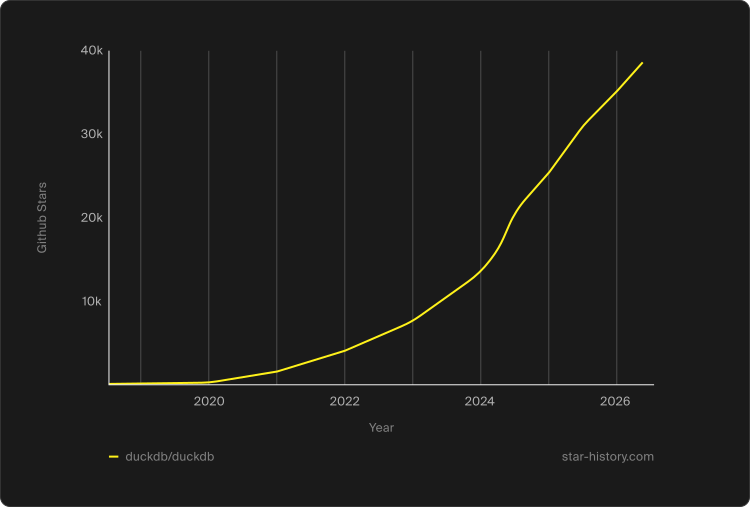
<h2 id="evolving-ducksql">Evolving DuckSQL</h2>

<p>With the PEG parser now in place for <a href="/2026/08/17/duckdb-20-highlights.html">DuckDB v2.0</a>, we have also continued to extend DuckSQL with new syntax.</p>

<p>One example is the new expression-statement syntax. Until now, executing a query consisting only of expressions always required writing a <code class="language-plaintext highlighter-rouge">SELECT</code>:</p>

<div class="language-sql highlighter-rouge"><div class="highlight"><pre class="highlight"><code><span class="k">SELECT</span> <span class="n">date</span><span class="p">:</span> <span class="nf">current_date</span><span class="p">(),</span> <span class="n">time</span><span class="p">:</span> <span class="nf">current_localtime</span><span class="p">();</span>
</code></pre></div></div>

<p>With an expression statement, the <code class="language-plaintext highlighter-rouge">SELECT</code> can be omitted:</p>

<div class="language-sql highlighter-rouge"><div class="highlight"><pre class="highlight"><code><span class="n">date</span><span class="p">:</span> <span class="nf">current_date</span><span class="p">(),</span> <span class="n">time</span><span class="p">:</span> <span class="nf">current_localtime</span><span class="p">();</span>
</code></pre></div></div>

<p>As a bonus, this also works with prefix aliases.</p>

<p>Another example is the new <a href="https://github.com/duckdb/duckdb/pull/22732"><code class="language-plaintext highlighter-rouge">CONNECT</code></a> statement, introduced for <a href="https://duckdb.org/quack/">Quack</a>. It allows you to connect to a remote database and route subsequent queries to it until you run <code class="language-plaintext highlighter-rouge">DISCONNECT</code>:</p>

<div class="language-sql highlighter-rouge"><div class="highlight"><pre class="highlight"><code><span class="k">CONNECT</span> <span class="s1">'postgres://localhost/mydb'</span><span class="p">;</span>
<span class="k">SELECT</span> <span class="nf">count</span><span class="p">(</span><span class="o">*</span><span class="p">)</span> <span class="k">FROM</span> <span class="n">orders</span><span class="p">;</span> <span class="c1">-- Runs on the PostgreSQL server</span>
<span class="k">DISCONNECT</span><span class="p">;</span>
</code></pre></div></div>

<p>There will also be new syntax for working with <a href="https://github.com/duckdb/duckdb/pull/23731">external resources</a>. This will allow you to manage resources that live outside DuckDB through an extension. You will be able to create, register, inspect, connect to, or destroy a resource all from within DuckDB:</p>

<div class="language-sql highlighter-rouge"><div class="highlight"><pre class="highlight"><code><span class="k">CREATE</span> <span class="k">EXTERNAL</span> <span class="k">RESOURCE</span> <span class="s1">'&lt;resource-type&gt;'</span> <span class="k">AS</span> <span class="o">&lt;</span><span class="k">name</span><span class="o">&gt;</span> <span class="p">(...);</span>
<span class="k">REGISTER</span> <span class="k">EXTERNAL</span> <span class="k">RESOURCE</span> <span class="s1">'&lt;resource-type&gt;'</span> <span class="k">AS</span> <span class="o">&lt;</span><span class="k">name</span><span class="o">&gt;</span> <span class="k">FROM</span> <span class="o">&lt;</span><span class="n">handle</span><span class="o">&gt;</span><span class="p">;</span>

<span class="k">SHOW</span> <span class="k">EXTERNAL</span> <span class="k">RESOURCES</span><span class="p">;</span>

<span class="k">CONNECT</span> <span class="k">TO</span> <span class="k">EXTERNAL</span> <span class="k">RESOURCE</span> <span class="o">&lt;</span><span class="k">name</span><span class="o">&gt;</span><span class="p">;</span>

<span class="k">DESTROY</span> <span class="k">EXTERNAL</span> <span class="k">RESOURCE</span> <span class="o">&lt;</span><span class="k">name</span><span class="o">&gt;</span><span class="p">;</span>
</code></pre></div></div>

<p>We have also extended <code class="language-plaintext highlighter-rouge">COPY TO</code> with <code class="language-plaintext highlighter-rouge">PARTITION BY</code> and <code class="language-plaintext highlighter-rouge">ORDER BY</code> syntax:</p>

<div class="language-sql highlighter-rouge"><div class="highlight"><pre class="highlight"><code><span class="k">COPY</span> <span class="n">orders</span> <span class="k">TO</span> <span class="s1">'orders'</span>
<span class="p">(</span>
    <span class="k">FORMAT</span> <span class="k">parquet</span><span class="p">,</span>
    <span class="k">PARTITION</span> <span class="k">BY</span> <span class="p">(</span><span class="n">year</span><span class="p">,</span> <span class="n">month</span><span class="p">),</span>
    <span class="k">ORDER</span> <span class="k">BY</span> <span class="p">(</span><span class="n">order_date</span><span class="p">)</span>
<span class="p">);</span>
</code></pre></div></div>

<p>These additions would also have been possible with the old PostgreSQL-derived parser, but adding them would have been considerably more cumbersome. The PEG grammar makes it easier for us to continue evolving DuckSQL.</p>

<p>So far, these rules are all part of DuckSQL itself. The next step is allowing extensions to add rules of their own.</p>

<h2 id="extending-the-parser">Extending the Parser</h2>

<p>Extensions are a central part of DuckDB. They can already add scalar and table functions, optimizer rules, query-plan rewrites, and even custom physical operators.</p>

<p>Extensions that add new syntax already exist, such as <a href="https://duckdb.org/community_extensions/extensions/psql"><code class="language-plaintext highlighter-rouge">psql</code></a> and <a href="https://duckdb.org/community_extensions/extensions/duckpgq"><code class="language-plaintext highlighter-rouge">duckpgq</code></a>, but under the hood they work as fallback parsers. DuckDB first tries to parse the query itself and only calls the extension if that fails. This works well for self-contained syntax, but an extension that wants to add syntax inside SQL also has to parse the surrounding SQL itself. These fallback parsers also make it impossible to combine the syntax of multiple extensions.</p>

<p>With the PEG parser, extensions can instead extend individual parts of DuckDB’s parser. They can extend the tokenizer, add grammar rules, and register custom matchers while continuing to reuse the rest of DuckSQL.</p>

<blockquote>
  <p>Warning The API shown below is still a preview and may change before <a href="/2026/08/17/duckdb-20-highlights.html">DuckDB v2.0</a>. You can follow the ongoing development <a href="https://github.com/duckdb/duckdb/pull/24919">on GitHub</a>.</p>
</blockquote>

<p>To make this concrete, we use Google’s <a href="https://docs.cloud.google.com/bigquery/docs/reference/standard-sql/pipe-syntax">pipe query syntax</a>. This is an extension to SQL that adds piped data flow syntax. Pipe syntax expresses a query as a sequence of operators, where each operator consumes the result of the previous one.</p>

<div class="language-sql highlighter-rouge"><div class="highlight"><pre class="highlight"><code><span class="k">FROM</span> <span class="n">produce</span>
  <span class="o">|&gt;</span> <span class="k">WHERE</span>
        <span class="n">item</span> <span class="o">!=</span> <span class="s1">'bananas'</span>
        <span class="k">AND</span> <span class="n">category</span> <span class="k">IN</span> <span class="p">(</span><span class="s1">'fruit'</span><span class="p">,</span> <span class="s1">'nut'</span><span class="p">)</span>
  <span class="o">|&gt;</span> <span class="k">AGGREGATE</span> <span class="k">COUNT</span><span class="p">(</span><span class="o">*</span><span class="p">)</span> <span class="k">AS</span> <span class="n">num_items</span><span class="p">,</span> <span class="k">SUM</span><span class="p">(</span><span class="n">sales</span><span class="p">)</span> <span class="k">AS</span> <span class="n">total_sales</span>
     <span class="k">GROUP</span> <span class="k">BY</span> <span class="n">item</span>
  <span class="o">|&gt;</span> <span class="k">ORDER</span> <span class="k">BY</span> <span class="n">item</span> <span class="k">DESC</span><span class="p">;</span>
</code></pre></div></div>

<p>A simplified PEG grammar for this needs a handful of rules:</p>

<div class="language-sql highlighter-rouge"><div class="highlight"><pre class="highlight"><code><span class="n">PipeSelectAtom</span> <span class="o">&lt;-</span> <span class="n">PipeSource</span> <span class="n">PipeStage</span><span class="o">+</span>
<span class="n">PipeSource</span> <span class="o">&lt;-</span> <span class="n">FromClause</span> <span class="o">/</span> <span class="n">SelectStatementType</span> <span class="o">/</span> <span class="n">SelectParens</span>
<span class="n">PipeStage</span> <span class="o">&lt;-</span> <span class="s1">'|&gt;'</span> <span class="n">PipeOperator</span>
<span class="n">PipeOperator</span> <span class="o">&lt;-</span> <span class="n">PipeAggregate</span> <span class="o">/</span> <span class="n">PipeAggregateGroupOnly</span> <span class="o">/</span> <span class="n">PipeWhere</span> <span class="o">/</span> <span class="n">PipeSelect</span> <span class="o">/</span> <span class="n">PipeExtend</span> <span class="o">/</span> <span class="n">PipeDistinct</span> <span class="o">/</span> <span class="n">PipeOrderBy</span> <span class="o">/</span> <span class="n">PipeLimit</span>
<span class="n">PipeWhere</span> <span class="o">&lt;-</span> <span class="n">WhereClause</span>
<span class="n">PipeSelect</span> <span class="o">&lt;-</span> <span class="s1">'SELECT'</span> <span class="n">TargetList</span>
<span class="n">PipeExtend</span> <span class="o">&lt;-</span> <span class="s1">'EXTEND'</span> <span class="n">TargetList</span>
<span class="n">PipeDistinct</span> <span class="o">&lt;-</span> <span class="s1">'DISTINCT'</span>
<span class="n">PipeOrderBy</span> <span class="o">&lt;-</span> <span class="n">OrderByClause</span>
<span class="n">PipeLimit</span> <span class="o">&lt;-</span> <span class="n">LimitClause</span> <span class="n">OffsetClause</span><span class="o">?</span>
<span class="n">PipeAggregate</span> <span class="o">&lt;-</span> <span class="s1">'AGGREGATE'</span> <span class="n">TargetList</span> <span class="n">GroupByClause</span><span class="o">?</span>
<span class="n">PipeAggregateGroupOnly</span> <span class="o">&lt;-</span> <span class="s1">'AGGREGATE'</span> <span class="n">GroupByClause</span>
</code></pre></div></div>

<p>Here, <code class="language-plaintext highlighter-rouge">+</code> means that <code class="language-plaintext highlighter-rouge">PipeStage</code> must occur one or more times, so a pipe query must contain at least one pipe operator.</p>

<p>This grammar can reuse existing rules, such as <code class="language-plaintext highlighter-rouge">GroupByClause</code>, to reduce the amount of grammar the extension needs to define. An extension can still define its own rule where DuckDB’s existing syntax does not fit.</p>

<h3 id="registering-the-grammar">Registering the Grammar</h3>

<p>Defining just the PEG rules does not yet make them part of DuckDB’s grammar. The extension must also specify (1) the existing grammar rule it wants to extend and (2) the transformer rules that convert the new syntax into DuckDB’s AST.</p>

<p>In the current prototype, certain grammar rules expose extension points. Pipe SQL registers <code class="language-plaintext highlighter-rouge">PipeSelectAtom</code> as an additional alternative for <code class="language-plaintext highlighter-rouge">SelectAtom</code>, together with the new keywords <code class="language-plaintext highlighter-rouge">AGGREGATE</code> and <code class="language-plaintext highlighter-rouge">EXTEND</code>.</p>

<div class="language-cpp highlighter-rouge"><div class="highlight"><pre class="highlight"><code><span class="k">static</span> <span class="kt">void</span> <span class="nf">LoadInternal</span><span class="p">(</span><span class="n">ExtensionLoader</span> <span class="o">&amp;</span><span class="n">loader</span><span class="p">)</span> <span class="p">{</span>
    <span class="n">ParserExtension</span> <span class="n">extension</span><span class="p">;</span>
    <span class="n">extension</span><span class="p">.</span><span class="n">grammar_extension</span><span class="p">.</span><span class="n">grammar</span> <span class="o">=</span> <span class="n">PIPE_SQL_GRAMMAR</span><span class="p">;</span>
    <span class="n">extension</span><span class="p">.</span><span class="n">grammar_extension</span><span class="p">.</span><span class="n">select_atom_rule</span> <span class="o">=</span> <span class="s">"PipeSelectAtom"</span><span class="p">;</span>

    <span class="n">extension</span><span class="p">.</span><span class="n">grammar_extension</span><span class="p">.</span><span class="n">RegisterSelectAtomTransformer</span><span class="p">(</span>
        <span class="s">"PipeSelectAtom"</span><span class="p">,</span>
        <span class="n">TransformPipeSelectAtom</span>
    <span class="p">);</span>

    <span class="n">loader</span><span class="p">.</span><span class="n">RegisterKeyword</span><span class="p">(</span>
        <span class="s">"aggregate"</span><span class="p">,</span>
        <span class="n">ExtensionKeywordCategory</span><span class="o">::</span><span class="n">RESERVED</span>
    <span class="p">);</span>
    <span class="n">loader</span><span class="p">.</span><span class="n">RegisterKeyword</span><span class="p">(</span>
        <span class="s">"extend"</span><span class="p">,</span>
        <span class="n">ExtensionKeywordCategory</span><span class="o">::</span><span class="n">RESERVED</span>
    <span class="p">);</span>

    <span class="n">loader</span><span class="p">.</span><span class="n">RegisterParserExtension</span><span class="p">(</span><span class="n">std</span><span class="o">::</span><span class="n">move</span><span class="p">(</span><span class="n">extension</span><span class="p">));</span>
<span class="p">}</span>
</code></pre></div></div>

<p>By registering this alternative, the resulting grammar is effectively:</p>

<div class="language-cpp highlighter-rouge"><div class="highlight"><pre class="highlight"><code><span class="n">SelectAtom</span> <span class="o">&lt;-</span>
    <span class="n">PipeSelectAtom</span> <span class="o">/</span>
    <span class="n">SelectParens</span> <span class="o">/</span>
    <span class="n">SelectStatementType</span>
</code></pre></div></div>

<p>The extension alternative is now tried first. If no pipe syntax is present, it fails without consuming any tokens and the query is parsed with the built-in alternatives.</p>

<h3 id="transforming-the-result">Transforming the Result</h3>

<p>Adding a grammar rule only gets us as far as a <code class="language-plaintext highlighter-rouge">ParseResult</code>. The extension still needs to transform that result into the DuckDB AST that is expected by the binder. Since <code class="language-plaintext highlighter-rouge">PipeSelectAtom</code> extends <code class="language-plaintext highlighter-rouge">SelectAtom</code>, its transformer returns a <code class="language-plaintext highlighter-rouge">SelectStatement</code>:</p>

<div class="language-cpp highlighter-rouge"><div class="highlight"><pre class="highlight"><code><span class="k">static</span> <span class="n">unique_ptr</span><span class="o">&lt;</span><span class="n">SelectStatement</span><span class="o">&gt;</span>
<span class="n">TransformPipeSelectAtom</span><span class="p">(</span><span class="n">PEGTransformer</span> <span class="o">&amp;</span><span class="n">transformer</span><span class="p">,</span> <span class="n">ParseResult</span> <span class="o">&amp;</span><span class="n">parse_result</span><span class="p">)</span> <span class="p">{</span>
    <span class="k">auto</span> <span class="o">&amp;</span><span class="n">pipe</span> <span class="o">=</span> <span class="n">parse_result</span><span class="p">.</span><span class="n">Cast</span><span class="o">&lt;</span><span class="n">ListParseResult</span><span class="o">&gt;</span><span class="p">();</span>

    <span class="c1">// PipeSelectAtom &lt;- PipeSource PipeStage+</span>
    <span class="k">auto</span> <span class="n">statement</span> <span class="o">=</span> <span class="n">TransformPipeSource</span><span class="p">(</span><span class="n">transformer</span><span class="p">,</span> <span class="n">pipe</span><span class="p">.</span><span class="n">GetChild</span><span class="p">(</span><span class="mi">0</span><span class="p">));</span>

    <span class="k">auto</span> <span class="o">&amp;</span><span class="n">stages</span> <span class="o">=</span> <span class="n">pipe</span><span class="p">.</span><span class="n">Child</span><span class="o">&lt;</span><span class="n">RepeatParseResult</span><span class="o">&gt;</span><span class="p">(</span><span class="mi">1</span><span class="p">);</span>
    <span class="k">for</span> <span class="p">(</span><span class="k">auto</span> <span class="o">&amp;</span><span class="n">stage</span> <span class="o">:</span> <span class="n">stages</span><span class="p">.</span><span class="n">GetChildren</span><span class="p">())</span> <span class="p">{</span>
        <span class="n">ApplyPipeStage</span><span class="p">(</span><span class="n">transformer</span><span class="p">,</span> <span class="n">stage</span><span class="p">.</span><span class="n">get</span><span class="p">(),</span> <span class="o">*</span><span class="n">statement</span><span class="p">);</span>
    <span class="p">}</span>

    <span class="k">return</span> <span class="n">statement</span><span class="p">;</span>
<span class="p">}</span>
</code></pre></div></div>

<p>The shape of the <code class="language-plaintext highlighter-rouge">ParseResult</code> follows the grammar rule we defined earlier. <code class="language-plaintext highlighter-rouge">PipeSelectAtom</code> contains a <code class="language-plaintext highlighter-rouge">PipeSource</code> and one or more <code class="language-plaintext highlighter-rouge">PipeStage</code>s. We first transform the <code class="language-plaintext highlighter-rouge">PipeSource</code> into a DuckDB <code class="language-plaintext highlighter-rouge">SelectStatement</code>. Each <code class="language-plaintext highlighter-rouge">PipeStage</code> is then applied to that statement in order. The resulting <code class="language-plaintext highlighter-rouge">SelectStatement</code> is then returned and can continue through the rest of the parser's pipeline and eventually on to the binder.</p>

<p>This is where reusing DuckDB's existing grammar becomes especially useful. The extension only needs to transform the new syntax it introduced. When it reuses an existing DuckDB grammar rule, such as <code class="language-plaintext highlighter-rouge">GroupByClause</code>, it can also reuse the corresponding transform function instead of having to implement <code class="language-plaintext highlighter-rouge">GROUP BY</code> itself.</p>

<p>This is an important difference from the fallback parsers that are available today. An extension no longer needs to implement expressions, table references, <code class="language-plaintext highlighter-rouge">GROUP BY</code> clauses, and the rest of SQL itself. Instead, it can add only the syntax it needs and reuse DuckDB’s grammar and transformations for everything else.</p>

<h3 id="executing-pipe-sql">Executing Pipe SQL</h3>

<p>With the extension registered, we can now execute queries using the new pipe syntax. For example, we can combine the pipe operators added by the extension with existing DuckSQL features such as <code class="language-plaintext highlighter-rouge">range()</code> and prefix aliases:</p>

<div class="language-sql highlighter-rouge"><div class="highlight"><pre class="highlight"><code><span class="k">FROM</span> <span class="nf">range</span><span class="p">(</span><span class="mi">6</span><span class="p">)</span> <span class="n">t</span><span class="p">(</span><span class="n">i</span><span class="p">)</span>
  <span class="o">|&gt;</span> <span class="k">WHERE</span> <span class="n">i</span> <span class="o">%</span> <span class="mi">2</span> <span class="o">=</span> <span class="mi">0</span>
  <span class="o">|&gt;</span> <span class="k">SELECT</span> <span class="n">i</span><span class="p">,</span> <span class="n">doubled</span><span class="p">:</span> <span class="n">i</span> <span class="o">*</span> <span class="mi">2</span>
  <span class="o">|&gt;</span> <span class="k">ORDER</span> <span class="k">BY</span> <span class="n">i</span> <span class="k">DESC</span><span class="p">;</span>
</code></pre></div></div>

<div class="language-text highlighter-rouge"><div class="highlight"><pre class="highlight"><code>┌───────┬─────────┐
│   i   │ doubled │
│ int64 │  int64  │
├───────┼─────────┤
│     4 │       8 │
│     2 │       4 │
│     0 │       0 │
└───────┴─────────┘
</code></pre></div></div>

<p>The extension only defines the pipe-specific syntax. Expressions, table references, <code class="language-plaintext highlighter-rouge">WHERE</code>, <code class="language-plaintext highlighter-rouge">SELECT</code>, <code class="language-plaintext highlighter-rouge">ORDER BY</code>, and other reused rules are still parsed and transformed by DuckDB itself. This means that new syntax can be combined with DuckSQL without the extension having to implement the rest of SQL again.</p>

<h2 id="to-conclude">To Conclude</h2>

<p>With DuckDB v2.0, we are replacing the PostgreSQL-derived parser with a new PEG parser. Existing DuckSQL queries should continue working as before. Under the hood, however, the new parser gives us something that is easier to evolve and designed for runtime extensibility.</p>

<p>The runtime grammar extension API shown in this post is still a preview and may change before v2.0 is released. However, the underlying idea is already working. Extensions can add their own syntax directly to DuckDB's grammar while reusing its existing rules and transformations. This means they no longer need to parse the rest of SQL themselves.</p>

<p>We are excited to see what new syntax the community will create. In the meantime, we will continue evolving DuckSQL and improving the parser.</p>

<p>If you do find an existing query that behaves differently with the PEG parser, please let us know by <a href="https://github.com/duckdb/duckdb/issues">filing an issue</a>.</p>]]></content><author><name>Daniël ten Wolde</name></author><category term="release" /><summary type="html"><![CDATA[DuckDB v2.0 replaces its PostgreSQL-derived SQL parser with a PEG-based parser that is easier to evolve and can be extended at runtime.]]></summary><media:thumbnail xmlns:media="http://search.yahoo.com/mrss/" url="https://duckdb.org/images/blog/thumbs/duckdb-20-peg-parser.png" /><media:content medium="image" url="https://duckdb.org/images/blog/thumbs/duckdb-20-peg-parser.png" xmlns:media="http://search.yahoo.com/mrss/" /></entry><entry><title type="html">Reconciling JSON in DuckDB, One Patch at a Time</title><link href="https://duckdb.org/2026/08/18/reconciling-json.html" rel="alternate" type="text/html" title="Reconciling JSON in DuckDB, One Patch at a Time" /><published>2026-08-18T00:00:00+00:00</published><updated>2026-08-18T00:00:00+00:00</updated><id>https://duckdb.org/2026/08/18/reconciling-json</id><content type="html" xml:base="https://duckdb.org/2026/08/18/reconciling-json.html"><![CDATA[<blockquote>
  <p>Guest blog post by <a href="https://www.linkedin.com/in/mustafahasankhan/">Mustafa Khan</a> (<a href="https://atlan.com/">Atlan</a>).</p>
</blockquote>

<p>DuckDB's JSON extension already covers reading JSON, extracting paths, applying RFC 7396 merge patches, and the usual scalar accessors. The <a href="/2026/08/17/duckdb-20-highlights.html">upcoming v2.0</a> release will extend it with four new scalar functions: <code class="language-plaintext highlighter-rouge">json_merge_patch_diff</code> computes the inverse of an RFC 7396 merge patch, <code class="language-plaintext highlighter-rouge">json_deep_merge</code> applies patches with skip-on-<code class="language-plaintext highlighter-rouge">null</code> semantics, <code class="language-plaintext highlighter-rouge">json_normalize</code> canonicalizes key order, and <code class="language-plaintext highlighter-rouge">json_strip_nulls</code> recursively removes <code class="language-plaintext highlighter-rouge">null</code>-valued keys. You can try these primitives today by installing the <a href="/install/preview.html">preview version of DuckDB v2.0-dev</a>.</p>

<p>These primitives address a handful of recurring problems in data pipelines that reconcile state between systems. The examples in this post come from <a href="https://atlan.com/">Atlan</a>. Atlan is a <em>context layer</em> for AI: a platform that gathers metadata, lineage, and semantics from a company's data systems so that data teams and AI agents can find and understand the data. Keeping that layer up to date means constantly reconciling entity documents from many upstream sources. Two upstream services may describe the same entity with different key orderings. Partial updates may carry <code class="language-plaintext highlighter-rouge">null</code> in a field to indicate either deletion or absence of data. Most events change only one or two fields out of dozens. Handling these cases in SQL previously required leaving the database. The four new functions allow you to perform the work in a single query.</p>

<p>In the rest of this post, we walk through each function, then chain them into an end-to-end reconciliation example. Finally, we present the results of a simple benchmark against equivalent Python implementations on 500,000 synthetic change data capture (CDC) events.</p>

<h2 id="json_merge_patch_diff-the-inverse-of-json_merge_patch"><code class="language-plaintext highlighter-rouge">json_merge_patch_diff</code>: The Inverse of <code class="language-plaintext highlighter-rouge">json_merge_patch</code></h2>

<p><code class="language-plaintext highlighter-rouge">json_merge_patch_diff(orig, modified)</code> returns the minimal RFC 7396 patch such that <code class="language-plaintext highlighter-rouge">json_merge_patch(orig, patch) = modified</code>.
<code class="language-plaintext highlighter-rouge">json_merge_patch</code> already exists in DuckDB. It applies an RFC 7396 patch to a document: a <code class="language-plaintext highlighter-rouge">null</code> value in the patch deletes the key, nested objects are merged recursively, and any other value overwrites the original.
Deleted keys appear as <code class="language-plaintext highlighter-rouge">null</code> in the patch, changed and added keys appear with their new values, and unchanged keys are omitted entirely.</p>

<div class="language-sql highlighter-rouge"><div class="highlight"><pre class="highlight"><code><span class="k">SELECT</span> <span class="nf">json_merge_patch_diff</span><span class="p">(</span><span class="s1">'{"a":1,"b":2,"c":3}'</span><span class="p">,</span> <span class="s1">'{"a":1,"b":99,"d":4}'</span><span class="p">);</span>
</code></pre></div></div>

<div class="language-text highlighter-rouge"><div class="highlight"><pre class="highlight"><code>{"c":null,"b":99,"d":4}
</code></pre></div></div>

<p><code class="language-plaintext highlighter-rouge">a</code> is unchanged, so it is omitted. <code class="language-plaintext highlighter-rouge">b</code> changed. <code class="language-plaintext highlighter-rouge">c</code> was removed, so it becomes <code class="language-plaintext highlighter-rouge">null</code>. <code class="language-plaintext highlighter-rouge">d</code> is new.</p>

<p>The function recurses into nested objects, producing patches that only touch the changed paths:</p>

<div class="language-sql highlighter-rouge"><div class="highlight"><pre class="highlight"><code><span class="k">SELECT</span> <span class="nf">json_merge_patch_diff</span><span class="p">(</span>
    <span class="s1">'{"user":{"name":"Alice","age":30}}'</span><span class="p">,</span>
    <span class="s1">'{"user":{"name":"Alice","age":31}}'</span>
<span class="p">);</span>
</code></pre></div></div>

<div class="language-text highlighter-rouge"><div class="highlight"><pre class="highlight"><code>{"user":{"age":31}}
</code></pre></div></div>

<p>The round trip with <code class="language-plaintext highlighter-rouge">json_merge_patch</code> holds by construction:</p>

<div class="language-sql highlighter-rouge"><div class="highlight"><pre class="highlight"><code><span class="k">SELECT</span> <span class="nf">json_merge_patch</span><span class="p">(</span>
    <span class="s1">'{"a":1,"b":2,"c":3}'</span><span class="p">,</span>
    <span class="nf">json_merge_patch_diff</span><span class="p">(</span><span class="s1">'{"a":1,"b":2,"c":3}'</span><span class="p">,</span> <span class="s1">'{"a":1,"b":99,"d":4}'</span><span class="p">)</span>
<span class="p">)</span> <span class="o">=</span> <span class="s1">'{"a":1,"b":99,"d":4}'</span> <span class="k">AS</span> <span class="n">round_trips</span><span class="p">;</span>
</code></pre></div></div>

<div class="language-text highlighter-rouge"><div class="highlight"><pre class="highlight"><code>true
</code></pre></div></div>

<p>Equality between subtrees is computed with <code class="language-plaintext highlighter-rouge">yyjson_equals</code>, which compares two <code class="language-plaintext highlighter-rouge">yyjson</code> values structurally without serializing either side. Subtrees that compare equal contribute nothing to the output and short-circuit the recursion:</p>

<div class="language-sql highlighter-rouge"><div class="highlight"><pre class="highlight"><code><span class="k">SELECT</span> <span class="nf">json_merge_patch_diff</span><span class="p">(</span>
    <span class="s1">'{"a":{"b":{"c":{"d":1}}}}'</span><span class="p">,</span>
    <span class="s1">'{"a":{"b":{"c":{"d":1}}}}'</span>
<span class="p">);</span>
</code></pre></div></div>

<div class="language-text highlighter-rouge"><div class="highlight"><pre class="highlight"><code>{}
</code></pre></div></div>

<p>This function is particularly useful for CDC pipelines, where most events on a metadata catalog touch one or two fields out of dozens. Shipping the output of <code class="language-plaintext highlighter-rouge">json_merge_patch_diff(prev_state, new_state)</code> downstream, instead of the full new state, cuts the change payload to a small fraction of its previous size. The diff is the change itself, so there is nothing extra to filter on the consumer side, and a <code class="language-plaintext highlighter-rouge">json_merge_patch</code> on the other end reconstructs the new state from <code class="language-plaintext highlighter-rouge">prev_state</code> and the patch.</p>

<h2 id="json_deep_merge-recursive-merge-where-null-means-skip"><code class="language-plaintext highlighter-rouge">json_deep_merge</code>: Recursive Merge where <code class="language-plaintext highlighter-rouge">null</code> Means “Skip”</h2>

<p>The patches from the previous section are applied with <code class="language-plaintext highlighter-rouge">json_merge_patch</code>, which strictly follows RFC 7396: <code class="language-plaintext highlighter-rouge">null</code> in the patch deletes the key. That is the right rule for the round trip with <code class="language-plaintext highlighter-rouge">json_merge_patch_diff</code>, but it is the wrong rule when you are reconciling fragments from multiple upstreams that emit <code class="language-plaintext highlighter-rouge">null</code> to mean “I do not have a value for this field on this message.”
<code class="language-plaintext highlighter-rouge">json_deep_merge</code> covers that case.</p>

<p><code class="language-plaintext highlighter-rouge">json_deep_merge</code> follows the same recursive merge structure as <code class="language-plaintext highlighter-rouge">json_merge_patch</code>, with one difference: a <code class="language-plaintext highlighter-rouge">null</code> value in the patch means “keep the original value” instead of “delete the key”. Everything else, including handling of non-null values, nested objects, and the variadic argument shape, matches <code class="language-plaintext highlighter-rouge">json_merge_patch</code>. In the following example, we apply a patch with the key <code class="language-plaintext highlighter-rouge">b</code> set to <code class="language-plaintext highlighter-rouge">null</code> with <code class="language-plaintext highlighter-rouge">json_merge_patch</code> and <code class="language-plaintext highlighter-rouge">json_deep_merge</code>, respectively, resulting in two different results:</p>

<div class="language-sql highlighter-rouge"><div class="highlight"><pre class="highlight"><code><span class="k">SELECT</span> <span class="nf">json_merge_patch</span><span class="p">(</span><span class="s1">'{"a":1,"b":2}'</span><span class="p">,</span> <span class="s1">'{"b":null}'</span><span class="p">)</span> <span class="k">AS</span> <span class="n">rfc_7396</span><span class="p">;</span>
</code></pre></div></div>

<div class="language-text highlighter-rouge"><div class="highlight"><pre class="highlight"><code>{"a":1}
</code></pre></div></div>

<div class="language-sql highlighter-rouge"><div class="highlight"><pre class="highlight"><code><span class="k">SELECT</span> <span class="nf">json_deep_merge</span><span class="p">(</span><span class="s1">'{"a":1,"b":2}'</span><span class="p">,</span> <span class="s1">'{"b":null}'</span><span class="p">)</span> <span class="k">AS</span> <span class="n">deep_merge</span><span class="p">;</span>
</code></pre></div></div>

<div class="language-text highlighter-rouge"><div class="highlight"><pre class="highlight"><code>{"a":1,"b":2}
</code></pre></div></div>

<p>Both functions replace the original value with the patch value when the patch contains a non-null value, and both recurse into nested objects when the original and patch are both objects. The handling of <code class="language-plaintext highlighter-rouge">null</code> is the only divergence:</p>

<div class="language-sql highlighter-rouge"><div class="highlight"><pre class="highlight"><code><span class="k">SELECT</span> <span class="nf">json_deep_merge</span><span class="p">(</span>
    <span class="s1">'{"a":{"x":1,"y":2}}'</span><span class="p">,</span>
    <span class="s1">'{"a":{"y":null,"z":3}}'</span>
<span class="p">);</span>
</code></pre></div></div>

<div class="language-text highlighter-rouge"><div class="highlight"><pre class="highlight"><code>{"a":{"x":1,"y":2,"z":3}}
</code></pre></div></div>

<p>The nested <code class="language-plaintext highlighter-rouge">y</code> is preserved because the patch contained <code class="language-plaintext highlighter-rouge">null</code>. <code class="language-plaintext highlighter-rouge">z</code> is added because the patch had a real value. The same patch through <code class="language-plaintext highlighter-rouge">json_merge_patch</code> deletes <code class="language-plaintext highlighter-rouge">y</code> instead:</p>
<div class="language-sql highlighter-rouge"><div class="highlight"><pre class="highlight"><code><span class="k">SELECT</span> <span class="nf">json_merge_patch</span><span class="p">(</span>
    <span class="s1">'{"a":{"x":1,"y":2}}'</span><span class="p">,</span>
    <span class="s1">'{"a":{"y":null,"z":3}}'</span>
<span class="p">);</span>
</code></pre></div></div>

<div class="language-text highlighter-rouge"><div class="highlight"><pre class="highlight"><code>{"a":{"x":1,"z":3}}
</code></pre></div></div>
<p>The function is variadic: pass any number of patches and they apply left to right.</p>

<div class="language-sql highlighter-rouge"><div class="highlight"><pre class="highlight"><code><span class="k">SELECT</span> <span class="nf">json_deep_merge</span><span class="p">(</span>
    <span class="s1">'{"a":1}'</span><span class="p">,</span>
    <span class="s1">'{"a":null}'</span><span class="p">,</span>
    <span class="s1">'{"a":2}'</span>
<span class="p">);</span>
</code></pre></div></div>

<div class="language-text highlighter-rouge"><div class="highlight"><pre class="highlight"><code>{"a":2}
</code></pre></div></div>

<p>The first patch skips (keeps <code class="language-plaintext highlighter-rouge">a=1</code>), the second overwrites (<code class="language-plaintext highlighter-rouge">a</code> becomes <code class="language-plaintext highlighter-rouge">2</code>).</p>

<p>The use case that motivates the skip-on-null rule is reconciling fragments from multiple sources. One source knows the column name (<code class="language-plaintext highlighter-rouge">columnName</code>) but not its parent table (<code class="language-plaintext highlighter-rouge">parentColumn</code>). Another knows the parent but not the column name. Each emits a fragment with the unknown fields as <code class="language-plaintext highlighter-rouge">null</code>:</p>

<div class="language-sql highlighter-rouge"><div class="highlight"><pre class="highlight"><code><span class="k">SELECT</span> <span class="nf">json_deep_merge</span><span class="p">(</span>
    <span class="s1">'{"columnName":"user_id","parentColumn":null}'</span><span class="p">,</span>
    <span class="s1">'{"columnName":null,"parentColumn":"accounts.id"}'</span>
<span class="p">);</span>
</code></pre></div></div>

<div class="language-text highlighter-rouge"><div class="highlight"><pre class="highlight"><code>{"columnName":"user_id","parentColumn":"accounts.id"}
</code></pre></div></div>

<p>Note that passing SQL <code class="language-plaintext highlighter-rouge">NULL</code> as an argument and using JSON <code class="language-plaintext highlighter-rouge">null</code> values result in different behaviors. A SQL <code class="language-plaintext highlighter-rouge">NULL</code> patch makes the result <code class="language-plaintext highlighter-rouge">NULL</code>, and a SQL <code class="language-plaintext highlighter-rouge">NULL</code> original is ignored, matching the behavior of <code class="language-plaintext highlighter-rouge">json_merge_patch</code>. JSON <code class="language-plaintext highlighter-rouge">null</code> inside a patch means “keep the original value for this key”.</p>

<h2 id="json_normalize-canonical-form-for-hashing"><code class="language-plaintext highlighter-rouge">json_normalize</code>: Canonical Form for Hashing</h2>

<p>The third primitive answers the first of the questions this post opened with: when two services emit the same JSON object with different key orders, are they the same document? Lexically they are not, which means comparing the content hashes of the raw strings will conclude they differ. <code class="language-plaintext highlighter-rouge">json_normalize</code> fixes that by recursively sorting the keys of every object, including objects nested inside arrays. Array elements keep their order, since element order is meaningful in JSON and key order is not. Scalar values are returned unchanged.</p>

<div class="language-sql highlighter-rouge"><div class="highlight"><pre class="highlight"><code><span class="k">SELECT</span> <span class="nf">json_normalize</span><span class="p">(</span><span class="s1">'{"z":1,"a":2,"m":3}'</span><span class="p">);</span>
</code></pre></div></div>

<div class="language-text highlighter-rouge"><div class="highlight"><pre class="highlight"><code>{"a":2,"m":3,"z":1}
</code></pre></div></div>

<p>Recursion descends into nested objects, and into objects nested inside arrays:</p>

<div class="language-sql highlighter-rouge"><div class="highlight"><pre class="highlight"><code><span class="k">SELECT</span> <span class="nf">json_normalize</span><span class="p">(</span><span class="s1">'{"c":{"b":{"z":1,"a":2},"a":3},"a":4}'</span><span class="p">);</span>
</code></pre></div></div>

<div class="language-text highlighter-rouge"><div class="highlight"><pre class="highlight"><code>{"a":4,"c":{"a":3,"b":{"a":2,"z":1}}}
</code></pre></div></div>

<div class="language-sql highlighter-rouge"><div class="highlight"><pre class="highlight"><code><span class="k">SELECT</span> <span class="nf">json_normalize</span><span class="p">(</span><span class="s1">'[{"z":1,"a":2},{"y":3,"b":4}]'</span><span class="p">);</span>
</code></pre></div></div>

<div class="language-text highlighter-rouge"><div class="highlight"><pre class="highlight"><code>[{"a":2,"z":1},{"b":4,"y":3}]
</code></pre></div></div>

<p>Once two semantically-equal documents normalize to the same bytes, hashing them collapses duplicates trivially:</p>

<div class="language-sql highlighter-rouge"><div class="highlight"><pre class="highlight"><code><span class="k">SELECT</span>
    <span class="nf">md5</span><span class="p">(</span><span class="nf">json_normalize</span><span class="p">(</span><span class="s1">'{"z":1,"a":2}'</span><span class="p">))</span> <span class="o">=</span>
    <span class="nf">md5</span><span class="p">(</span><span class="nf">json_normalize</span><span class="p">(</span><span class="s1">'{"a":2,"z":1}'</span><span class="p">))</span> <span class="k">AS</span> <span class="n">same_hash</span><span class="p">;</span>
</code></pre></div></div>

<div class="language-text highlighter-rouge"><div class="highlight"><pre class="highlight"><code>true
</code></pre></div></div>

<p>A <code class="language-plaintext highlighter-rouge">GROUP BY md5(json_normalize(payload))</code> collapses duplicate emissions to a single row, deduplicating entities that differ only in key ordering. This is useful for a metadata catalog where the same entity may be described by two different upstream sources with slightly different key orderings.</p>

<p>Internally, the function walks the mutable doc, sorts each object's key-value pairs with <code class="language-plaintext highlighter-rouge">std::sort</code>, and rebuilds the object in order.</p>

<h2 id="json_strip_nulls-recursively-drop-null-valued-keys"><code class="language-plaintext highlighter-rouge">json_strip_nulls</code>: Recursively Drop Null-Valued Keys</h2>

<p><code class="language-plaintext highlighter-rouge">json_strip_nulls</code> is a cleanup helper. It removes every key whose value is JSON <code class="language-plaintext highlighter-rouge">null</code>, recursively. Array elements are not modified (since <code class="language-plaintext highlighter-rouge">null</code> is a valid array element), and scalar values are returned unchanged.</p>

<div class="language-sql highlighter-rouge"><div class="highlight"><pre class="highlight"><code><span class="k">SELECT</span> <span class="nf">json_strip_nulls</span><span class="p">(</span><span class="s1">'{"a":1,"b":null,"c":null,"d":2}'</span><span class="p">);</span>
</code></pre></div></div>

<div class="language-text highlighter-rouge"><div class="highlight"><pre class="highlight"><code>{"a":1,"d":2}
</code></pre></div></div>

<p>It descends into nested objects:</p>

<div class="language-sql highlighter-rouge"><div class="highlight"><pre class="highlight"><code><span class="k">SELECT</span> <span class="nf">json_strip_nulls</span><span class="p">(</span><span class="s1">'{"a":{"x":1,"y":null},"b":2}'</span><span class="p">);</span>
</code></pre></div></div>

<div class="language-text highlighter-rouge"><div class="highlight"><pre class="highlight"><code>{"a":{"x":1},"b":2}
</code></pre></div></div>

<p>And into objects inside arrays, while leaving the array structure intact:</p>

<div class="language-sql highlighter-rouge"><div class="highlight"><pre class="highlight"><code><span class="k">SELECT</span> <span class="nf">json_strip_nulls</span><span class="p">(</span><span class="s1">'{"a":[{"x":1,"y":null},{"z":null}]}'</span><span class="p">);</span>
</code></pre></div></div>

<div class="language-text highlighter-rouge"><div class="highlight"><pre class="highlight"><code>{"a":[{"x":1},{}]}
</code></pre></div></div>

<p>The motivating case is cleaning patches before storing them. After computing a <code class="language-plaintext highlighter-rouge">json_merge_patch_diff</code>, the patch contains <code class="language-plaintext highlighter-rouge">null</code> entries for deleted keys, which is correct under RFC 7396. If you only want to ship the additions and updates, <code class="language-plaintext highlighter-rouge">json_strip_nulls(json_merge_patch_diff(orig, modified))</code> removes those <code class="language-plaintext highlighter-rouge">null</code> entries from the patch. The resulting patch can add and update fields but never delete them. The same idea applies to trimming verbose API responses before hashing or storing them.</p>

<p>Under the hood, this uses <code class="language-plaintext highlighter-rouge">yyjson_mut_obj_iter_remove</code>, which deletes keys during iteration without invalidating the iterator. Calling <code class="language-plaintext highlighter-rouge">json_strip_nulls</code> on an already-clean document reduces to a parse, one pass, and a serialize.</p>

<h2 id="composing-them-an-end-to-end-reconciliation">Composing Them: An End-to-End Reconciliation</h2>

<p>The four functions compose into a small reconciliation workflow. Suppose an upstream system emits partial JSON documents on each change. Some fields are present with new values, some are absent because the upstream did not include them, and some are explicitly <code class="language-plaintext highlighter-rouge">null</code> because the upstream has no data for them on this event. The goal is to clean the event, compute the minimal patch against the previous state, ship that patch, and store a canonical hash of the resulting document so identical entities collapse on deduplication.</p>

<p>Let's see this workflow through a concrete example:</p>

<div class="language-sql highlighter-rouge"><div class="highlight"><pre class="highlight"><code><span class="k">CREATE</span> <span class="k">TABLE</span> <span class="k">catalog</span> <span class="p">(</span><span class="n">id</span> <span class="nb">INTEGER</span><span class="p">,</span> <span class="n">state</span> <span class="nb">JSON</span><span class="p">);</span>
<span class="k">INSERT</span> <span class="k">INTO</span> <span class="k">catalog</span> <span class="k">VALUES</span> <span class="p">(</span>
    <span class="mi">1</span><span class="p">,</span>
    <span class="s1">'{"typeName":"Column","name":"user_id","description":"primary key","dataType":"BIGINT","ownerEmail":"alice@example.com"}'</span>
<span class="p">);</span>

<span class="k">CREATE</span> <span class="k">TABLE</span> <span class="n">incoming_events</span> <span class="p">(</span><span class="n">id</span> <span class="nb">INTEGER</span><span class="p">,</span> <span class="n">event</span> <span class="nb">JSON</span><span class="p">);</span>
<span class="k">INSERT</span> <span class="k">INTO</span> <span class="n">incoming_events</span> <span class="k">VALUES</span> <span class="p">(</span>
    <span class="mi">1</span><span class="p">,</span>
    <span class="s1">'{"name":"user_id","description":"primary key for the users table","dataType":"BIGINT","ownerEmail":null,"team":null}'</span>
<span class="p">);</span>
</code></pre></div></div>

<p>Step 1: strip the <code class="language-plaintext highlighter-rouge">null</code> placeholders out of the incoming event so they do not get treated as deletes:</p>

<div class="language-sql highlighter-rouge"><div class="highlight"><pre class="highlight"><code><span class="k">SELECT</span> <span class="nf">json_strip_nulls</span><span class="p">(</span><span class="n">event</span><span class="p">)</span> <span class="k">AS</span> <span class="n">clean_event</span>
<span class="k">FROM</span> <span class="n">incoming_events</span>
<span class="k">WHERE</span> <span class="n">id</span> <span class="o">=</span> <span class="mi">1</span><span class="p">;</span>
</code></pre></div></div>

<div class="language-text highlighter-rouge"><div class="highlight"><pre class="highlight"><code>{"name":"user_id","description":"primary key for the users table","dataType":"BIGINT"}
</code></pre></div></div>

<p>Step 2: produce a minimal patch against the current state. Deep-merge the cleaned event onto the original (so missing fields keep their previous value), then diff back against the original:</p>

<div class="language-sql highlighter-rouge"><div class="highlight"><pre class="highlight"><code><span class="k">SELECT</span> <span class="nf">json_merge_patch_diff</span><span class="p">(</span>
    <span class="n">c.state</span><span class="p">,</span>
    <span class="nf">json_deep_merge</span><span class="p">(</span><span class="n">c.state</span><span class="p">,</span> <span class="nf">json_strip_nulls</span><span class="p">(</span><span class="n">e.event</span><span class="p">))</span>
<span class="p">)</span> <span class="k">AS</span> <span class="n">patch</span>
<span class="k">FROM</span> <span class="k">catalog</span> <span class="n">c</span>
<span class="k">JOIN</span> <span class="n">incoming_events</span> <span class="n">e</span> <span class="k">USING</span> <span class="p">(</span><span class="n">id</span><span class="p">);</span>
</code></pre></div></div>

<div class="language-text highlighter-rouge"><div class="highlight"><pre class="highlight"><code>{"description":"primary key for the users table"}
</code></pre></div></div>

<p>Only the changed field appears. <code class="language-plaintext highlighter-rouge">dataType</code> was unchanged, <code class="language-plaintext highlighter-rouge">ownerEmail</code> and <code class="language-plaintext highlighter-rouge">team</code> were <code class="language-plaintext highlighter-rouge">null</code> and got stripped, so neither are returned. The patch is what you would ship downstream.</p>

<p>Step 3: apply the patch back and hash the normalized result:</p>

<div class="language-sql highlighter-rouge"><div class="highlight"><pre class="highlight"><code><span class="k">SELECT</span>
    <span class="nf">md5</span><span class="p">(</span><span class="nf">json_normalize</span><span class="p">(</span>
        <span class="nf">json_merge_patch</span><span class="p">(</span>
            <span class="n">c.state</span><span class="p">,</span>
            <span class="s1">'{"description":"primary key for the users table"}'</span>
        <span class="p">)</span>
    <span class="p">))</span> <span class="k">AS</span> <span class="n">content_hash</span>
<span class="k">FROM</span> <span class="k">catalog</span> <span class="n">c</span>
<span class="k">WHERE</span> <span class="n">id</span> <span class="o">=</span> <span class="mi">1</span><span class="p">;</span>
</code></pre></div></div>

<div class="language-text highlighter-rouge"><div class="highlight"><pre class="highlight"><code>21ceaced24d8958d71d537f6fcebe8a2
</code></pre></div></div>

<p>Each function performs a single transformation, and the whole chain runs in a single query.</p>

<h2 id="benchmarks-duckdb-vs-python-on-500000-cdc-events">Benchmarks: DuckDB vs. Python on 500,000 CDC Events</h2>

<p>The benchmark below compares each function and the full composed chain against equivalent Python implementations on 500,000 synthetic catalog-event pairs (roughly 600 bytes per document). The Python implementations parse with <code class="language-plaintext highlighter-rouge">json.loads</code>, apply the equivalent transformation in pure Python (the Python output matches DuckDB's exactly on 100 sample documents), and serialize back with <code class="language-plaintext highlighter-rouge">json.dumps</code>. That is the closest apples-to-apples comparison to what DuckDB does end-to-end on a JSON column.</p>

<table>
  <thead>
    <tr>
      <th>Function</th>
      <th style="text-align: right">Python (s)</th>
      <th style="text-align: right">DuckDB (s)</th>
      <th style="text-align: right">Speedup</th>
    </tr>
  </thead>
  <tbody>
    <tr>
      <td><code class="language-plaintext highlighter-rouge">json_normalize</code></td>
      <td style="text-align: right">7.02</td>
      <td style="text-align: right">0.15</td>
      <td style="text-align: right">46.8x</td>
    </tr>
    <tr>
      <td><code class="language-plaintext highlighter-rouge">json_deep_merge</code></td>
      <td style="text-align: right">8.45</td>
      <td style="text-align: right">0.47</td>
      <td style="text-align: right">18.0x</td>
    </tr>
    <tr>
      <td><code class="language-plaintext highlighter-rouge">json_merge_patch_diff</code></td>
      <td style="text-align: right">6.66</td>
      <td style="text-align: right">0.19</td>
      <td style="text-align: right">35.1x</td>
    </tr>
    <tr>
      <td><code class="language-plaintext highlighter-rouge">json_strip_nulls</code></td>
      <td style="text-align: right">6.17</td>
      <td style="text-align: right">0.05</td>
      <td style="text-align: right">123.4x</td>
    </tr>
    <tr>
      <td>Full chain (composed)</td>
      <td style="text-align: right">11.11</td>
      <td style="text-align: right">1.03</td>
      <td style="text-align: right">10.8x</td>
    </tr>
  </tbody>
</table>

<p>The benchmark methodology is as follows. Each measurement is the median of five iterations. Python timings include parse, transform, and serialize per row, with data pre-loaded into memory so disk I/O is excluded. For DuckDB, we timed the whole run from the command line and subtracted a no-op <code class="language-plaintext highlighter-rouge">SELECT json</code> run, so only the transformation is measured. Hardware is an Apple M3 Pro (arm64) with 18 GB RAM, Python 3.11. DuckDB runs multi-threaded by default, while the Python script is single-threaded. The benchmark code and synthetic data generator are available <a href="https://github.com/mustafahasankhan/duckdb-json-bench">on GitHub</a>.</p>

<p>The speedup comes from two sources: DuckDB operates on <code class="language-plaintext highlighter-rouge">yyjson</code> trees in place, while the Python equivalent spends most of its cycles in <code class="language-plaintext highlighter-rouge">json.loads</code> and <code class="language-plaintext highlighter-rouge">json.dumps</code>. The result is a speedup of about 1-2 orders of magnitude, depending on how much transformation work the function does. <code class="language-plaintext highlighter-rouge">json_strip_nulls</code> is the extreme case, since the work after parsing reduces to a single iterator pass with an in-place delete. On the composed chain, the per-function gap narrows because the absolute work goes up on both sides, but DuckDB still finishes the full reconciliation of 500,000 event pairs in roughly one second.</p>

<h2 id="performance-notes">Performance Notes</h2>

<p>There are a few characteristics worth pointing out:</p>

<ul>
  <li>All four functions operate on <code class="language-plaintext highlighter-rouge">yyjson</code> mutable values directly.</li>
  <li><code class="language-plaintext highlighter-rouge">json_merge_patch_diff</code> uses <code class="language-plaintext highlighter-rouge">yyjson_equals</code> for deep equality, and subtrees that compare equal stop the recursion.</li>
  <li><code class="language-plaintext highlighter-rouge">json_normalize</code>'s sort is per-object, not global. The cost scales with the size of each object, not the document.</li>
  <li>All four are plain scalar functions that process one vector of rows at a time, so they fit DuckDB's vectorized execution model.</li>
</ul>

<h2 id="trying-the-functions">Trying the Functions</h2>

<p>The four functions will ship in DuckDB v2.0. To try them today, install <a href="/install/preview.html">a v2.0-dev preview build</a>, then load the JSON extension:</p>

<div class="language-sql highlighter-rouge"><div class="highlight"><pre class="highlight"><code><span class="k">LOAD</span><span class="n"> json</span><span class="p">;</span>

<span class="k">SELECT</span> <span class="nf">json_normalize</span><span class="p">(</span><span class="s1">'{"z":1,"a":2}'</span><span class="p">);</span>
</code></pre></div></div>

<h2 id="wrapping-up">Wrapping Up</h2>

<p>These four functions extend the DuckDB JSON extension with primitives for diffing, merging, normalizing, and stripping <code class="language-plaintext highlighter-rouge">null</code> values. They compose into reconciliation pipelines that previously required transformations outside SQL.</p>

<p>That's not all. The functions <code class="language-plaintext highlighter-rouge">json_set(json, path, value)</code>, <code class="language-plaintext highlighter-rouge">json_remove</code>, <code class="language-plaintext highlighter-rouge">json_insert</code>, and <code class="language-plaintext highlighter-rouge">json_replace</code> are also available in DuckDB v2.0 preview (<a href="https://github.com/duckdb/duckdb/pull/23786">#23786</a>), completing the set of edit primitives defined in the SQL/JSON specification. For the implementations, see the JSON extension source in <a href="https://github.com/duckdb/duckdb/tree/main/extension/json"><code class="language-plaintext highlighter-rouge">extension/json</code></a>.</p>

<p>Feedback and bug reports are welcome on <a href="https://discord.duckdb.org">Discord</a> or <a href="https://github.com/duckdb/duckdb">GitHub</a>.</p>]]></content><author><name>{&quot;picture&quot; =&gt; &quot;/images/blog/authors/mustafa_khan_atlan.jpg&quot;}</name></author><category term="extension" /><summary type="html"><![CDATA[DuckDB v2.0 will ship JSON functions that allow you to easily apply JSON patches.]]></summary><media:thumbnail xmlns:media="http://search.yahoo.com/mrss/" url="https://duckdb.org/images/blog/thumbs/json-patch.png" /><media:content medium="image" url="https://duckdb.org/images/blog/thumbs/json-patch.png" xmlns:media="http://search.yahoo.com/mrss/" /></entry><entry><title type="html">A Preview of DuckDB v2.0</title><link href="https://duckdb.org/2026/08/17/duckdb-20-highlights.html" rel="alternate" type="text/html" title="A Preview of DuckDB v2.0" /><published>2026-08-17T00:00:00+00:00</published><updated>2026-08-17T00:00:00+00:00</updated><id>https://duckdb.org/2026/08/17/duckdb-20-highlights</id><content type="html" xml:base="https://duckdb.org/2026/08/17/duckdb-20-highlights.html"><![CDATA[<p>DuckDB v2.0 will be named “Cyanoptera” after the <a href="https://en.wikipedia.org/wiki/Cinnamon_teal">cinnamon teal</a> <em>(Anas cyanoptera),</em> a strikingly reddish-brown duck found in the western Americas.</p>

<p>A major version bump is not something we do lightly, and it is not just ceremony: v2.0 ships a new SQL parser, a new default storage format, a reworked C API, and a small number of carefully chosen breaking changes. But above all, it is a feature release, built from over 10,000 commits since we released v1.5 in March. Where last year was the year of the lakehouse, this release kicks off the year of DuckDB as a server. We previewed many of these features in the <a href="https://www.youtube.com/watch?v=iFPKNQu0FtE">“State of the Duck” talk at DuckCon #7</a>, if you prefer to watch instead of read.</p>

<p>DuckDB is moving rather quickly, and we can only cover a small fraction of the changes here. Condensing all new features down to a shortlist is always a fight over what gets in, and yes, we know that what follows is technically a listicle <em>(Ten Things Coming to DuckDB v2.0, Number Eight Will Shock You).</em> We are not proud of the format, but it works, so here it is, starting with the SQL-level features and working down into the engine.</p>

<h2 id="1-duckdb-as-a-server-quack-and-connect">1. DuckDB as a Server: Quack and <code class="language-plaintext highlighter-rouge">CONNECT</code></h2>

<p>DuckDB has been an in-process database since day one. But people have asked us – very persistently – for a client/server mode, and we have finally caved. The <a href="https://github.com/duckdb/duckdb-quack"><code class="language-plaintext highlighter-rouge">quack</code> extension</a> implements DuckDB's native protocol for talking to other DuckDBs. It was <a href="/2026/05/12/quack-remote-protocol.html">released as a preview</a> shortly before DuckCon #7, graduates to stable in v2.0, and it is a big part of where DuckDB is headed: any DuckDB process can serve its databases over the network, and any other DuckDB can attach to it and route queries there using the new <code class="language-plaintext highlighter-rouge">CONNECT</code> statement. For example:</p>

<!-- markdownlint-disable MD001 -->

<div class="duck-diagram">

  <div class="duck-diagram-box">

    <h4 id="duckdb-server"><svg class="icon"><use href="#database-01"></use></svg> DuckDB server</h4>

    <div class="language-sql highlighter-rouge"><div class="highlight"><pre class="highlight"><code><span class="k">CALL</span> <span class="nf">quack_serve</span><span class="p">(</span>
    <span class="k">token</span> <span class="o">=</span> <span class="s1">'my_token'</span>
<span class="p">);</span>
</code></pre></div>    </div>

  </div>

  <div class="duck-diagram-arrow">quack:</div>

  <div class="duck-diagram-box">

    <h4 id="duckdb-client"><svg class="icon"><use href="#database-01"></use></svg> DuckDB client</h4>

    <div class="language-sql highlighter-rouge"><div class="highlight"><pre class="highlight"><code><span class="k">ATTACH</span> <span class="s1">'quack:server.example.com'</span>
    <span class="k">AS</span> <span class="n">qk</span> <span class="p">(</span><span class="k">TOKEN</span> <span class="s1">'my_token'</span><span class="p">);</span>

<span class="k">CONNECT</span> <span class="n">qk</span><span class="p">;</span>
<span class="k">SELECT</span> <span class="nf">count</span><span class="p">(</span><span class="o">*</span><span class="p">)</span> <span class="k">FROM</span> <span class="n">events</span><span class="p">;</span>
<span class="c1">-- executes on the server,</span>
<span class="c1">-- results stream back</span>
<span class="k">DISCONNECT</span><span class="p">;</span>
</code></pre></div>    </div>

  </div>

</div>

<!-- markdownlint-enable MD001 -->

<p><code class="language-plaintext highlighter-rouge">CONNECT</code> is the successor to the <code class="language-plaintext highlighter-rouge">remote.query($$...$$)</code> workaround we showed when Quack was first revealed – we looked at that syntax and said: no, this cannot be it. And <code class="language-plaintext highlighter-rouge">CONNECT</code> is not limited to Quack: it points your session at any remote database that supports it, and the new remote pushdown optimizer (<a href="https://github.com/duckdb/duckdb/pull/22914">#22914</a>) ships SQL directly to PostgreSQL and MySQL instead of pulling tables over the wire:</p>

<div class="language-sql highlighter-rouge"><div class="highlight"><pre class="highlight"><code><span class="k">CONNECT</span> <span class="s1">'postgres://localhost/mydb'</span><span class="p">;</span>
<span class="k">SELECT</span> <span class="nf">count</span><span class="p">(</span><span class="o">*</span><span class="p">)</span> <span class="k">FROM</span> <span class="n">orders</span><span class="p">;</span> <span class="c1">-- runs on the PostgreSQL server</span>
<span class="k">DISCONNECT</span><span class="p">;</span>
</code></pre></div></div>

<p>If you have worked with analytical systems in the past, you may assume that DuckDB cannot handle transactional workloads. But DuckDB has been built as a transactional, multi-connection database with full MVCC and transaction isolation since day one. Most users just never needed that in a single-user scenario. It turns out DuckDB handles transactions well: it's fast enough to compete with general-purpose databases like PostgreSQL on quite a few workloads, and the client/server pattern finally lets that machinery shine in multi-tenant, long-running deployments.</p>

<p>Running DuckDB long-term also comes with new challenges, which is why v2.0 pushes on better metrics, logs, and observability (see, e.g., the metrics layer rework in <a href="https://github.com/duckdb/duckdb/pull/22799">#22799</a>) that let you look at a DuckDB instance and see what it is actually doing. People even built standalone clients for the Quack protocol within weeks of the preview. We thought we were extending DuckDB to talk to other DuckDBs; the world said no, no, no, and built their own clients. Who would have thought.</p>

<h2 id="2-variant-becomes-a-first-class-citizen">2. <code class="language-plaintext highlighter-rouge">VARIANT</code> Becomes a First-Class Citizen</h2>

<p>The <code class="language-plaintext highlighter-rouge">VARIANT</code> type shipped in <a href="/2026/03/09/announcing-duckdb-150.html">DuckDB v1.5</a>, and the way to think about it is JSON on steroids. Basically, imagine if JSON were fast. Like JSON, a <code class="language-plaintext highlighter-rouge">VARIANT</code> column can store differently-shaped data in every row. Unlike JSON, it is not a text format: DuckDB automatically detects the common structure hidden in your semi-structured data and “shreds” it, so it compresses well in storage and executes fast in queries, all without you ever declaring a schema. This makes <code class="language-plaintext highlighter-rouge">VARIANT</code> a natural fit for real-time log ingestion, where streams of JSON-ish records share structure but evolve over time.</p>

<p>In v2.0, this pipeline works end to end: shredded execution straight from storage (<a href="https://github.com/duckdb/duckdb/pull/20912">#20912</a>), extraction pushdown into scans (<a href="https://github.com/duckdb/duckdb/pull/22478">#22478</a>), shredded <code class="language-plaintext highlighter-rouge">VARIANT</code> reading <em>and</em> writing for Parquet, and a family of <code class="language-plaintext highlighter-rouge">variant_*</code> functions:</p>

<div class="language-sql highlighter-rouge"><div class="highlight"><pre class="highlight"><code><span class="k">CREATE</span> <span class="k">TABLE</span> <span class="n">events</span> <span class="p">(</span><span class="n">payload</span> <span class="nb">VARIANT</span><span class="p">);</span>
<span class="k">INSERT</span> <span class="k">INTO</span> <span class="n">events</span>
<span class="k">VALUES</span> <span class="p">(</span><span class="s1">'{"user": {"id": 42, "tags": ["a", "b"]}}'</span><span class="p">::</span><span class="nb">JSON</span><span class="p">::</span><span class="nb">VARIANT</span><span class="p">);</span>

<span class="k">SELECT</span> <span class="nf">variant_type</span><span class="p">(</span><span class="n">payload</span><span class="p">),</span> <span class="nf">variant_keys</span><span class="p">(</span><span class="n">payload</span><span class="p">)</span>
<span class="k">FROM</span> <span class="n">events</span><span class="p">;</span>

<span class="k">SELECT</span> <span class="o">*</span>
<span class="k">FROM</span> <span class="n">events</span>
<span class="k">WHERE</span> <span class="nf">variant_contains</span><span class="p">(</span><span class="n">payload</span><span class="p">,</span> <span class="p">{</span><span class="s1">'user'</span><span class="p">:</span> <span class="p">{</span><span class="s1">'id'</span><span class="p">:</span> <span class="mi">42</span><span class="p">}}::</span><span class="nb">VARIANT</span><span class="p">);</span>
</code></pre></div></div>

<p>Longer term, likely soon after v2.0 (but don't hold us to it), we plan to back the regular <code class="language-plaintext highlighter-rouge">JSON</code> type with <code class="language-plaintext highlighter-rouge">VARIANT</code>, so existing JSON workloads get all of these benefits without changing a single query.</p>

<h2 id="3-triggers">3. Triggers</h2>

<p>Triggers have been a long-standing feature request, and DuckDB v2.0 delivers them in full: <code class="language-plaintext highlighter-rouge">BEFORE</code> and <code class="language-plaintext highlighter-rouge">AFTER</code> triggers, <code class="language-plaintext highlighter-rouge">FOR EACH ROW</code> and <code class="language-plaintext highlighter-rouge">FOR EACH STATEMENT</code>, transition tables via <code class="language-plaintext highlighter-rouge">REFERENCING OLD/NEW TABLE</code>, multiple triggers per event, <code class="language-plaintext highlighter-rouge">RETURNING</code> on triggered tables, and <code class="language-plaintext highlighter-rouge">DROP TRIGGER</code>.</p>

<p>The classic use case is audit tables: something happens in the system, and a trigger records what changed. For example:</p>

<div class="language-sql highlighter-rouge"><div class="highlight"><pre class="highlight"><code><span class="k">CREATE</span> <span class="k">TABLE</span> <span class="n">target</span> <span class="p">(</span><span class="n">id</span> <span class="nb">INTEGER</span><span class="p">,</span> <span class="n">val</span> <span class="nb">INTEGER</span><span class="p">);</span>
<span class="k">CREATE</span> <span class="k">TABLE</span> <span class="n">audit</span> <span class="p">(</span><span class="n">id</span> <span class="nb">INTEGER</span><span class="p">,</span> <span class="n">old_val</span> <span class="nb">INTEGER</span><span class="p">,</span> <span class="n">new_val</span> <span class="nb">INTEGER</span><span class="p">);</span>

<span class="k">CREATE</span> <span class="k">TRIGGER</span> <span class="n">trg_audit</span> <span class="k">AFTER</span> <span class="k">UPDATE</span> <span class="k">ON</span> <span class="n">target</span>
<span class="k">REFERENCING</span> <span class="k">OLD</span> <span class="k">TABLE</span> <span class="k">AS</span> <span class="n">o</span> <span class="k">NEW</span> <span class="k">TABLE</span> <span class="k">AS</span> <span class="n">n</span>
<span class="k">FOR</span> <span class="k">EACH</span> <span class="k">STATEMENT</span>
    <span class="k">INSERT</span> <span class="k">INTO</span> <span class="n">audit</span>
    <span class="k">SELECT</span> <span class="n">n.id</span><span class="p">,</span> <span class="n">o.val</span><span class="p">,</span> <span class="n">n.val</span>
    <span class="k">FROM</span> <span class="n">o</span>
    <span class="k">JOIN</span> <span class="n">n</span> <span class="k">ON</span> <span class="n">o.id</span> <span class="o">=</span> <span class="n">n.id</span><span class="p">;</span>

<span class="k">INSERT</span> <span class="k">INTO</span> <span class="n">target</span> <span class="k">VALUES</span> <span class="p">(</span><span class="mi">1</span><span class="p">,</span> <span class="mi">10</span><span class="p">),</span> <span class="p">(</span><span class="mi">2</span><span class="p">,</span> <span class="mi">20</span><span class="p">);</span>
<span class="k">UPDATE</span><span class="n"> target</span> <span class="k">SET</span> <span class="n">val</span> <span class="o">=</span> <span class="n">val</span> <span class="o">*</span> <span class="mi">10</span> <span class="k">WHERE</span> <span class="n">id</span> <span class="o">&lt;=</span> <span class="mi">2</span><span class="p">;</span>
<span class="k">SELECT</span> <span class="o">*</span> <span class="k">FROM</span> <span class="n">audit</span><span class="p">;</span>
</code></pre></div></div>

<table>
  <thead>
    <tr>
      <th style="text-align: right">id</th>
      <th style="text-align: right">old_val</th>
      <th style="text-align: right">new_val</th>
    </tr>
  </thead>
  <tbody>
    <tr>
      <td style="text-align: right">1</td>
      <td style="text-align: right">10</td>
      <td style="text-align: right">100</td>
    </tr>
    <tr>
      <td style="text-align: right">2</td>
      <td style="text-align: right">20</td>
      <td style="text-align: right">200</td>
    </tr>
  </tbody>
</table>

<p>Triggers fit naturally with long-running DuckDB services, and we are also planning to use them internally to build several upcoming features. They are fully exposed at the SQL level too, so you can build your own cool stuff with them.</p>

<h2 id="4-sql-dialect-additions">4. SQL Dialect Additions</h2>

<p>As always, DuckDB's SQL dialect keeps growing. A few favorites from this release cycle:</p>

<p>With <strong><code class="language-plaintext highlighter-rouge">NEAREST</code> joins</strong> (<a href="https://github.com/duckdb/duckdb/pull/24137">#24137</a>), top-k similarity search becomes a join clause, handy for vector and embedding workloads:</p>

<div class="language-sql highlighter-rouge"><div class="highlight"><pre class="highlight"><code><span class="k">SELECT</span> <span class="n">q.user_id</span><span class="p">,</span> <span class="n">t.product_id</span>
<span class="k">FROM</span> <span class="n">users</span> <span class="n">q</span>
    <span class="k">INNER</span> <span class="k">JOIN</span> <span class="n">products</span> <span class="n">t</span> <span class="k">APPROX</span> <span class="k">NEAREST</span> <span class="mi">2</span>
    <span class="k">BY</span> <span class="k">SIMILARITY</span> <span class="nf">array_cosine_similarity</span><span class="p">(</span><span class="n">q.embedding</span><span class="p">,</span> <span class="n">t.embedding</span><span class="p">);</span>
</code></pre></div></div>

<p><strong>DML inside CTEs</strong> (<a href="https://github.com/duckdb/duckdb/pull/21634">#21634</a>, <a href="https://github.com/duckdb/duckdb/pull/21997">#21997</a>, <a href="https://github.com/duckdb/duckdb/pull/24217">#24217</a>) lets you use <code class="language-plaintext highlighter-rouge">INSERT</code>, <code class="language-plaintext highlighter-rouge">UPDATE</code>, <code class="language-plaintext highlighter-rouge">DELETE</code>, and <code class="language-plaintext highlighter-rouge">COPY</code> as pipeline steps:</p>

<div class="language-sql highlighter-rouge"><div class="highlight"><pre class="highlight"><code><span class="k">WITH</span> <span class="n">moved</span> <span class="k">AS</span> <span class="k">MATERIALIZED</span> <span class="p">(</span>
    <span class="k">DELETE</span> <span class="k">FROM</span> <span class="n">staging</span> <span class="k">RETURNING</span> <span class="o">*</span>
<span class="p">)</span>
<span class="k">INSERT</span> <span class="k">INTO</span> <span class="n">archive</span> <span class="k">SELECT</span> <span class="o">*</span> <span class="k">FROM</span> <span class="n">moved</span><span class="p">;</span>
</code></pre></div></div>

<p><strong>Nested schemas</strong> (<a href="https://github.com/duckdb/duckdb/pull/23492">#23492</a>, <a href="https://github.com/duckdb/duckdb/pull/24222">#24222</a>) allow schemas within schemas:</p>

<div class="language-sql highlighter-rouge"><div class="highlight"><pre class="highlight"><code><span class="k">CREATE</span> <span class="k">SCHEMA</span> <span class="n">finance</span><span class="p">;</span>
<span class="k">CREATE</span> <span class="k">SCHEMA</span> <span class="n">finance.reports</span><span class="p">;</span>
<span class="k">CREATE</span> <span class="k">TABLE</span> <span class="n">finance.reports.q3</span> <span class="p">(</span><span class="n">revenue</span> <span class="nb">DECIMAL</span><span class="p">);</span>
</code></pre></div></div>

<p>The new <strong>variable syntax</strong> (<a href="https://github.com/duckdb/duckdb/pull/21194">#21194</a>) lets you write <code class="language-plaintext highlighter-rouge">$x</code> anywhere an expression is allowed, no more <a href="/docs/current/sql/functions/utility.html#getvariablevariable_name"><code class="language-plaintext highlighter-rouge">getvariable(...)</code> verbiage</a>:</p>

<div class="language-sql highlighter-rouge"><div class="highlight"><pre class="highlight"><code><span class="k">SET</span> <span class="k">VARIABLE</span> <span class="n">threshold</span> <span class="o">=</span> <span class="mi">100</span><span class="p">;</span>
<span class="k">SELECT</span> <span class="o">*</span> <span class="k">FROM</span> <span class="n">orders</span> <span class="k">WHERE</span> <span class="n">amount</span> <span class="o">&gt;</span> <span class="err">$</span><span class="n">threshold</span><span class="p">;</span>
</code></pre></div></div>

<p>The <strong>JSON mutation functions</strong> <code class="language-plaintext highlighter-rouge">json_set</code>, <code class="language-plaintext highlighter-rouge">json_insert</code>, <code class="language-plaintext highlighter-rouge">json_replace</code>, and <code class="language-plaintext highlighter-rouge">json_remove</code> (<a href="https://github.com/duckdb/duckdb/pull/23786">#23786</a>) finally let you modify JSON documents in place:</p>

<div class="language-sql highlighter-rouge"><div class="highlight"><pre class="highlight"><code><span class="k">SELECT</span> <span class="nf">json_set</span><span class="p">(</span><span class="s1">'{"a":1}'</span><span class="p">,</span> <span class="s1">'$.b'</span><span class="p">,</span> <span class="s1">'2'</span><span class="p">);</span>
</code></pre></div></div>

<table>
  <thead>
    <tr>
      <th>json_set('{"a":1}', '$.b', '2')</th>
    </tr>
  </thead>
  <tbody>
    <tr>
      <td>{"a":1,"b":2}</td>
    </tr>
  </tbody>
</table>

<p>And <strong>recursive CTEs with <a href="/2025/05/23/using-key.html"><code class="language-plaintext highlighter-rouge">USING KEY</code></a> aggregation</strong> (<a href="https://github.com/duckdb/duckdb/pull/19481">#19481</a>) enable iterative algorithms in pure SQL, backed by the rewritten recursive CTE engine described below:</p>

<div class="language-sql highlighter-rouge"><div class="highlight"><pre class="highlight"><code><span class="k">WITH</span> <span class="k">RECURSIVE</span> <span class="n">tbl</span><span class="p">(</span><span class="n">a</span><span class="p">,</span> <span class="n">b</span><span class="p">)</span> <span class="k">USING</span> <span class="k">KEY</span> <span class="p">(</span><span class="n">a</span><span class="p">,</span> <span class="nf">avg</span><span class="p">(</span><span class="n">b</span><span class="p">))</span> <span class="k">AS</span> <span class="p">(</span>
    <span class="k">SELECT</span> <span class="mi">1</span><span class="p">,</span> <span class="mi">5</span>
    <span class="nb">UNION</span> <span class="k">ALL</span>
    <span class="k">SELECT</span> <span class="n">a</span><span class="p">,</span> <span class="n">b</span> <span class="o">-</span> <span class="mi">1</span> <span class="k">FROM</span> <span class="n">tbl</span> <span class="k">WHERE</span> <span class="n">b</span> <span class="o">&gt;</span> <span class="mi">0</span>
<span class="p">)</span>
<span class="k">TABLE</span> <span class="n">tbl</span><span class="p">;</span>
</code></pre></div></div>

<table>
  <thead>
    <tr>
      <th style="text-align: right">a</th>
      <th style="text-align: right">b</th>
    </tr>
  </thead>
  <tbody>
    <tr>
      <td style="text-align: right">1</td>
      <td style="text-align: right">2.5</td>
    </tr>
  </tbody>
</table>

<p>There is more: SQL-standard <code class="language-plaintext highlighter-rouge">FETCH FIRST 2 ROWS ONLY</code> (<a href="https://github.com/duckdb/duckdb/pull/23533">#23533</a>), <code class="language-plaintext highlighter-rouge">OVERLAY()</code> (<a href="https://github.com/duckdb/duckdb/pull/22456">#22456</a>), <code class="language-plaintext highlighter-rouge">UNNEST</code> in <code class="language-plaintext highlighter-rouge">GROUP BY</code> (<a href="https://github.com/duckdb/duckdb/pull/23644">#23644</a>), and well-defined <code class="language-plaintext highlighter-rouge">MERGE</code> / <code class="language-plaintext highlighter-rouge">UPDATE ... FROM</code> semantics for multi-matched rows (<a href="https://github.com/duckdb/duckdb/pull/24058">#24058</a>).</p>

<h2 id="5-asynchronous-io">5. Asynchronous I/O</h2>

<p>Interacting with object stores like S3 is central to the DuckDB experience: your data has to come from somewhere, and it often sits in object storage. DuckDB has long been able to read from object stores in parallel, but synchronous access placed a limit on how fast this could go. DuckDB v2.0 introduces asynchronous I/O throughout the engine. We described the design in detail in <a href="/2026/07/31/asynchronous-io.html">a dedicated blog post</a>.</p>

<p>Thanks to asynchronous access, the I/O layer now scales independently from the query processing layer, which means far more parallelism for remote reads and dramatically faster queries on network storage. Parquet support came first (<a href="https://github.com/duckdb/duckdb/pull/23662">#23662</a>), with CSV (<a href="https://github.com/duckdb/duckdb/pull/23961">#23961</a>) and DuckDB's own file format (<a href="https://github.com/duckdb/duckdb/pull/24654">#24654</a>) following, along with asynchronous Parquet writes (<a href="https://github.com/duckdb/duckdb/pull/23283">#23283</a>) and new <code class="language-plaintext highlighter-rouge">MMAP</code> and <code class="language-plaintext highlighter-rouge">DIRECT_IO</code> modes (<a href="https://github.com/duckdb/duckdb/pull/22988">#22988</a>). Local storage benefits a little too, but network storage is where you will see the big gains.</p>

<h2 id="6-faster-queries-across-the-board">6. Faster Queries Across the Board</h2>

<p>As with every release, a lot of work went into making your existing queries faster without you doing anything. To pick some highlights: partial aggregates are now pushed below joins (<a href="https://github.com/duckdb/duckdb/pull/22572">#22572</a>) and redundant aggregations are reused (<a href="https://github.com/duckdb/duckdb/pull/24543">#24543</a>), the recursive CTE engine has been rewritten (<a href="https://github.com/duckdb/duckdb/pull/22211">#22211</a>), aggregations now spill to disk when they outgrow memory (<a href="https://github.com/duckdb/duckdb/pull/24499">#24499</a>), and the Windows CLI got approximately 2.2× faster at multi-threaded result materialization (<a href="https://github.com/duckdb/duckdb/pull/24036">#24036</a>).</p>

<p>How much faster can this get? Here is a microbenchmark you can run on a laptop: single-source reachability over a graph with one million edges, written as a plain <a href="/docs/current/sql/query_syntax/with.html">recursive CTE</a>.</p>

<div class="language-sql highlighter-rouge"><div class="highlight"><pre class="highlight"><code><span class="k">CREATE</span> <span class="k">TABLE</span> <span class="n">edges</span> <span class="k">AS</span>
    <span class="k">SELECT</span> <span class="p">(</span><span class="py">range</span> <span class="o">%</span> <span class="mi">100_000</span><span class="p">)::</span><span class="nb">INTEGER</span> <span class="k">AS</span> <span class="n">src</span><span class="p">,</span>
           <span class="p">((</span><span class="py">range</span> <span class="o">*</span> <span class="mi">13</span> <span class="o">+</span> <span class="mi">7</span><span class="p">)</span> <span class="o">%</span> <span class="mi">100_000</span><span class="p">)::</span><span class="nb">INTEGER</span> <span class="k">AS</span> <span class="n">dst</span>
    <span class="k">FROM</span> <span class="nf">range</span><span class="p">(</span><span class="mi">1_000_000</span><span class="p">);</span>

<span class="k">WITH</span> <span class="k">RECURSIVE</span> <span class="n">reachable</span><span class="p">(</span><span class="n">node</span><span class="p">)</span> <span class="k">AS</span> <span class="p">(</span>
    <span class="k">SELECT</span> <span class="mi">0</span>
    <span class="nb">UNION</span>
    <span class="k">SELECT</span> <span class="n">dst</span> <span class="k">FROM</span> <span class="n">edges</span><span class="p">,</span> <span class="n">reachable</span> <span class="k">WHERE</span> <span class="n">src</span> <span class="o">=</span> <span class="n">node</span>
<span class="p">)</span>
<span class="k">SELECT</span> <span class="nf">count</span><span class="p">(</span><span class="o">*</span><span class="p">)</span> <span class="k">FROM</span> <span class="n">reachable</span><span class="p">;</span>
</code></pre></div></div>

<table>
  <thead>
    <tr>
      <th>Version</th>
      <th style="text-align: right">Run time</th>
    </tr>
  </thead>
  <tbody>
    <tr>
      <td>DuckDB v1.5.4</td>
      <td style="text-align: right">4.90 s</td>
    </tr>
    <tr>
      <td>DuckDB v2.0 (preview)</td>
      <td style="text-align: right">0.12 s</td>
    </tr>
  </tbody>
</table>

<p>As you can see, DuckDB v2.0 is about 40× faster (!) for the same recursive query.</p>

<blockquote>
  <p>Update We published a blog post on <a href="/2026/08/25/how-duckdb-runs-recursive-ctes-faster.html">how we are speeding up recursive CTEs in DuckDB v2.0</a>.</p>
</blockquote>

<p>Row-group pruning has been massively expanded: <a href="/docs/current/sql/indexes.html#min-max-index-zonemap %}">min-max indexes (zone maps)</a> and <a href="/2025/03/07/parquet-bloom-filters-in-duckdb.html">Parquet Bloom filters</a> now skip data for structs, lists, decimals, UUIDs, <code class="language-plaintext highlighter-rouge">IN</code> filters, and even function predicates:</p>

<div class="language-sql highlighter-rouge"><div class="highlight"><pre class="highlight"><code><span class="c1">-- these now prune row groups instead of scanning them:</span>
<span class="k">SELECT</span> <span class="o">*</span> <span class="k">FROM</span> <span class="n">logs</span> <span class="k">WHERE</span> <span class="nf">contains</span><span class="p">(</span><span class="n">message</span><span class="p">,</span> <span class="s1">'ERROR'</span><span class="p">);</span>
<span class="k">SELECT</span> <span class="o">*</span> <span class="k">FROM</span> <span class="n">t</span> <span class="k">WHERE</span> <span class="nf">substr</span><span class="p">(</span><span class="n">code</span><span class="p">,</span> <span class="mi">1</span><span class="p">,</span> <span class="mi">3</span><span class="p">)</span> <span class="o">=</span> <span class="s1">'NL-'</span><span class="p">;</span>
<span class="k">SELECT</span> <span class="o">*</span> <span class="k">FROM</span> <span class="s1">'data/*.parquet'</span> <span class="k">WHERE</span> <span class="n">id</span> <span class="k">IN</span> <span class="p">(</span><span class="mi">1</span><span class="p">,</span> <span class="mi">5</span><span class="p">,</span> <span class="mi">9</span><span class="p">);</span>
</code></pre></div></div>

<p>Query planning also becomes <strong>partition-aware</strong> (<a href="https://github.com/duckdb/duckdb/pull/22336">#22336</a>). <a href="/docs/current/lakehouse_formats.html">Lakehouse formats</a> (DuckLake, Iceberg and plain Hive-partitioned Parquet on S3) are all partitioned, and exploiting that partitioning is often the difference between scanning a dataset and skipping most of it. In v2.0, the planner and optimizer take full advantage of existing partitioning, and partitioned writes have been reworked as well (<a href="https://github.com/duckdb/duckdb/pull/22225">#22225</a>, <a href="https://github.com/duckdb/duckdb/pull/22620">#22620</a>).</p>

<h2 id="7-storage-format-v20">7. Storage Format v2.0</h2>

<p>DuckDB v2.0 bumps the default <a href="/docs/current/internals/storage.html">storage format version</a> to v2.0.0 (<a href="https://github.com/duckdb/duckdb/pull/22875">#22875</a>).</p>

<p>Column metadata is now loaded lazily (<a href="https://github.com/duckdb/duckdb/pull/22333">#22333</a>), so wide tables open faster too. The <code class="language-plaintext highlighter-rouge">DICT_FSST</code> string compression method is enabled by default (<a href="https://github.com/duckdb/duckdb/pull/23733">#23733</a>), deletes are stored compactly (<a href="https://github.com/duckdb/duckdb/pull/24336">#24336</a>), and the storage layer performs much stronger corruption validation on read. In short: databases with big indexes and wide tables open faster and use far less memory. The new storage format also allows checkpoint vacuuming to compact tables with ART indexes by incrementally remapping entries whose row IDs change, avoiding a full index rebuild (<a href="https://github.com/duckdb/duckdb/pull/23653">#23653</a>).</p>

<p>Later this year, ART indexes will be buffer-managed (<a href="https://github.com/duckdb/duckdb/pull/21458">#21458</a>, <a href="https://github.com/duckdb/duckdb/pull/23605">#23605</a>). This will allow ART index buffers to be evicted under memory pressure, and remove the restriction on the ART index fitting completely within memory.</p>

<h2 id="8-a-brand-new-sql-parser">8. A Brand New SQL Parser</h2>

<p>DuckDB has famously always used a parser derived from PostgreSQL's. We have decided that enough is enough: v2.0 ships our own modern, extensible PEG-based parser (<a href="https://github.com/duckdb/duckdb/pull/22194">#22194</a>), an idea we first explored in our 2024 post on <a href="/2024/11/22/runtime-extensible-parsers.html">runtime-extensible parsers</a>. This change ties into the extension ecosystem: extensions can now hook into the grammar itself, so expect extensions that expose entirely new SQL syntax. It also brings better error messages with precise source locations.</p>

<p>You should not actually notice anything from the parser swap as we designed it to be compatible with the old one. If you do notice, please file an issue.</p>

<blockquote>
  <p>Update We published a new blog post on the <a href="/2026/08/20/duckdb-20-peg-parser.html">PEG parser</a>.</p>
</blockquote>

<h2 id="9-timezones-calendars-and-collations-without-icu">9. Timezones, Calendars, and Collations Without ICU</h2>

<p>Timezone-aware timestamps, calendars, and collations in DuckDB have always been powered by the ICU library. ICU is a fine library, but we only ever used a small slice of it, while still carrying it around in every DuckDB distribution. In v2.0, the ICU library is gone entirely: the <code class="language-plaintext highlighter-rouge">icu</code> extension now implements timezones, calendars, and collations itself (<a href="https://github.com/duckdb/duckdb/pull/24463">#24463</a>, <a href="https://github.com/duckdb/duckdb/pull/24403">#24403</a>), with the timezone data built directly from the IANA database and compressed down to around 45 kB. Everything keeps working exactly as before:</p>

<div class="language-sql highlighter-rouge"><div class="highlight"><pre class="highlight"><code><span class="k">SELECT</span> <span class="s1">'2026-08-14 12:00:00'</span><span class="p">::</span><span class="nb">TIMESTAMPTZ</span> <span class="k">AT</span> <span class="nb">TIME</span> <span class="k">ZONE</span> <span class="s1">'Europe/Paris'</span><span class="p">;</span>
<span class="k">SELECT</span> <span class="o">*</span> <span class="k">FROM</span> <span class="k">names</span> <span class="k">ORDER</span> <span class="k">BY</span> <span class="k">name</span> <span class="k">COLLATE</span> <span class="n">de</span><span class="p">;</span>
</code></pre></div></div>

<p>Besides being much smaller and easier to keep up to date, the new implementation is also simply faster. Here's a quick microbenchmark on a MacBook that converts 25 million timestamps to a timezone and filters 5 million strings with a German collation:</p>

<table>
  <thead>
    <tr>
      <th>Query</th>
      <th style="text-align: right">v1.5.4 (ICU)</th>
      <th style="text-align: right">v2.0 (native)</th>
      <th style="text-align: right">Speedup</th>
    </tr>
  </thead>
  <tbody>
    <tr>
      <td><code class="language-plaintext highlighter-rouge">ts AT TIME ZONE 'Europe/Paris'</code>, 25 M rows</td>
      <td style="text-align: right">0.24 s</td>
      <td style="text-align: right">0.11 s</td>
      <td style="text-align: right">2.2×</td>
    </tr>
    <tr>
      <td>Filter with <code class="language-plaintext highlighter-rouge">COLLATE de</code>, 5 M rows</td>
      <td style="text-align: right">0.15 s</td>
      <td style="text-align: right">0.06 s</td>
      <td style="text-align: right">2.6×</td>
    </tr>
  </tbody>
</table>

<h2 id="10-write-extensions-once-host-them-yourself">10. Write Extensions Once, Host Them Yourself</h2>

<p>Extensions are one of the best things about DuckDB, but today, most of them, including our own, build against the <a href="/docs/current/clients/cpp.html">unstable C++ API</a>. Extension authors are required to rebuild and publish their extensions for every DuckDB release, even if the extension itself does not change. This is often a non-trivial operation for the extension author and a non-trivial coordination effort for the DuckDB team. Not rebuilding an extension means it can't be installed on the latest version of DuckDB.</p>

<h3 id="developing-extensions">Developing Extensions</h3>

<p>DuckDB v2.0 will ship with a revamped C API (see <a href="https://github.com/duckdb/duckdb/pull/24702">#24702</a> for part 1). The API will have a versioned <a href="https://github.com/duckdb/duckdb/tree/main/api_spec">specification expressed in YAML</a> that uses an also versioned specification <em>schema</em>, and tooling for code generation (<a href="https://github.com/duckdb/duckdb/pull/24135">#24135</a>). The schema lets us tag every symbol with its lifecycle and stability guarantees (<a href="https://github.com/duckdb/duckdb/pull/24435">#24435</a>). A large part of the API will be marked stable and frozen, providing a stable ABI across DuckDB versions.</p>

<p>The API itself improves over the pre-2.0 C API in a number of ways. It provides coherent error handling and a unified set of conventions around naming and ownership. It covers a much larger feature surface, including scalar, aggregate, table, cast, and copy functions with named parameters and varargs, parsing and inspecting SQL statements, prepared statements, replacement scans, custom filesystems, direct access to vector buffers, values and types, and more. It supports streaming query result consumption. With this API we want to provide the primitives to access DuckDB's most powerful features.</p>

<p>You won't need to program against the C API directly, though. We also provide a C++ API on top of it. It is a thin layer that compiles into your extension and talks only to the stable C ABI, so the binary you ship stays independent of DuckDB versions. It gives you a convenient, typed, well-documented way to access DuckDB's API. We're also working on bindings that provide the same for extension writers using Rust.</p>

<p>So what will an extension using the C++ API look like? Here is a complete example, though the details may still change: a single file that registers a vectorized scalar function.</p>

<div class="language-cpp highlighter-rouge"><div class="highlight"><pre class="highlight"><code><span class="cp">#include</span> <span class="cpf">"duckdb_cpp.hpp"</span><span class="cp">
</span>
<span class="k">using</span> <span class="k">namespace</span> <span class="n">duckdb_api</span><span class="p">;</span>

<span class="n">DUCKDB_CPP_EXTENSION_ENTRYPOINT</span><span class="p">(</span><span class="n">extension</span><span class="p">)</span> <span class="p">{</span>
    <span class="c1">// add_numbers(a BIGINT, b BIGINT DEFAULT 2): adds two BIGINTs, one vector at a time</span>
    <span class="n">ScalarFunction</span> <span class="n">function</span><span class="p">;</span>
    <span class="n">function</span><span class="p">.</span><span class="n">SetName</span><span class="p">(</span><span class="s">"add_numbers"</span><span class="p">)</span>
        <span class="p">.</span><span class="n">SetSignature</span><span class="p">(</span><span class="n">FunctionSignature</span><span class="o">::</span><span class="n">Create</span><span class="p">()</span>
                        <span class="p">.</span><span class="n">AddParameter</span><span class="p">(</span><span class="s">"a"</span><span class="p">,</span> <span class="n">LogicalType</span><span class="o">::</span><span class="n">BIGINT</span><span class="p">())</span>
                        <span class="p">.</span><span class="n">AddParameterDefault</span><span class="p">(</span><span class="s">"b"</span><span class="p">,</span> <span class="n">LogicalType</span><span class="o">::</span><span class="n">BIGINT</span><span class="p">(),</span> <span class="n">Value</span><span class="o">::</span><span class="n">Bigint</span><span class="p">(</span><span class="mi">2</span><span class="p">))</span>
                        <span class="p">.</span><span class="n">SetReturnType</span><span class="p">(</span><span class="n">LogicalType</span><span class="o">::</span><span class="n">BIGINT</span><span class="p">()))</span>
        <span class="p">.</span><span class="n">SetExecCallback</span><span class="p">([](</span><span class="n">ScalarFunction</span><span class="o">::</span><span class="n">ExecInput</span> <span class="o">&amp;</span><span class="n">input</span><span class="p">)</span> <span class="p">{</span>
            <span class="k">auto</span> <span class="n">chunk</span> <span class="o">=</span> <span class="n">input</span><span class="p">.</span><span class="n">GetInputChunk</span><span class="p">();</span>
            <span class="k">auto</span> <span class="n">a</span> <span class="o">=</span> <span class="n">chunk</span><span class="p">.</span><span class="n">GetVector</span><span class="p">(</span><span class="mi">0</span><span class="p">).</span><span class="n">GetView</span><span class="p">();</span>
            <span class="k">auto</span> <span class="n">b</span> <span class="o">=</span> <span class="n">chunk</span><span class="p">.</span><span class="n">GetVector</span><span class="p">(</span><span class="mi">1</span><span class="p">).</span><span class="n">GetView</span><span class="p">();</span>
            <span class="k">auto</span> <span class="n">out</span> <span class="o">=</span> <span class="n">input</span><span class="p">.</span><span class="n">GetResultVector</span><span class="p">().</span><span class="n">GetDataMutable</span><span class="o">&lt;</span><span class="kt">int64_t</span><span class="o">&gt;</span><span class="p">();</span>
            <span class="k">for</span> <span class="p">(</span><span class="n">idx_t</span> <span class="n">i</span> <span class="o">=</span> <span class="mi">0</span><span class="p">;</span> <span class="n">i</span> <span class="o">&lt;</span> <span class="n">chunk</span><span class="p">.</span><span class="n">GetRowCount</span><span class="p">();</span> <span class="n">i</span><span class="o">++</span><span class="p">)</span> <span class="p">{</span>
                <span class="n">out</span><span class="p">[</span><span class="n">i</span><span class="p">]</span> <span class="o">=</span> <span class="n">a</span><span class="p">.</span><span class="n">Data</span><span class="o">&lt;</span><span class="kt">int64_t</span><span class="o">&gt;</span><span class="p">()[</span><span class="n">a</span><span class="p">.</span><span class="n">SelAt</span><span class="p">(</span><span class="n">i</span><span class="p">)]</span> <span class="o">+</span> <span class="n">b</span><span class="p">.</span><span class="n">Data</span><span class="o">&lt;</span><span class="kt">int64_t</span><span class="o">&gt;</span><span class="p">()[</span><span class="n">b</span><span class="p">.</span><span class="n">SelAt</span><span class="p">(</span><span class="n">i</span><span class="p">)];</span>
            <span class="p">}</span>
        <span class="p">})</span>
        <span class="p">.</span><span class="n">Register</span><span class="p">(</span><span class="n">extension</span><span class="p">);</span>
<span class="p">}</span>
</code></pre></div></div>

<p>You can use it as follows:</p>

<div class="language-sql highlighter-rouge"><div class="highlight"><pre class="highlight"><code><span class="k">LOAD</span><span class="n"> add_numbers</span><span class="p">;</span>
<span class="k">SELECT</span> <span class="n">add_numbers</span><span class="p">(</span><span class="mi">40</span><span class="p">,</span> <span class="mi">2</span><span class="p">);</span>           <span class="c1">-- 42</span>
<span class="k">SELECT</span> <span class="n">add_numbers</span><span class="p">(</span><span class="mi">40</span><span class="p">);</span>              <span class="c1">-- 42: b falls back to its default</span>
<span class="k">SELECT</span> <span class="n">add_numbers</span><span class="p">(</span><span class="n">b</span> <span class="p">:</span><span class="o">=</span> <span class="mi">2</span><span class="p">,</span> <span class="n">a</span> <span class="p">:</span><span class="o">=</span> <span class="mi">40</span><span class="p">);</span> <span class="c1">-- 42: named arguments work too</span>
<span class="k">SELECT</span> <span class="n">add_numbers</span><span class="p">(</span><span class="mi">40</span><span class="p">,</span> <span class="nb">NULL</span><span class="p">);</span>        <span class="c1">-- NULL, without the function doing anything</span>
</code></pre></div></div>

<p>You do not need re-target or rebuild it every time a new DuckDB version comes out. And nowadays, with all the AI tooling around, building an extension has never been easier.</p>

<h3 id="distributing-extensions">Distributing Extensions</h3>

<p>So you have written your extension. But how should you distribute it? Until now, DuckDB could only install extensions from the built-in repositories (<code class="language-plaintext highlighter-rouge">core</code>, <code class="language-plaintext highlighter-rouge">core_nightly</code>, <code class="language-plaintext highlighter-rouge">community</code>, …). In v2.0, you will be able to register your own trusted repositories (<a href="https://github.com/duckdb/duckdb/pull/24777">#24777</a>, currently work-in-progress), so an organization can host and sign its own extensions and have them install and load just like the built-in ones:</p>

<div class="language-sql highlighter-rouge"><div class="highlight"><pre class="highlight"><code><span class="k">SET</span> <span class="n">allow_extension_repositories</span> <span class="o">=</span> <span class="s1">'allowed'</span><span class="p">;</span>

<span class="k">CREATE</span> <span class="k">EXTENSION</span> <span class="k">REPOSITORY</span> <span class="n">my_repo</span>
    <span class="k">WITH</span> <span class="k">PREFIX</span> <span class="s1">'https://extensions.example.org'</span><span class="p">;</span>

<span class="k">INSTALL</span><span class="n"> my_ext</span> <span class="k">FROM</span> <span class="n">my_repo</span><span class="p">;</span>
<span class="k">LOAD</span><span class="n"> my_repo</span><span class="o">/</span><span class="n">my_ext</span><span class="p">;</span>
</code></pre></div></div>

<p>A repository is a name, a URL prefix, and one or more RSA public keys that are trusted to sign the extensions served from it. The prefix can point at anything DuckDB can read: a local path, <code class="language-plaintext highlighter-rouge">https</code>, <code class="language-plaintext highlighter-rouge">s3</code>, you name it. At <code class="language-plaintext highlighter-rouge">CREATE</code> time, DuckDB fetches the repository's public keys and pins them into the repository definition, printing each key's SHA-256 fingerprint so you can compare it against one published out of band. If you would rather not trust the network at all, you can pass the key directly:</p>

<div class="language-sql highlighter-rouge"><div class="highlight"><pre class="highlight"><code><span class="k">CREATE</span> <span class="k">EXTENSION</span> <span class="k">REPOSITORY</span> <span class="n">my_repo</span>
    <span class="k">WITH</span> <span class="k">PREFIX</span> <span class="s1">'https://extensions.example.org'</span><span class="p">;</span>
    <span class="k">USING</span> <span class="k">PUBLIC</span> <span class="k">KEY</span> <span class="s1">'-----BEGIN PUBLIC KEY----- ...'</span><span class="p">;</span>
</code></pre></div></div>

<p>Pinned repositories survive restarts, support key rotation by trusting multiple keys, and can be audited at any time through the <code class="language-plaintext highlighter-rouge">duckdb_extension_repositories()</code> table function, or removed again with <code class="language-plaintext highlighter-rouge">DROP EXTENSION REPOSITORY</code>. Together with the stable C API, the extension story rounds out nicely: write your extension once, sign it, host it wherever you like, and <code class="language-plaintext highlighter-rouge">INSTALL</code> it anywhere.</p>

<blockquote>
  <p>Update This feature is now available in the <a href="/install/preview.html">preview build</a>.</p>
</blockquote>

<h2 id="bonus-duckdb-foundation--advisory-board">Bonus: DuckDB Foundation – Advisory Board</h2>

<p>Starting this fall, we will add a stakeholder advisory board to the <a href="https://duckdb.foundation/">DuckDB Foundation</a>. The advisory board will provide input on the development roadmap of DuckDB, DuckLake, and Quack. This allows key stakeholders to have a say in the projects' direction.</p>

<h2 id="final-thoughts">Final Thoughts</h2>

<p>These are only a few highlights, and this post is only a preview. Some details may still shift before the release this fall, and there are many more features and improvements that we could not cover here. DuckDB v2.0 will also come with a small set of breaking changes, including the new default storage format and the completed lambda syntax transition, which we will cover in detail in the release announcement.</p>

<p>There have been more than 10,000 commits by many contributors since we released v1.5. We would like to thank our community for the detailed issue reports, feedback, and contributions that shaped this release. If you want a taste before the fall, the <a href="/install/preview.html">preview builds</a> have most of these features today, and if something breaks, you know where <a href="https://github.com/duckdb/duckdb/issues">the issue tracker</a> is.</p>]]></content><author><name>Mark Raasveldt and Hannes Mühleisen</name></author><category term="release" /><summary type="html"><![CDATA[DuckDB v2.0 is coming this fall. In this post, we preview its headline features: DuckDB as a server, triggers, the VARIANT type, asynchronous I/O, a new SQL parser, a new storage format, and much more.]]></summary><media:thumbnail xmlns:media="http://search.yahoo.com/mrss/" url="https://duckdb.org/images/blog/thumbs/duckdb-preview-2-0.png" /><media:content medium="image" url="https://duckdb.org/images/blog/thumbs/duckdb-preview-2-0.png" xmlns:media="http://search.yahoo.com/mrss/" /></entry><entry><title type="html">Thank You for 40 000 Stars on GitHub</title><link href="https://duckdb.org/2026/08/05/github-40k-stars.html" rel="alternate" type="text/html" title="Thank You for 40 000 Stars on GitHub" /><published>2026-08-05T00:00:00+00:00</published><updated>2026-08-05T00:00:00+00:00</updated><id>https://duckdb.org/2026/08/05/github-40k-stars</id><content type="html" xml:base="https://duckdb.org/2026/08/05/github-40k-stars.html"><![CDATA[<p>The <a href="https://github.com/duckdb/duckdb"><code class="language-plaintext highlighter-rouge">duckdb/duckdb</code> GitHub repository</a> has just passed 40 000 stars!</p>

<p><img src="/images/blog/star-history-20260805-dark.svg" alt="Star history" class="darkmode-img" />
<img src="/images/blog/star-history-20260805-light.svg" alt="Star history" class="lightmode-img" /></p>

<p>We’d like to use this milestone to stop for a moment and revisit recent developments in the “Duck Stack” ecosystem since last summer (2025), when we surpassed <a href="https://duckdb.org/2025/06/06/github-30k-stars">30 000 stars</a>.</p>

<h2 id="releases">Releases</h2>

<ul>
  <li>Since the last milestone, the DuckLabs team has released <a href="https://duckdb.org/2025/09/16/announcing-duckdb-140">DuckDB 1.4.0</a>, our first long-term support release, and <a href="https://duckdb.org/2026/03/09/announcing-duckdb-150">DuckDB 1.5.0</a>. Both releases are packed with many new features, performance optimizations, and bugfixes.</li>
  <li>The DuckLabs team also published the <a href="https://ducklake.select/2026/04/13/ducklake-10/">DuckLake 1.0</a> standard, our production-ready format for SQL-as-a-lakehouse.</li>
  <li>Finally, we released <a href="https://duckdb.org/2026/05/12/quack-remote-protocol">the Quack remote protocol</a>, which lets you run DuckDB in a client-server setup with multiple concurrent writers. That’s right: DuckDB instances can now talk to each other!</li>
</ul>

<h2 id="community-metrics">Community Metrics</h2>

<p>Besides the GitHub stars, the DuckDB community has also experienced a lot of growth in other metrics:</p>

<ul>
  <li>Each month, <code class="language-plaintext highlighter-rouge">duckdb.org</code> receives traffic from over 8 million unique visitors – more than double last summer’s numbers. We also see over 2 PB (!) in traffic from millions of extension downloads. <a href="https://duckdb.foundation/#technical-sponsors">Thanks again to Cloudflare</a> for sponsoring the project.</li>
  <li>DuckDB now has <a href="https://pypistats.org/packages/duckdb">50M+ monthly downloads in PyPI</a>, more than double the 20M we reported last time.</li>
</ul>

<p><em>(As usual, we’d like to emphasize that while we’re happy to see these metrics grow, we are not glorifying them and they are not a target per se in accordance with <a href="https://en.wikipedia.org/wiki/Goodhart%27s_law">Goodhart’s law</a>.)</em></p>

<h2 id="events">Events</h2>

<p>Since 30 000 stars, we ran DuckDB meetups in <a href="https://duckdb.org/events/2025/09/17/duckdb-amsterdam-meetup-3/">Amsterdam</a>, <a href="https://duckdb.org/events/2025/06/26/duckdb-berlin-meetup/">Berlin</a>, and <a href="https://duckdb.org/events/2025/09/04/duckdb-science-and-education-london-meetup/">London</a>. We also hosted a <a href="https://duckdb.org/events/2026/01/30/duckdb-developer-meeting-1/">Developer Meeting</a> focused on DuckDB internals and extension development.</p>

<p>Finally, we hosted <a href="https://duckdb.org/events/2026/06/24/duckcon7/">DuckCon #7</a>, our largest DuckCon so far, which we also streamed online. These events allowed us to connect with our community of engineers, builders, and scientists, and learn about the many ways they are using DuckDB.</p>

<p>Next up, we'll host the <a href="https://luma.com/p9n5hkvf">DuckDB Paris meetup</a> with <a href="https://altertable.ai/">Altertable</a> and we are setting up a
<a href="/events/2026/09/03/duckdb-boston-meetup/">meetup in Boston</a>.
Stay tuned!</p>

<h2 id="duckdb-in-the-wild">DuckDB in the Wild</h2>

<p>Here are just a few of the projects, extensions, and announcements that happened in the DuckDB community since the last 10 000-star milestone:</p>

<ul>
  <li><strong>Blog:</strong> Petrica Leuca shows you <a href="https://duckdb.org/2025/06/13/text-analytics">how to use DuckDB for keyword, full-text, and semantic similarity search</a> with embeddings for lightweight text analytics.</li>
  <li><strong>Video:</strong> GizmoEdge: <a href="https://www.youtube.com/watch?v=xlvjN_eFJvM">A distributed DuckDB engine for IoT</a> (from the first DuckDB Developer Meeting) by Philip Moore.</li>
  <li><strong>Blog:</strong> <a href="https://duckdb.org/2025/10/13/duckdb-streaming-patterns">DuckDB for streaming analytics?</a> Yes, says Guillermo Sanchez, you can use DuckDB to refresh your data at near real-time speed.</li>
  <li><strong>Use Case Walkthrough:</strong> Uncovering <a href="https://duckdb.org/2025/10/22/duckdb-graph-queries-duckpgq">Financial Crime with DuckDB and SQL/PGQ</a> graph syntax that's part of SQL:2023 by Daniël ten Wolde.</li>
  <li><strong>For Fun:</strong> DuckDB co-creator Hannes Mühleisen shows you <a href="https://duckdb.org/2025/10/27/movies-in-databases">how to store and even process video in DuckDB</a>.</li>
  <li><strong>Blog:</strong> <a href="https://duckdb.org/2025/12/16/iceberg-in-the-browser">Iceberg in the Browser</a>: learn how to read and write tables in Iceberg catalogs without needing to manage any infrastructure – directly from your browser!</li>
  <li><strong>Presentation:</strong> Denis Hirn from University of Tübingen introduces you to DuckPL: <a href="https://www.youtube.com/watch?v=cjmtEBz_hSc">A procedural language in DuckDB</a>.</li>
  <li><strong>Hardware benchmarks:</strong> Hannes Mühleisen tests <a href="https://duckdb.org/2026/01/06/duckdb-on-loongarch-morefine">DuckDB on a Loongson CPU</a> and Gábor Szárnyas put <a href="https://duckdb.org/2026/03/11/big-data-on-the-cheapest-macbook">DuckDB to work on a MacBook Neo</a>.</li>
  <li><strong>Video:</strong> Barry Smart walks you through 20 years of wind data while <a href="https://www.youtube.com/watch?v=7dUEgMLuUcI">auditing UK energy policy without a cluster</a> (DuckCon).</li>
  <li><strong>Blog:</strong> Interested in <a href="https://duckdb.org/2026/03/20/duckdb-extensionkit-csharp">building DuckDB extensions in C#</a>? Giorgi Dalakishvili shows you how to build DuckDB extensions in C# with DuckDB.ExtensionKit.</li>
  <li><strong>Talk:</strong> Kian Mehrabani takes you on a tour of <a href="https://www.youtube.com/watch?v=-9GY1CCJG5o">how Spotify is using DuckDB</a> as a SQL layer over user listening history in this video from DuckCon.</li>
  <li><strong>Preview:</strong> In DuckDB v2.0, scheduled for fall 2026, DuckDB will support async reads of Parquet and CSV files. Pedro Holanda walks you through the details of <a href="https://duckdb.org/2026/07/31/asynchronous-io">asynchronous I/O</a>.</li>
</ul>

<h2 id="closing-thoughts">Closing Thoughts</h2>

<p>We would like to extend a heartfelt <strong>thank you</strong> to the DuckDB community of users and contributors. We look forward to growing the community around the “DuckStack” and hope the GitHub stars follow. We'll report back when we reach 50 000 stars.</p>]]></content><author><name>The DuckDB team</name></author><category term="release" /><summary type="html"><![CDATA[DuckDB just reached 40&nbsp;000 stars on GitHub! Here's what happened since the last 10&nbsp;000-star milestone.]]></summary><media:thumbnail xmlns:media="http://search.yahoo.com/mrss/" url="https://duckdb.org/images/blog/thumbs/github-stars.png" /><media:content medium="image" url="https://duckdb.org/images/blog/thumbs/github-stars.png" xmlns:media="http://search.yahoo.com/mrss/" /></entry><entry><title type="html">Asynchronous I/O in DuckDB: Work, Thread, Work</title><link href="https://duckdb.org/2026/07/31/asynchronous-io.html" rel="alternate" type="text/html" title="Asynchronous I/O in DuckDB: Work, Thread, Work" /><published>2026-07-31T00:00:00+00:00</published><updated>2026-07-31T00:00:00+00:00</updated><id>https://duckdb.org/2026/07/31/asynchronous-io</id><content type="html" xml:base="https://duckdb.org/2026/07/31/asynchronous-io.html"><![CDATA[<p>It doesn't matter how fast query operators are in a database system if we can't pull in the data quickly. For most of DuckDB's history, however, this problem was largely avoided by pruning data early. By pushing down filters and projections, we could ensure that we only read what we actually needed.</p>

<p>This worked particularly well because DuckDB primarily ran locally, with its main use case being as a quick-draw database engine for querying data directly from your machine's SSD. We could split the data into several partitions, such as row groups for Parquet files or fixed-size buffers for CSV files, and load them with low latency and high bandwidth. As a result, the main bottlenecks were elsewhere: subqueries, joins, aggregations, and so on. The actual data access path received less attention because synchronous access was perfectly suitable for this use case.</p>

<p>As usual, things changed. We realized that DuckDB's architecture was a great fit for querying remotely stored large-scale datasets, such as data lakes (e.g., <a href="https://ducklake.select/">DuckLake</a>). Since <a href="/2026/05/12/quack-remote-protocol.html">May this year</a>, we can even run DuckDB as a server using the <a href="https://duckdb.org/quack">Quack protocol</a>. The original expectation of data files sitting on a local SSD therefore no longer always holds.</p>

<p>The practical implication of these changes is that many current DuckDB setups need to transfer files from remote storage to the machine that will actually process them. For data lakes, for example, a typical setup is to store the data in blob storage, such as S3, and process it on an EC2 machine in the same region. In this setup, latency and bandwidth play a much more significant role. If we cannot issue enough concurrent requests to use the available network bandwidth, performance can suffer drastically, with threads spending a large amount of their time waiting for remote reads instead of processing data.</p>

<p>As an example, let's consider a simple query over a remote Parquet file. For simplicity, let's assume we only have a single thread executing.</p>

<div class="language-sql highlighter-rouge"><div class="highlight"><pre class="highlight"><code><span class="k">FROM</span> <span class="nf">read_parquet</span><span class="p">(</span><span class="s1">'s3://bucket/file.parquet'</span><span class="p">);</span>
</code></pre></div></div>

<p>A Parquet scan is partitioned into row-group-based jobs, with each job containing one or more fetch tasks that issue byte-range requests. With synchronous I/O, the worker thread will be blocked, waiting for the data to arrive at the machine before performing actual work, such as decoding, aggregating, and so on. You can see a visual depiction in the figure below, where the thread is blocked from doing any work while it waits for the read to finish.</p>

<p><img src="/images/blog/async/sync-light.svg" alt="Synchronous read" class="lightmode-img" />
<img src="/images/blog/async/sync-dark.svg" alt="Synchronous read" class="darkmode-img" />
<em class="caption">Synchronous read</em></p>

<p>To address this, we have been implementing asynchronous I/O pipelines in DuckDB. They are currently implemented for Parquet and for uncompressed, seekable UTF-8 CSV files, with support for other formats, such as DuckDB's native format and JSON, still to come. In the remainder of this blog post, we will give a simple explanation of how asynchronous I/O is implemented in DuckDB and provide benchmarks for both Parquet and CSV files.</p>

<blockquote>
  <p>If you would like to try asynchronous I/O now, you can do so by using <a href="https://duckdb.org/install/preview">DuckDB's v2.0.0-dev preview builds</a>.
Asynchronous I/O will be used by default from the next major DuckDB version, v2.0, released <a href="/release_calendar.html">in the fall</a>.</p>
</blockquote>

<h2 id="asynchronous-io">Asynchronous I/O</h2>

<p>The conceptual idea of asynchronous I/O is rather simple: we should be able to start an I/O operation without blocking the worker thread that requested it. Applied to our Parquet example, the same picture would look like the following:</p>

<p><img src="/images/blog/async/async-light.svg" alt="Asynchronous read" class="lightmode-img" />
<img src="/images/blog/async/async-dark.svg" alt="Asynchronous read" class="darkmode-img" />
<em class="caption">Asynchronous read</em></p>

<p>In this example, we have two <code class="language-plaintext highlighter-rouge">ASYNC</code> threads and one regular worker thread. The <code class="language-plaintext highlighter-rouge">ASYNC</code> threads keep <em>fetch tasks</em> in flight while the worker thread decodes data. During the initial warm-up, the scan task parks, leaving the worker thread free to run other pipeline tasks. Once the first job is ready, fetching and decoding can overlap.</p>

<p>In DuckDB, we implemented something similar. We have <a href="https://github.com/duckdb/duckdb/blob/34f2a32f08e9c454205f1ce45a4e9fa38adf4f53/src/include/duckdb/common/enums/task_scheduler_type.hpp#L15-L17">two separate thread pools</a>:</p>

<ul>
  <li><code class="language-plaintext highlighter-rouge">REGULAR</code> – This pool contains our worker threads (by default: one for each available CPU thread). These are the ones that do real work, like decoding, joins, and aggregations. They prioritize regular work but can also perform I/O tasks when idle.</li>
  <li><code class="language-plaintext highlighter-rouge">ASYNC</code> – A pool of threads intended for asynchronous tasks, primarily blocking I/O.</li>
</ul>

<p>The main reason we have these two different pools is that, for remote I/O, these threads can spend almost all their time blocked, waiting for an HTTP response, for example, and hence have very little CPU utilization. Because of that, we have many more <code class="language-plaintext highlighter-rouge">ASYNC</code> workers than system threads, with the default setting being <code class="language-plaintext highlighter-rouge">4 * system threads</code> and the total being capped at 256.</p>

<p>It's of utmost importance to keep as many of our <code class="language-plaintext highlighter-rouge">ASYNC</code> threads busy as possible. To ensure that, we implement a read-ahead strategy instead of issuing reads on demand. This means scheduling fetch tasks ahead of what our regular worker threads currently need.</p>

<p>One thing we need to be attentive to is that read-ahead buys throughput by holding memory. If decoding is slow and the network is fast, prefetched data can accumulate and lead to out-of-memory issues. To mitigate this, we also implemented asynchronous memory governance. Both read-ahead and memory governance will be explained in more detail in the following sections.</p>

<h3 id="read-ahead-queue">Read-Ahead Queue</h3>

<p>The idea of read-ahead is also straightforward. Instead of starting a read at the exact moment a regular worker needs the data, we schedule fetch tasks for work that lies further ahead. While a regular worker decodes the current job, the ASYNC threads are already pulling in data for the next jobs. The goal is to keep enough fetch tasks in flight to hide the latency of remote storage.</p>

<p>The jobs are units of work that can be scheduled and processed independently, and they can be different depending on the underlying file format. For a Parquet file, a job is one row group of one file. For a CSV file, a job is a scan boundary that generally covers a fixed byte range within the file.</p>

<p>A Parquet job might be broken down into multiple fetch tasks depending on the query projections, filter pushdowns, physical column locations, and which nearby byte ranges can be combined. The two fetch tasks in the figure below are illustrative, as their exact grouping and sizes depend on the file and query.</p>

<p>For CSV files, we don't have the same granularity of information as we do for Parquet files. A job's fetch tasks load its starting buffer if it is not already in memory and, when the scan boundary reaches the end of that buffer, the following buffer as well (e.g., to handle lines that are split across two buffers).</p>

<p><img src="/images/blog/async/jobs-light.svg" alt="Jobs" class="lightmode-img" />
<img src="/images/blog/async/jobs-dark.svg" alt="Jobs" class="darkmode-img" />
<em class="caption">Jobs</em></p>

<p>Filling the queue requires no dedicated producer thread. Any regular worker that comes looking for scan work first tops up the queue as far as it is allowed to. The limit is either given by a user-specified number of slots or by a memory budget. If there is space, a job and its fetch tasks are created. The fetch tasks are scheduled immediately on the <code class="language-plaintext highlighter-rouge">ASYNC</code> pool, while the job is admitted to the read-ahead queue in batch order.</p>

<p><code class="language-plaintext highlighter-rouge">ASYNC</code> threads execute individual fetch tasks independently of the job queue's claim order. Fetch tasks from the same job can run concurrently, although no particular assignment to <code class="language-plaintext highlighter-rouge">ASYNC</code> threads is guaranteed. All fetch tasks of a job share a countdown, and the fetch task that brings it to zero completes the job's I/O.</p>

<p>A worker thread claims the oldest job in the queue and checks that countdown. If I/O is done, the worker starts decoding the job. If not, it parks the scan task and is free to run other pipeline tasks. The last fetch task then unblocks the scan task, which may resume on any regular worker.</p>

<p>Claiming the job also immediately frees a queue slot, allowing any regular worker looking for scan work to produce a replacement job at the back of the queue. The figure below depicts this cycle:</p>

<p><img src="/images/blog/async/cycle-light.svg" alt="Read-ahead cycle" class="lightmode-img" />
<img src="/images/blog/async/cycle-dark.svg" alt="Read-ahead cycle" class="darkmode-img" />
<em class="caption">Read-ahead cycle</em></p>

<h3 id="memory-management">Memory Management</h3>

<p>Keeping more fetch tasks in flight consumes more memory. To determine a budget and avoid out-of-memory issues, we introduced the <code class="language-plaintext highlighter-rouge">read_ahead_depth</code> configuration option. It can have three types of values:</p>

<ul>
  <li><code class="language-plaintext highlighter-rouge">-1</code> (default): unlimited depth, bounded by memory.</li>
  <li><code class="language-plaintext highlighter-rouge">N &gt; 0</code>: at most <code class="language-plaintext highlighter-rouge">N</code> jobs ahead, with no memory budget.</li>
  <li><code class="language-plaintext highlighter-rouge">0</code>: read-ahead is off, each scan task schedules I/O only for its own job.</li>
</ul>

<p>To configure it, use the <code class="language-plaintext highlighter-rouge">SET</code> clause, e.g.:</p>

<div class="language-sql highlighter-rouge"><div class="highlight"><pre class="highlight"><code><span class="k">SET</span> <span class="n">read_ahead_depth</span> <span class="o">=</span> <span class="mi">5</span><span class="p">;</span>
</code></pre></div></div>

<p>In the default mode, the budget is negotiated with the temporary memory manager, which is the same manager that splits memory between concurrent joins, sorts, and window operators. When there is a lot of memory pressure, for example, because an operator is using a large amount of memory, queue reservations might instantly be over budget. In practice, this means that the queue will only allow one job at a time, and the scan will behave close to a synchronous scan.</p>

<p>When the memory-heavy operator finishes, the memory manager has more budget to give, and the queue fills back up.</p>

<h2 id="benchmarks">Benchmarks</h2>

<p>Asynchronous I/O should have the largest effect when the latency of synchronous requests prevents us from using the available remote bandwidth. To measure this effect, we ran <a href="https://duckdb.org/docs/current/core_extensions/tpch">TPC-H Query 6 at SF100</a>, with the data sitting on S3, and compared the results against <a href="/2026/07/22/announcing-duckdb-155.html">DuckDB v1.5.5</a>, our latest stable release. The SF100 dataset was written as a single file per table for both the Parquet and CSV benchmarks, with the <code class="language-plaintext highlighter-rouge">lineitem</code> table containing 600,037,902 rows.</p>

<p>For compute, we used an EC2 <a href="http://instances.vantage.sh/aws/ec2/r7i.16xlarge">r7i.16xlarge</a> machine (64 vCPUs and 512 GB of RAM), with both the machine and the S3 bucket with the data located in the same region. We executed the query five times and report the mean execution time. The files were never cached (i.e., <code class="language-plaintext highlighter-rouge">SET enable_external_file_cache = false;</code>), meaning that every execution read the data straight from S3.</p>

<h3 id="parquet">Parquet</h3>

<p>The Parquet file is approximately 22 GB and has around 4,880 row groups, with each row group containing approximately 122,880 rows. With asynchronous I/O, the mean runtime drops from 8.230 seconds to 2.844 seconds, making the query almost 3× faster.</p>

<table>
  <thead>
    <tr>
      <th>Version</th>
      <th style="text-align: right">Q6 runtime</th>
    </tr>
  </thead>
  <tbody>
    <tr>
      <td>v1.5.5 (synchronous)</td>
      <td style="text-align: right">8.230 s</td>
    </tr>
    <tr>
      <td>v2.0.0-dev (asynchronous I/O)</td>
      <td style="text-align: right">2.844 s</td>
    </tr>
  </tbody>
</table>

<p>Below we also show the network throughput over the course of the query:</p>

<p><img src="/images/blog/async/q6_network_throughput_3way-light.svg" alt="Network throughput" class="lightmode-img" />
<img src="/images/blog/async/q6_network_throughput_3way-dark.svg" alt="Network throughput" class="darkmode-img" />
<em class="caption">Network throughput</em></p>

<p>In it, we run DuckDB v1.5.5 and two variations of DuckDB v2.0.0-dev. One with the read-ahead depth determined by the memory governor, and one tuned for this machine, where we cap the read-ahead at 64 in-flight jobs and adjust the I/O settings (<code class="language-plaintext highlighter-rouge">SET async_threads = 48; SET http_retries = 8; SET http_retry_wait_ms = 50; SET http_retry_backoff = 2</code>). We can see that v2.0.0-dev uses the available bandwidth much more effectively, approaching the network limit and reaching it at several points. The tuned version goes further. With fewer, hotter connections and cheap retries, the throughput variance drops to a minimum and the 25 Gbit/s network stays almost fully saturated. Its query time was 2.227 seconds, reducing the runtime of the untuned v2.0.0-dev run by 21.7% and making it about 3.7× faster than DuckDB v1.5.5. In comparison, v1.5.5 stays around 5 Gbit/s because its synchronous reads do not keep enough requests in flight to saturate the network.</p>

<p>One other detail worth noting is that, in all experiments, a few hundred milliseconds pass before the first bump in network traffic, followed by another few hundred milliseconds before the main data transfer begins. The first gap is the time needed to open a DuckDB connection, perform the first TLS handshake, and open the file. The bump corresponds to downloading the file footer, while the second gap comes from processing the information in the footer before executing the query. We believe this is an area we can investigate and optimize further before the v2.0 release.</p>

<blockquote>
  <p>We sampled the NIC's received-byte counter every 50 ms and calculated the throughput from the change in bytes between samples. We independently confirmed that the machine can access the network at 25 Gbit/s with both a DuckDB full-file read and the <a href="https://github.com/peak/s5cmd"><code class="language-plaintext highlighter-rouge">s5cmd</code> tool</a>.</p>
</blockquote>

<h4 id="local-disk">Local Disk</h4>

<p>Remote storage is the main target for asynchronous I/O, but cold local reads give us a useful contrast. To measure them, we ran TPC-H Query 6 over the SF100 Parquet file, this time with the file sitting on the local disk of a MacBook Pro (Apple M4 Max, 14 cores, and 36 GB of RAM). Since the benefit of asynchronous I/O on local disks comes from cold reads, we cleared the OS caches (with the macOS <code class="language-plaintext highlighter-rouge">purge</code> command) between runs, making sure every execution actually read the file from disk.</p>

<table>
  <thead>
    <tr>
      <th>Version</th>
      <th style="text-align: right">Q6 runtime</th>
    </tr>
  </thead>
  <tbody>
    <tr>
      <td>v1.5.5 (synchronous)</td>
      <td style="text-align: right">1.321 s</td>
    </tr>
    <tr>
      <td>v2.0.0-dev (asynchronous I/O)</td>
      <td style="text-align: right">0.883 s</td>
    </tr>
  </tbody>
</table>

<p>We can see that, for cold runs, asynchronous I/O is approximately 1.5× faster, reducing runtime by about 33%. The performance difference is much smaller than in the cases presented above, due to the SSD having much lower latency and much higher bandwidth than the EC2/S3 network. For hot runs, the difference is negligible, as there is no disk access happening if data is properly cached.</p>

<h4 id="small-files">Small Files</h4>

<p>Partitioned datasets are a particularly relevant use case here, as partitioning can easily spread the data across many small files. To see how asynchronous I/O behaves in this setup, we also performed a Parquet run using the same TPC-H SF100 dataset. Instead of using one file, we generated 976 files with five row groups each. Each file contains approximately 615,000 rows and is around 22 MB in size.</p>

<table>
  <thead>
    <tr>
      <th>Version</th>
      <th style="text-align: right">Q6 runtime</th>
    </tr>
  </thead>
  <tbody>
    <tr>
      <td>v1.5.5 (synchronous)</td>
      <td style="text-align: right">9.344 s</td>
    </tr>
    <tr>
      <td>v2.0.0-dev (asynchronous I/O)</td>
      <td style="text-align: right">2.945 s</td>
    </tr>
  </tbody>
</table>

<p>We can see that v2.0.0-dev delivers a similar performance improvement here as it does for the single-file benchmark, running around 3× faster. This shows that read-ahead can also parallelize across multiple files without becoming bottlenecked by opening files or fetching their footers.</p>

<h4 id="large-row-groups">Large Row Groups</h4>

<p>We also wanted to see what happens at the other extreme, when a Parquet file has only a few very large row groups. For this experiment, we generated six versions of the same TPC-H SF100 <code class="language-plaintext highlighter-rouge">lineitem</code> table as a single file, changing only the requested row group (RG) size, and ran Q6 using DuckDB v2.0.0-dev. The table below reports the runtime for each version.</p>

<table>
  <thead>
    <tr>
      <th style="text-align: right">Rows / RG</th>
      <th style="text-align: right">RGs</th>
      <th style="text-align: right">Approx. RG size (MB)</th>
      <th style="text-align: right">Total file size (MB)</th>
      <th style="text-align: right">Time</th>
    </tr>
  </thead>
  <tbody>
    <tr>
      <td style="text-align: right">122,880</td>
      <td style="text-align: right">4,886</td>
      <td style="text-align: right">~4 MB</td>
      <td style="text-align: right">~21,600 MB</td>
      <td style="text-align: right">2.74 s</td>
    </tr>
    <tr>
      <td style="text-align: right">1,966,080</td>
      <td style="text-align: right">306</td>
      <td style="text-align: right">~70 MB</td>
      <td style="text-align: right">~21,400 MB</td>
      <td style="text-align: right">2.11 s</td>
    </tr>
    <tr>
      <td style="text-align: right">9,375,593</td>
      <td style="text-align: right">64</td>
      <td style="text-align: right">~320 MB</td>
      <td style="text-align: right">~20,500 MB</td>
      <td style="text-align: right">2.27 s</td>
    </tr>
    <tr>
      <td style="text-align: right">62,914,560</td>
      <td style="text-align: right">10</td>
      <td style="text-align: right">~1,500 MB</td>
      <td style="text-align: right">~14,700 MB</td>
      <td style="text-align: right">3.69 s</td>
    </tr>
    <tr>
      <td style="text-align: right">150,009,476</td>
      <td style="text-align: right">4</td>
      <td style="text-align: right">~3,200 MB</td>
      <td style="text-align: right">~12,800 MB</td>
      <td style="text-align: right">8.01 s</td>
    </tr>
    <tr>
      <td style="text-align: right">600,037,902</td>
      <td style="text-align: right">1</td>
      <td style="text-align: right">~12,300 MB</td>
      <td style="text-align: right">~12,300 MB</td>
      <td style="text-align: right">25.26 s</td>
    </tr>
  </tbody>
</table>

<p>At first, larger row groups decrease query times. As we increase the row-group size, request latency is amortized over much larger transfers. However, beyond a certain point, the available parallelism starts to fall. A row group is DuckDB's unit of Parquet scan parallelism, so ideally a scan should expose at least one row group per system thread. On this 64-vCPU machine, the version with 64 row groups provides exactly that and finishes in 2.27 seconds, while the fastest run comes from the version with 306 row groups, at 2.11 seconds.</p>

<p>However, with fewer row groups than threads, we lose parallelism and can no longer saturate the network. For Q6, the projections and the physical location of the columns result in two fetch requests per row group. Four row groups therefore expose only about eight concurrent S3 streams, raising the runtime to 8.01 seconds. For the largest configuration, the file contains a single row group, and its I/O is effectively reduced to two giant streams, pushing the runtime to 25.26 seconds. This happens even though better compression makes the file a little over half the size of the version with 4,886 row groups. In this case, the extra bandwidth required by smaller row groups is cheaper than the parallelism lost with extremely large ones.</p>

<h4 id="concurrent-queries">Concurrent Queries</h4>

<p>The effect becomes even clearer when several queries run at the same time. For this experiment, we ran TPC-H queries 1, 6, 9, and 18 concurrently against the same SF100 Parquet dataset on S3, using a single DuckDB instance. We picked these queries because they cover a mix of scans, aggregations, and joins, with different CPU and memory requirements. We repeated the experiment with the default memory configuration and with memory limits of 16 GB and 8 GB. The total runtime is the wall-clock time until all four queries finish. We report the average and peak CPU utilization (number of cores utilized), the peak bandwidth (bw.) and the peak resident set size (RSS).</p>

<table>
  <thead>
    <tr>
      <th>Version</th>
      <th style="text-align: right">Mem. limit</th>
      <th style="text-align: right">Runtime</th>
      <th style="text-align: right">Avg. CPU</th>
      <th style="text-align: right">Peak CPU</th>
      <th style="text-align: right">Peak bw.</th>
      <th style="text-align: right">Peak RSS</th>
    </tr>
  </thead>
  <tbody>
    <tr>
      <td>v1.5.5</td>
      <td style="text-align: right">default</td>
      <td style="text-align: right">35.8 s</td>
      <td style="text-align: right">5.9</td>
      <td style="text-align: right">35.7</td>
      <td style="text-align: right">10.7 Gbit/s</td>
      <td style="text-align: right">14.5 GB</td>
    </tr>
    <tr>
      <td>v2.0.0-dev</td>
      <td style="text-align: right">default</td>
      <td style="text-align: right">15.6 s</td>
      <td style="text-align: right">48.1</td>
      <td style="text-align: right">64.0</td>
      <td style="text-align: right">24.9 Gbit/s</td>
      <td style="text-align: right">20.1 GB</td>
    </tr>
    <tr>
      <td>v1.5.5</td>
      <td style="text-align: right">16 GB</td>
      <td style="text-align: right">35.6 s</td>
      <td style="text-align: right">6.1</td>
      <td style="text-align: right">25.7</td>
      <td style="text-align: right">17.4 Gbit/s</td>
      <td style="text-align: right">14.1 GB</td>
    </tr>
    <tr>
      <td>v2.0.0-dev</td>
      <td style="text-align: right">16 GB</td>
      <td style="text-align: right">22.7 s</td>
      <td style="text-align: right">35.2</td>
      <td style="text-align: right">63.4</td>
      <td style="text-align: right">24.8 Gbit/s</td>
      <td style="text-align: right">15.7 GB</td>
    </tr>
    <tr>
      <td>v1.5.5</td>
      <td style="text-align: right">8 GB</td>
      <td style="text-align: right">35.9 s</td>
      <td style="text-align: right">6.9</td>
      <td style="text-align: right">38.8</td>
      <td style="text-align: right">16.8 Gbit/s</td>
      <td style="text-align: right">10.4 GB</td>
    </tr>
    <tr>
      <td>v2.0.0-dev</td>
      <td style="text-align: right">8 GB</td>
      <td style="text-align: right">24.2 s</td>
      <td style="text-align: right">30.3</td>
      <td style="text-align: right">63.7</td>
      <td style="text-align: right">25.0 Gbit/s</td>
      <td style="text-align: right">11.5 GB</td>
    </tr>
  </tbody>
</table>

<p>With the default memory configuration, DuckDB v1.5.5 keeps an average of only about 6 of the 64 cores busy. In other words, around 90% of the machine sits idle waiting for synchronous S3 reads. DuckDB v2.0.0-dev, on the other hand, averages 48 busy cores, reaches all 64 at its peak, and saturates the 25 Gbit/s network. As a result, all four queries finish in less than half the time.</p>

<p>The memory results are also interesting. As we lower the limit, the memory governor reduces the read-ahead backlog, while memory-heavy operators such as those in Q18 can spill to disk. This lowers the peak physical memory used by the DuckDB process (i.e., RSS) of DuckDB v2.0.0-dev from 20.1 GB with the default configuration to 15.7 GB with a 16 GB limit and 11.5 GB with an 8 GB limit. The additional spilling and reduced read-ahead also lower average CPU utilization and increase the runtime, but v2.0.0-dev continues to saturate the network and remains substantially faster than v1.5.5 in both cases.</p>

<blockquote>
  <p>One might notice that the 8 GB result still peaks at 11.5 GB of RSS. This is because <a href="/docs/current/internals/jemalloc.html">jemalloc</a> keeps recently freed pages resident for about one second so they can be reused. This memory is no longer counted by DuckDB's memory manager, and v1.5.5 shows the same allocator behavior.</p>
</blockquote>

<h3 id="csv">CSV</h3>

<p>The effect is larger on CSV files. The CSV file is 80.89 GB, and asynchronous I/O reduces the mean runtime from 878 seconds to just 45 seconds, making the query almost 20× faster. CSV is row-oriented, so the scan transfers substantially more data and performs fixed-size buffer reads, making concurrent remote reads especially valuable.</p>

<table>
  <thead>
    <tr>
      <th>Version</th>
      <th style="text-align: right">Q6 runtime</th>
    </tr>
  </thead>
  <tbody>
    <tr>
      <td>v1.5.5 (synchronous)</td>
      <td style="text-align: right">877.563 s</td>
    </tr>
    <tr>
      <td>v2.0.0-dev (asynchronous I/O)</td>
      <td style="text-align: right">45.264 s</td>
    </tr>
  </tbody>
</table>

<p>As in the other experiments, we used the default memory-governed read-ahead depth, so this run was not tuned to keep the 25 Gbit/s network saturated on average.</p>

<h2 id="conclusion">Conclusion</h2>

<p>In this blog post, we presented the recent work on asynchronous I/O for Parquet and CSV files. Most of its benefit comes from accessing remote data, but cold local reads can also benefit, albeit less. Next, we plan to add async reads for JSON and DuckDB-native files, as these are the two other formats most relevant to DuckDB core. Formats that live in out-of-tree extensions are not on the roadmap yet. We will also investigate <a href="https://man7.org/linux/man-pages/man7/io_uring.7.html"><code class="language-plaintext highlighter-rouge">io_uring</code></a>, Linux's asynchronous I/O interface, which could reduce system-call overhead and the number of threads blocked on I/O. If it proves beneficial in practice, we will integrate it into DuckDB. One important thing to notice is that any of the data lake solutions supported in DuckDB can already benefit from asynchronous I/O automatically as long as the underlying data format is Parquet (or CSV, if you are brave enough).</p>]]></content><author><name>{&quot;picture&quot; =&gt; &quot;/images/blog/authors/pedro_holanda.jpg&quot;}</name></author><category term="deep dive" /><summary type="html"><![CDATA[Starting with v2.0, scheduled for fall 2026, DuckDB will support asynchronous reads of Parquet and CSV files. This can significantly speed up queries when synchronous I/O does not saturate the available bandwidth, as is typical in EC2/S3 compute-storage setups.]]></summary><media:thumbnail xmlns:media="http://search.yahoo.com/mrss/" url="https://duckdb.org/images/blog/thumbs/async.jpg" /><media:content medium="image" url="https://duckdb.org/images/blog/thumbs/async.jpg" xmlns:media="http://search.yahoo.com/mrss/" /></entry></feed>